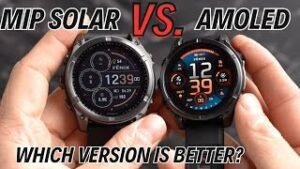
AMOLED on a Garmin watch means a bright, colorful display with deep blacks and strong contrast.
If you searched for “what does AMOLED mean Garmin,” you likely want to know more than the acronym. You may also be comparing a Garmin watch with a solar or memory-in-pixel model. This guide explains how AMOLED works, what it changes during workouts, its benefits and limits, and how to choose the right display for your daily life.
What does AMOLED mean on a Garmin watch?
AMOLED stands for Active Matrix Organic Light Emitting Diode. It is a type of display that uses tiny organic light-emitting pixels. Each pixel creates its own light, so the screen does not need one large backlight.
That design helps an AMOLED Garmin watch show rich colors, sharp text, and deep black areas. Black pixels can turn off almost fully. This gives the screen a strong contrast ratio, much like a modern smartphone.
When people ask, “what does AMOLED mean Garmin,” the simple answer is this: Garmin uses a vivid, self-lit screen instead of a reflective memory-in-pixel display on some watch models.
An AMOLED screen can show:
• Bright red, blue, green, and yellow colors
• Smooth animations and transitions
• Detailed maps and graphics
• Clear photos and watch faces
• Dark blacks with bright icons and numbers
The term “active matrix” refers to the way the display controls each pixel. This allows fast updates and smooth movement. That matters when you view maps, scroll through widgets, or check workout data while running.

How Garmin AMOLED displays work
An AMOLED display has millions of small pixels. Each pixel contains subpixels that produce red, green, and blue light. By changing the strength of these colors, the watch creates different shades and images.
Unlike a traditional LCD screen, AMOLED does not need a separate backlight. A white LCD backlight shines through colored filters. An AMOLED screen creates light directly at the pixel level.
This difference explains why AMOLED screens can look so vivid. It also explains why a black background uses less energy than a bright white background. Black pixels are usually off or use very little power.
Garmin may adjust the screen in several ways to balance clarity and battery life:
• Brightness can change based on the selected setting
• The display can turn off after a set time
• Touch sensitivity can be adjusted on supported models
• Gesture mode can wake the screen when you raise your wrist
• An always-on display mode may keep basic watch information visible
The exact controls vary by Garmin model and software version. Always check the settings menu and the product manual for your watch.
In practical terms, what does AMOLED mean Garmin users see every day? It means the display looks more like a premium phone screen than a basic digital watch. Text is usually crisp, colors stand out, and maps are easier to read at a glance.

AMOLED versus Garmin MIP displays
Garmin has used memory-in-pixel, or MIP, displays in many outdoor and fitness watches. MIP screens reflect light from the environment. They often become easier to see in direct sunlight.
AMOLED screens work in the opposite way. They produce their own light. They usually look brighter indoors, in low light, and at night.
Here is a simple comparison:
| Feature | AMOLED | MIP |
|---|---|---|
| Color quality | Rich and bright | More muted |
| Black levels | Deep black | Often gray or reflective |
| Indoor viewing | Excellent | Good |
| Direct sunlight | Very good with enough brightness | Often excellent |
| Battery demand | Usually higher | Usually lower |
| Animations | Smooth | More limited |
| Always-on use | Can reduce battery life | Often more efficient |
| Watch face detail | High | More restrained |
Neither display is best for everyone. An AMOLED Garmin watch may suit you if you value a colorful screen, touch controls, and a modern look. A MIP Garmin watch may suit you better if long battery life and outdoor readability are your top concerns.
This is one of the most important lessons when researching what does AMOLED mean Garmin. Display type affects the whole ownership experience. It is not only a question of screen quality.

The main benefits of Garmin AMOLED
Brighter colors and sharper detail
AMOLED screens can show strong colors and fine detail. This makes small text easier to read and watch faces more attractive. Maps, health charts, notifications, and workout screens can also feel more polished.
For example, a heart rate chart may use clear color changes to show different zones. A weather widget can show detailed icons. A map can display roads and trails with better visual separation.
Better viewing in dark places
AMOLED screens perform well indoors, in a car, at a restaurant, or during an evening walk. Since the display creates its own light, you do not need bright room lighting to read it.
This can be useful when checking a watch during a movie, a flight, or a late-night run. You can lower the brightness to reduce glare and protect your night vision.
Strong contrast
Deep blacks help white numbers and colored graphics stand out. This is especially useful for workout data, where you may only have a second to glance at the screen.
The contrast can make a dark watch face look clean and modern. It also helps photos, illustrations, and animated screens appear more natural.
Smooth user interaction
Many AMOLED Garmin watches combine the display with a responsive touchscreen. Swiping through widgets, scrolling through menus, and viewing maps can feel smooth.
Most Garmin watches still include physical buttons. That is helpful during rain, swimming, cold weather, or intense exercise when touch controls may be harder to use.
More design choices
AMOLED allows Garmin to offer watch faces with gradients, moving elements, rich colors, and detailed layouts. You can often choose a simple digital face or a more advanced face with data fields.
The display can make the watch feel closer to a small wearable computer. That is a major reason people search what does AMOLED mean Garmin before buying a newer model.

The limitations of an AMOLED Garmin watch
Battery life can be shorter
The biggest trade-off is power use. A bright screen, frequent notifications, GPS use, music, and health tracking can reduce battery life.
Always-on display mode may use even more power. It keeps basic information visible instead of waiting for a wrist gesture. The exact effect depends on brightness, screen timeout, GPS settings, phone connection, and the watch model.
To improve battery life, try these steps:
- Use gesture mode instead of always-on mode.
- Lower the brightness when you are indoors.
- Choose a dark watch face with fewer bright elements.
- Shorten the screen timeout.
- Disable features you do not use.
- Use battery saver mode during long trips.
- Charge before long GPS activities.
Direct sunlight may require more brightness
AMOLED screens can work well outdoors, but very strong sunlight may require a high brightness setting. A reflective MIP display can sometimes look clearer under direct midday sun.
This does not mean AMOLED is poor outside. It means viewing comfort can change with the angle of the sun, the brightness setting, and the screen coating.
Always-on mode can create a compromise
Always-on mode makes the watch feel more like a regular timepiece. However, it can reduce battery life. Some watches also show a dimmed version of the watch face rather than the full bright design.
If you need maximum battery life for a long hike, turning off always-on mode may be a smart choice. If you want quick time checks during work, travel, or meetings, you may prefer to keep it on.
Potential long-term image retention
OLED technology can experience image retention or burn-in after prolonged use of the same bright, fixed elements. Modern AMOLED watches use software controls to reduce this risk, such as dimming and pixel adjustments.
The risk is not the same on every model. Avoid leaving maximum brightness on all day and use varied watch faces when practical. This is a sensible habit for any OLED device.
Does AMOLED affect Garmin battery life?
Yes, AMOLED can affect Garmin battery life. The screen uses power when it lights bright pixels, shows animations, or stays on continuously.
However, the display is only one part of total battery use. GPS, music, LTE features, sensors, maps, notifications, and health tracking can also use significant power.
A Garmin watch with an AMOLED screen may still offer strong battery life. The result depends on the model and how you use it. A short daily workout with the screen off between checks uses much less power than long GPS navigation with always-on mode.
Here is a simple example:
• Office use: Low brightness and gesture mode may provide several days of use.
• Daily training: GPS workouts and frequent screen checks may shorten that time.
• Long adventure: GPS, maps, music, and always-on mode can drain the battery faster.
• Battery saver use: Reduced features can extend the time between charges.
When comparing watches, do not focus only on the largest battery number. Look for separate estimates for smartwatch mode, GPS mode, music mode, and always-on display use.
This is another key point in understanding what does AMOLED mean Garmin. The screen changes the balance between beauty, visibility, and endurance.

Is an AMOLED Garmin watch good for running and hiking?
An AMOLED Garmin watch can be excellent for running, hiking, walking, cycling, and everyday fitness. The colorful screen makes pace, distance, heart rate, elevation, and route data easy to scan.
During a run, clear contrast can help you read a data screen without stopping. During a hike, a detailed map may be easier to understand than a simple line display.
Still, outdoor athletes should consider more than image quality. Review these features before you buy:
• GPS battery life
• Screen brightness in direct sun
• Physical button controls
• Water resistance
• Map support
• Compass and altimeter features
• Glove-friendly operation
• Charging time
• Battery saver settings
In my experience testing fitness watches, the most common mistake is choosing a display first and checking endurance later. A beautiful screen is helpful, but it cannot replace enough battery for your longest activity.
For a runner who trains near home, AMOLED may be the better daily choice. For an ultramarathoner or multi-day backpacker, a MIP model may offer more comfort because charging becomes less urgent.

How to choose between AMOLED and MIP
Start with your main use. Think about where you wear the watch, how often you train, and how much you value a bright screen.
Choose AMOLED if:
• You want vivid colors and a phone-like display
• You read notifications often
• You spend a lot of time indoors or in low light
• You enjoy detailed maps and rich watch faces
• You prefer a modern touchscreen experience
• You are comfortable charging more often
Choose MIP if:
• You spend many hours outdoors
• You want maximum battery endurance
• You prefer a simple, always-readable screen
• You take long hiking or adventure trips
• You do not need rich colors or complex animations
• You want less concern about screen brightness settings
Also consider your charging habits. If you charge your watch each night, AMOLED may fit easily into your routine. If you often forget to charge devices, a long-lasting MIP watch may reduce stress.
A useful buying test is to visit a store and view both types under different lighting. Check small text, maps, workout screens, and button controls. Product photos cannot show how a screen feels during a real workout.

Common mistakes to avoid with Garmin AMOLED
Many buyers understand what does AMOLED mean Garmin but overlook the small settings that shape daily use.
Avoid these mistakes:
• Assuming every AMOLED model has the same battery life
• Leaving maximum brightness on all day
• Using always-on mode without checking its battery cost
• Ignoring screen readability in direct sunlight
• Choosing a watch without enough physical controls
• Comparing only the display and not the training features
• Forgetting that maps and music can use extra power
• Expecting touchscreen controls to work perfectly with wet fingers
Another mistake is treating AMOLED as a measure of overall watch quality. AMOLED describes the screen. It does not automatically tell you how accurate the GPS is, how advanced the training tools are, or how durable the case may be.
Check the full specification sheet. Look at battery estimates, water rating, sensors, navigation tools, software support, and warranty terms. These details matter more than a single display feature.

Frequently Asked Questions
What does AMOLED mean on a Garmin watch?
AMOLED means Active Matrix Organic Light Emitting Diode. It is a self-lit display technology that produces bright colors, deep blacks, and strong contrast.
Is AMOLED better than MIP on Garmin?
AMOLED is better for vivid colors, indoor viewing, and detailed graphics. MIP can be better for long battery life and easy viewing in strong outdoor light.
Does Garmin AMOLED use more battery?
It can use more battery, especially with high brightness and always-on mode. GPS, music, maps, notifications, and health sensors also affect battery life.
Can I use a Garmin AMOLED watch in direct sunlight?
Yes, Garmin AMOLED watches can be used outdoors and in direct sunlight. You may need to raise the brightness, and a MIP screen may still look easier to read in very strong sun.
Should runners choose an AMOLED Garmin watch?
Many runners will enjoy AMOLED because it makes pace, heart rate, and other data clear and colorful. Runners who train for very long events should compare GPS battery estimates before choosing.
Does AMOLED work well at night?
Yes, AMOLED works very well at night because it creates its own light. Lower the brightness to reduce glare and preserve battery life.
Can an AMOLED Garmin screen burn in?
OLED screens can develop image retention after long exposure to fixed bright elements. Garmin uses software controls to reduce the risk, and sensible brightness settings can help.
Do Garmin AMOLED watches have touchscreens?
Many Garmin watches with AMOLED displays include touchscreen controls, but features vary by model. Physical buttons are also available on many models for use during workouts or wet conditions.
Conclusion
AMOLED on a Garmin watch means a self-lit display with bright colors, deep blacks, sharp detail, and smooth graphics. It can make maps, notifications, workout data, and watch faces easier and more enjoyable to view.
The trade-off is power use. AMOLED may reduce battery life compared with a MIP display, especially when you use high brightness or always-on mode. Your best choice depends on your training style, outdoor habits, charging routine, and display preferences.
Before buying, compare real battery estimates and test both screen types if possible. Use this guide to narrow your options, then explore Garmin’s current models and choose the display that fits your everyday life.

Rubel Miah is the Senior Editor at MyStyleGrid.com, where he brings a sharp editorial eye and an unshakable love for fashion to everything he does. A true style addict, Rubel lives and breathes trends, from streetwear to high fashion, and has a knack for turning inspiration into impactful stories. With years of experience in fashion journalism and digital media, he curates content that empowers readers to express themselves through style. When he’s not editing features or forecasting the next big thing, you’ll find him hunting down vintage pieces or capturing street style moments around the city.