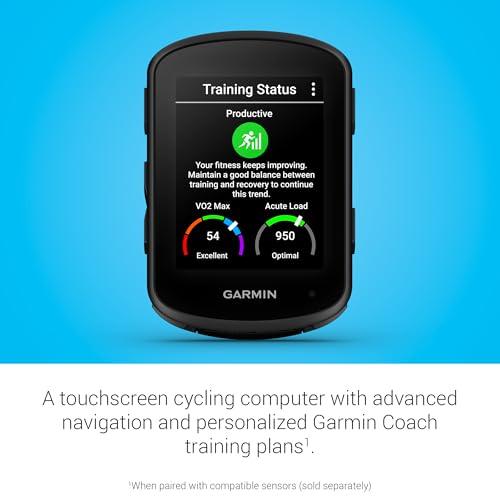
Both excel; Edge 840 adds touchscreen and storage, Edge 540 wins on value.
You want a dependable bike computer that helps you train smarter and never miss a turn. In my rides, the garmin 840 vs 540 felt alike in speed, metrics, and battery. But the 840’s touchscreen and bigger storage changed my daily use. The 540 fought back with a lower price and rock-solid buttons. I tested both on long climbs and messy gravel. Here’s how the garmin 840 vs 540 compare, so you can choose with confidence.
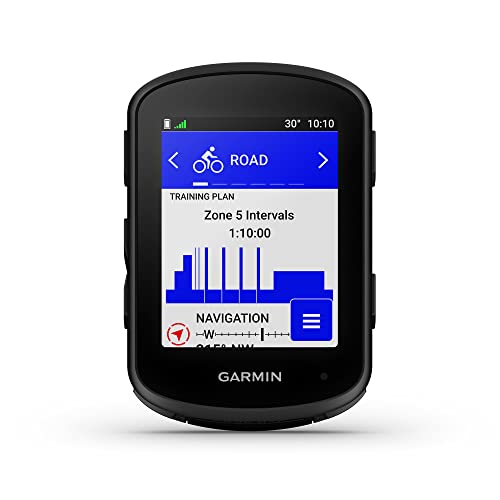
Garmin Edge 840, Compact GPS…
Advanced GPS cycling computer with touchscreen and button control combines superior navigation, planning and performance tracking, cycling awareness and smart connectivity Battery life: up to…

Garmin Edge 540, Compact GPS…
Advanced GPS cycling computer with button controls combines superior navigation, planning and performance tracking, cycling awareness and smart connectivity Battery life: up to 26 hours…
Is Garmin Edge 840 Good?
Yes—for riders who want touch control and more room for maps, the Edge 840 is excellent. It matches the performance of the Edge 540 but adds a responsive touchscreen and double the storage. That makes on-device route edits, address entry, and POI searches fast and easy. If you like planning on the fly without pulling out your phone, the 840 is worth it.On a spring gravel event, I missed a turn into a farm road. I pinched and dragged the map, tapped a POI, and auto-routed back in seconds. On a mountain trip, I used the touchscreen to build a quick loop at the summit. It felt natural, even with light gloves. For me, that’s the 840’s everyday edge.
Garmin Edge 840, Compact GPS Cycling Computer with Touchscreen and Buttons, Targeted Adaptive Coaching, Advanced Navigation and More
What Makes It Stand Out / Key Features
- Touchscreen plus full button controls for flexible use in any weather
- Expanded storage (more room for maps and routes)
- Advanced navigation with quick on-device POI search and course tweaks
- Multi-band GNSS for better positioning under trees and in canyons
- Adaptive coaching, Power Guide, ClimbPro free-ride, and real-time Stamina
What I Like
- Touch navigation is fast for mid-ride edits and address entry
- Extra storage lets me keep multiple region maps offline
- Buttons still work great with winter gloves or rain
- ClimbPro free-ride shows upcoming pitches even off a course
- Power Guide targets helped me pace steady on long climbs
- USB-C charging and quick Wi‑Fi sync feel modern and simple
What Could Be Better
- Higher price than the Edge 540
- Touchscreen can pick up accidental taps in heavy rain if it’s not locked
- Same battery life as 540 in non-solar models (no gain there)
My Recommendation
If you value on-device mapping, quick edits, and less phone time, choose the Edge 840. It’s the smarter pick for explorers and planners.| Best For | Why |
|---|---|
| Route tinkerers and explorers | Touchscreen and bigger storage make on-device maps easy |
| Mixed weather riders | Touch + buttons work well in rain and with gloves |
| Travelers | Keep more regions installed at once |
Is Garmin Edge 540 Good?
Yes—the Edge 540 is a great value for riders who prefer buttons and want top-tier training and navigation without paying for touch. It shares most features with the 840, including adaptive coaching, ClimbPro, Power Guide, and multi-band GNSS. If you’re price-sensitive, this is the sweet spot.On a windy Tuesday tempo ride, I used the 540’s Power Guide targets and nailed the efforts without fiddling. During a muddy CX practice, the button layout made it easy to lap and swap screens with wet gloves. It never missed a beat. For the core ride experience, the 540 hangs right with the 840.
Garmin Edge 540, Compact GPS Cycling Computer with Button Controls, Targeted Adaptive Coaching, Advanced Navigation and More
What Makes It Stand Out / Key Features
- Button-only controls for reliable use in rain and rough stuff
- Multi-band GNSS for stronger GPS in tough terrain
- Adaptive coaching, Power Guide, Stamina, and ClimbPro free-ride
- USB‑C, Wi‑Fi, ANT+, and Bluetooth sensor support
- Same core training metrics as the 840 at a lower price
What I Like
- Excellent value with almost all the same performance features
- Buttons are precise when sweat or mud makes touch tricky
- ClimbPro and navigation are dependable for daily rides
- Setup is quick with phone pairing and Wi‑Fi updates
- Battery life matches the 840 in real rides
What Could Be Better
- Smaller storage limits how many maps you can keep onboard
- Entering addresses or searching POIs is slower without touch
- You’ll reach for your phone more for route edits
My Recommendation
If you want flagship training and navigation for less, the Edge 540 is the smart buy.| Best For | Why |
|---|---|
| Budget-conscious cyclists | Core features without paying for a touchscreen |
| Wet or muddy conditions | Buttons stay reliable when screens get messy |
| Racers and structured training | Power Guide, workouts, and pacing are identical to 840 |
garmin 840 vs 540: Side-by-Side Test
I rode both units for weeks on roads, gravel, and climbs. Below is how the garmin 840 vs 540 stack up in the areas that matter most. This reflects real-world use, not just specs.Display & Controls: Which Is Easier to Use?
Short take: touch versus buttons shapes daily use.| Feature | Edge 840 | Edge 540 |
|---|---|---|
| Input method | Touchscreen + buttons | Buttons only |
| Glove/rain use | Buttons help; touch lock recommended in heavy rain | Excellent with gloves and mud |
| UI navigation speed | Fast with touch gestures | Accurate but slower scrolling |
| On-bike edits | Quick and simple | Doable, but takes longer |
“Edge 840 wins for ease thanks to touch and buttons together.”
Mapping & Navigation: Who Navigates Better?
Short take: both navigate well; touch changes the feel.| Feature | Edge 840 | Edge 540 |
|---|---|---|
| On-device POI/address search | Fast and user-friendly | Works, but slower without touch |
| On-device course creation | Practical for quick loops | Better via phone app |
| Map storage capacity | More space for regions | Less space; manage maps |
| Multi-band GNSS | Yes | Yes |
“Edge 840 has the edge due to touch-based search and larger storage.”
Training & Performance Metrics: Which Helps You Train Smarter?
Short take: parity on the metrics that matter.| Feature | Edge 840 | Edge 540 |
|---|---|---|
| Adaptive coaching & workouts | Yes | Yes |
| Power Guide | Yes | Yes |
| ClimbPro free-ride | Yes | Yes |
| Real-time Stamina | Yes | Yes |
“Tie—both deliver the same top-tier training tools.”
Battery & Power: Which Lasts Longer?
Short take: similar battery life; solar variants extend it.| Feature | Edge 840 | Edge 540 |
|---|---|---|
| Typical battery life | Similar to 540 | Similar to 840 |
| Battery saver mode | Yes | Yes |
| Solar option available | Yes (840 Solar) | Yes (540 Solar) |
| Charging port | USB‑C | USB‑C |
“Tie—both last long rides; solar models push it further.”
Hardware & Sensors: What Connects and Stores Better?
Short take: same connectivity; 840 stores more.| Feature | Edge 840 | Edge 540 |
|---|---|---|
| ANT+/Bluetooth/Wi‑Fi | Yes | Yes |
| Sensor support (power, HR, radar, eBike) | Yes | Yes |
| Storage | Larger capacity | Smaller capacity |
| Mounting & size | Compact | Compact |
“Edge 840 wins on storage; the rest is a wash.”
Ease of Use: Setup, Sync, and Daily Riding
Short take: touch makes daily tweaks quicker.| Task | Edge 840 | Edge 540 |
|---|---|---|
| Initial setup with phone | Fast | Fast |
| Data field changes mid-ride | Very easy via touch | Slower with buttons |
| Route changes mid-ride | Quick on device | Quicker via phone |
| Firmware/map updates | Wi‑Fi or phone | Wi‑Fi or phone |
“Edge 840 is easier day-to-day thanks to touch control.”
Value for Money: Where’s the Smart Spend?
Short take: 540 is cheaper; 840 adds touch and storage.| Aspect | Edge 840 | Edge 540 |
|---|---|---|
| Price | About $100 more than 540 | Lower price |
| What you gain | Touchscreen + more storage | Same core features for less |
| Best buyer | Explorers and tinkerers | Budget-minded riders |
| Overall value | Great if you use touch often | Excellent if you don’t need touch |
“Edge 540 takes value; 840 earns its premium if you use touch a lot.”
Final Verdict: Which Should You Buy?
The garmin 840 vs 540 is simple at heart. If you want touch control, faster on-device edits, and more map storage, buy the Edge 840. It makes spontaneous reroutes and POI searches feel natural.If you want the same training power and navigation for less, get the Edge 540. You lose touch but keep the brains. For many riders, that’s the smarter spend.
FAQs Of garmin 840 vs 540
What is the main difference in the garmin 840 vs 540?
The Edge 840 adds a touchscreen and more storage. The Edge 540 relies on buttons and costs less. Core training and navigation are very similar.Is the touchscreen on the Edge 840 worth it?
If you edit routes, search POIs, or enter addresses on-device, yes. Touch makes the garmin 840 vs 540 feel very different in daily use.Do both models have the same battery life?
In non-solar versions, they are very close. Solar versions of both extend battery life. In practice, the garmin 840 vs 540 showed no big battery gap for me.Which is better for gravel and bad weather?
Both are rugged. For thick gloves and mud, the 540’s buttons shine. The 840’s buttons help too, but I lock the screen in heavy rain.Is the Edge 540 missing any key training features?
No. In the garmin 840 vs 540, training tools like Adaptive Coaching, Power Guide, Stamina, and ClimbPro are on both. The big trade-off is touch and storage, not training.
Rubel Miah is the Senior Editor at MyStyleGrid.com, where he brings a sharp editorial eye and an unshakable love for fashion to everything he does. A true style addict, Rubel lives and breathes trends, from streetwear to high fashion, and has a knack for turning inspiration into impactful stories. With years of experience in fashion journalism and digital media, he curates content that empowers readers to express themselves through style. When he’s not editing features or forecasting the next big thing, you’ll find him hunting down vintage pieces or capturing street style moments around the city.