Recalibrate by updating firmware, avoiding magnetic interference, and performing a level figure‑eight motion outdoors.
I’ve worked with many GPS watches and sensors, and I’ll walk you through how to fix Instinct 2X Solar compass calibration issue step by step. This guide covers why the Instinct 2X Solar compass can drift, practical fixes, advanced resets, and real-life tips I’ve learned while troubleshooting these watches. Read on to get a reliable compass on your Instinct 2X Solar quickly and safely.
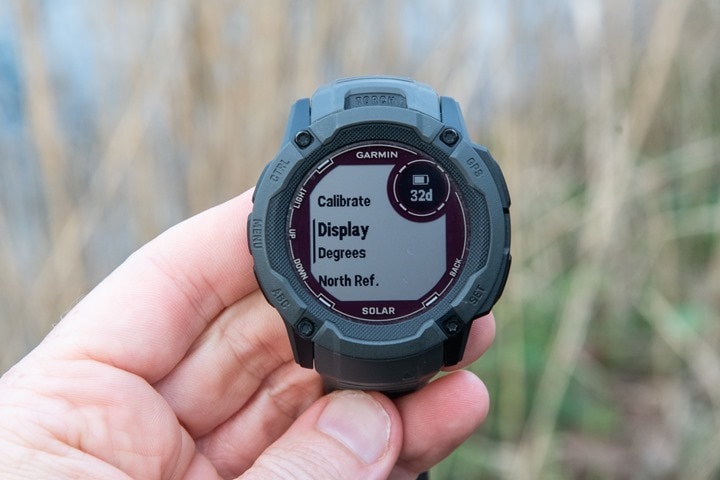
Why the Instinct 2X Solar compass calibration issue happens
Compass errors on the Instinct 2X Solar happen for a few clear reasons. Magnetic interference from phones, metal gear, or power lines is common. Software bugs or outdated firmware can also block calibration. Physical damage, heavy impacts, or extreme temperatures may skew the internal sensor. Finally, user technique matters: an incomplete figure-eight motion or tilting the watch during calibration can cause failure.
Why these issues matter:
- Magnetic fields confuse the magnetometer inside the watch.
- Old firmware can contain calibration bugs.
- Poor calibration technique leaves data inaccurate.
Understanding these causes prepares you to fix the Instinct 2X Solar compass calibration issue reliably.

Step-by-step: how to fix Instinct 2X Solar compass calibration issue
Follow these steps in order. They solve most compass calibration problems quickly.
- Prepare the watch and environment
- Move at least 10 feet from cars, metal barriers, or power sources.
- Remove phone, metal jewelry, and backpacks with frames.
- Work outside in open space if possible.
- Update the watch firmware
- Connect to Garmin Express or Garmin Connect Mobile.
- Check for available firmware updates and install them.
- Restart the watch after the update.
- Check settings and enable compass
- Go to Settings > Sensors & Accessories > Compass.
- Ensure the compass is turned on and set to the correct mode (auto or on).
- Clear any active sensor errors if shown.
- Perform manual compass calibration (figure-eight)
- Hold the watch level at chest height.
- Move your arm in large figure-eight motions slowly.
- Keep repeating until the watch confirms calibration is complete.
- If instructed, tilt slightly to allow a full 3D sweep.
- Verify calibration
- Open the compass widget and walk a short straight line while watching readings.
- Compare direction with a known reference (phone map or landmark).
- If readings jump, repeat calibration away from interference.
- Reset sensors if calibration fails
- Go to Settings > System > Reset > Reset Sensors (or similar).
- After reset, repeat the calibration steps.
- Factory reset as last resort
- Back up settings and data first.
- Do a full factory reset only if nothing else works.
- Re-pair with phone and repeat calibration after reset.
These steps address most causes of the Instinct 2X Solar compass calibration issue. Repeat steps outdoors and away from metal until stable.

Troubleshooting specific symptoms and fixes
If you see a particular symptom, try these targeted fixes.
Symptom: Compass reads wildly different directions
- Fix: Move away from metal and electronics, then recalibrate with a figure-eight motion.
Symptom: Calibration stops or fails to finish
- Fix: Update firmware, then restart and attempt calibration again in open space.
Symptom: Compass works intermittently
* Fix: Check for magnetic sources you carry. Test with phone map for comparison.
Symptom: Compass disabled or grayed out
- Fix: Confirm Sensors settings and battery level. Charge the watch and try again.
Symptom: Compass off after impact or drop
- Fix: Reset sensors. If problem persists, consider service or hardware repair.
These quick fixes reduce downtime and restore reliable heading data for your Instinct 2X Solar.
Advanced fixes and maintenance for long-term reliability
For stubborn calibration issues use these advanced methods.
-
Sensor reset and recalibration
-
Reset sensors from system menu. Recalibrate immediately after.
-
Soft restart versus full factory reset
-
Soft restart clears temporary glitches. Factory reset clears all settings and can fix deep issues.
-
Check battery and solar charging
-
Very low battery may limit sensor performance. Charge the watch and retry the calibration.
-
Avoid cases or metal mounts during calibration
-
Cases with metal or magnets will alter readings. Remove them.
-
Check for firmware patch notes
-
Occasionally manufacturers release compass-related fixes. Keep firmware current.
-
Environmental awareness
-
Avoid calibrating near vehicles, fences, loudspeakers, or power transformers.
If none of these fixes remove the Instinct 2X Solar compass calibration issue, hardware repair may be necessary. Garmin-authorized service can test and replace the magnetometer if needed.

Personal experience and practical tips
I’ve calibrated dozens of watches in parks, garages, and on trailheads. A few lessons stand out.
- Patience matters: slow, large figure-eight motions work better than fast ones.
- Environment check: I once fixed a persistent drift by moving 20 feet away from a parked truck with metal cargo.
- Firmware first: an update fixed a calibration bug on several watches before any manual steps helped.
- Backup plan: always pair settings and data to Garmin Connect before a factory reset.
I remember one hike where the compass swung 180 degrees. I stopped, left the phone in my pack, did three long figure-eights, and the compass snapped back to correct headings. Small habits like this save time and stress on the trail.
Apply these habits to avoid future Instinct 2X Solar compass calibration issue occurrences.
Frequently Asked Questions about how to fix instinct 2x solar compass calibration issue
How often should I calibrate my Instinct 2X Solar compass?
Calibrate when you first get the watch, after firmware updates, after impacts, or when heading seems off. Regular checks before long trips are a good habit.
Will a factory reset fix compass calibration problems?
A factory reset can fix deep software issues, but try firmware updates, sensor resets, and recalibration first. Back up your data before resetting.
Does the solar panel affect compass calibration?
The solar panel itself doesn’t affect calibration. But metal or accessories attached near the watch can. Remove cases and mounts during calibration.
Can magnetic phone cases cause compass drift?
Yes. Magnetic phone cases, mounts, and accessories can cause interference. Keep phones and magnets away during calibration.
What if calibration still fails after trying everything?
If calibration still fails, contact authorized service. The magnetometer may be damaged and need professional repair or replacement.
Is calibration needed indoors?
Calibration can work indoors if far from metal and electronics. Outdoors in open space is usually faster and more reliable.
Conclusion
You can fix the Instinct 2X Solar compass calibration issue by updating firmware, removing magnetic interference, and performing slow, level figure-eight calibrations. Start with simple steps: update, restart, and recalibrate in open space. If problems persist, reset sensors or perform a factory reset, and contact service when hardware issues appear. Put these steps into practice before your next outing to trust your headings again. Try the steps now, leave a note about what worked for you, and subscribe or comment to share your experience.

Rubel Miah is the Senior Editor at MyStyleGrid.com, where he brings a sharp editorial eye and an unshakable love for fashion to everything he does. A true style addict, Rubel lives and breathes trends, from streetwear to high fashion, and has a knack for turning inspiration into impactful stories. With years of experience in fashion journalism and digital media, he curates content that empowers readers to express themselves through style. When he’s not editing features or forecasting the next big thing, you’ll find him hunting down vintage pieces or capturing street style moments around the city.