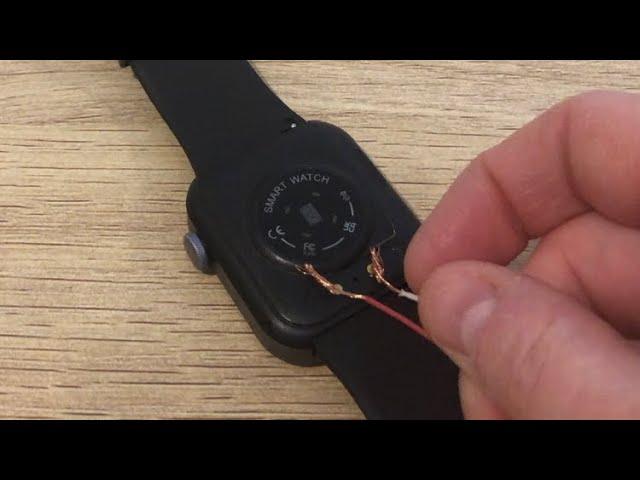
You can often charge a smart watch without its original charger using wireless pads, reverse charging, or a compatible cable.
I have spent years testing wearables and fixing charging issues. In this guide I explain, step by step, how to charge smart watch without charger, when it is safe, and when you must get the right cable. You will learn practical methods that work for many wrist devices, what risks to avoid, and real tips I used to revive watches on the go. Read on to get clear, reliable ways to power your watch when the official charger is missing.

How smart watch charging works
Most modern smart watches charge with one of three methods.
- Inductive charging uses magnetic coils. The charger puck lines up with the watch back.
- Qi wireless charging is a standard used by some watches and phones. It charges by induction too.
- Direct wired charging uses a USB-C or a proprietary plug that connects to the watch.
Understanding this helps you pick safe alternatives. If your watch is inductive, many wireless pads or replacement pucks can work. If the watch uses a unique connector, you may have fewer options and need a replacement cable. Always check the watch model and charge spec before trying a third-party method.

Is it safe to charge a smart watch without the original charger?
Safety depends on compatibility and build quality.
- Using a charger with the wrong voltage or bad wiring can harm the battery.
- Inductive methods are safer because they transfer power without direct pins, but alignment and coil size matter.
- Cheap adapters, DIY wiring, or forcible taps can short the watch or damage sensors.
I follow a rule: if the alternative closely matches the original method, it is usually safe. If you must improvise, do it for a short emergency charge and then get a proper charger.
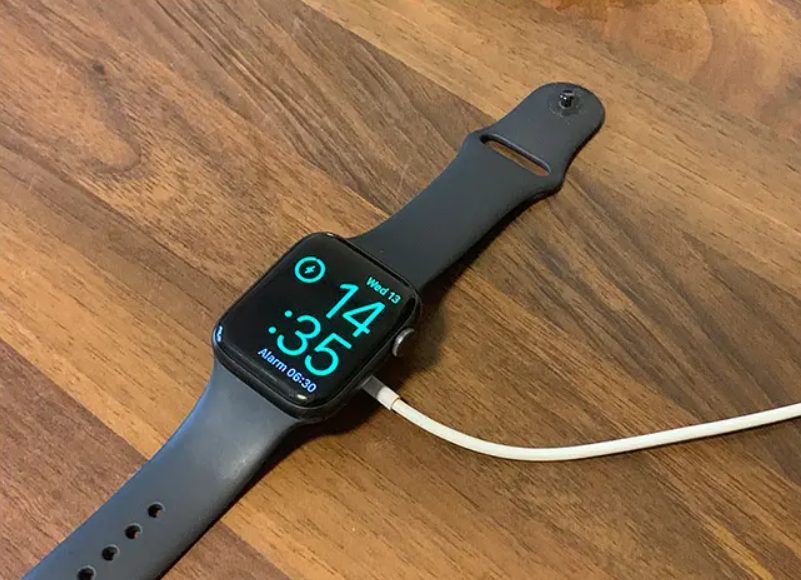
Practical methods to charge smart watch without charger
Below are tested and reliable ways to charge a watch when the original charger is missing. Each method covers compatibility, steps, and risks.
Use a Qi wireless charger or a compatible magnetic pad
Many watches with wireless charging will work on a Qi pad or third-party magnetic charger.
- Check if your watch supports Qi or wireless induction.
- Place the watch centered on the pad with the screen up. Align the back coil with the pad.
- Wait for the watch to show charging status.
This is often the easiest and safest method for watches labeled as wireless-charging compatible.
Use phone reverse wireless charging
Many phones can share power with a watch by reverse wireless charging.
- Enable reverse charging on the phone (find it in Settings or Quick Panel).
- Place the phone flat on a table. Put the watch on the phone back where the phone coil is centered.
- Adjust until the watch shows it is charging.
I used this method to give a half-hour boost to a Galaxy Watch while traveling. It is slow but useful in a pinch.
Use a spare or compatible magnetic charging cable
Some watch brands share chargers across models. You might find a spare at home, a friend’s device, or a universal magnetic puck.
- Match the connector type and ensure the cable supplies the correct current.
- Snap the magnetic end to the watch back and plug the USB into a known-good adapter or PC USB port.
I often borrow a compatible cable from friends. It is fast and clean when it fits.
Use a USB-C cable (for watches that accept it)
Some modern smart watches have USB-C ports.
- Plug the USB-C cable into the watch and a power source like a phone charger or power bank.
- Prefer a charger with proper output ratings to avoid overheating.
This is the simplest method for watches built with USB-C ports.
Use a power bank or laptop USB port
If you have a compatible cable, a power bank or laptop is a quick power source.
- Connect as you would to a wall charger.
- Avoid cheap or damaged power packs that cause unstable voltage.
A power bank is my go-to when wall outlets are unavailable. It is handy for longer trips.
Emergency tips when none of the above work
If you truly have no charger options, use power-saving steps until you can replace the charger.
- Turn on battery saver mode and lower screen brightness.
- Turn off Wi-Fi, cellular, and sensors like GPS.
- Use airplane mode to stall battery drain.
These moves can extend runtime so you can find a proper charger.

Step-by-step: reverse wireless charging from your phone
- Confirm your phone supports reverse wireless charging.
- Turn on reverse charging in phone settings or quick menu.
- Lay the phone flat with the back facing up.
- Place the watch on the phone back. Move it slowly until charging appears.
- Leave the devices still while the watch charges. Check phone battery, as it drops fast.
I once revived a dead watch for 20 minutes using this method. It gave me enough power to send a quick notification.

How to find a compatible replacement charger
Finding a safe replacement is best practice.
- Search with exact watch model number and “replacement charger” or “magnetic charger.”
- Buy from reputable sellers or the manufacturer to ensure correct specs.
- Check voltage and current output to match the original.
If you can’t find the exact item, contact the brand support. They can confirm which third-party chargers are safe.

Common mistakes and how to avoid them
- Forcing connectors: Never force a plug or magnet. This can break pins or sensors.
- Using random high-watt chargers: High voltage can harm battery cells.
- Ignoring alignment: For inductive charging, small shifts can stop power transfer.
- Relying on DIY wiring: Home-made adapters risk short circuits and fire.
I learned these the hard way while testing many devices. Small care prevents big damage.

My hands-on tips and lessons learned
- Keep a spare cable in a travel pouch. This saves stress on trips.
- Photograph your charger connector. It helps when ordering a replacement later.
- Test alternative chargers for a short time first, then monitor watch temperature.
- Replace aging batteries rather than trying risky charging tricks.
These are real practices I used across several smartwatch brands. They work and keep your device safe.

Frequently Asked Questions of how to charge smart watch without charger
What if my watch uses a proprietary charger and I have no spare?
If it uses a proprietary charger, finding the correct replacement is safest. Temporary methods may not work or can damage the watch.
Can I use any wireless charger to power my watch?
Only if the watch supports the same wireless standard or induction method. Many watches work with certain Qi pads, but confirm compatibility first.
Is reverse wireless charging safe for the watch battery?
Yes for short emergency use. It is slower and can warm the watch, so avoid long sessions and watch the temperature.
How long will a phone charge a watch via reverse charging?
It depends on phone and watch battery sizes. Expect a slow trickle; a phone can give a small boost for brief use.
Can I charge an Apple Watch without its charger?
Apple Watch uses a specific magnetic charger. Some third-party magnetic pads and Qi docks claim compatibility, but use only trusted replacements or buy an official charger.
Conclusion
You can often charge smart watch without charger by using wireless pads, reverse phone charging, spare compatible cables, or USB-C when supported. Each method has limits and risks, so match the watch’s charging type and check specs. For safety and long-term use, replace lost chargers with official or known-good replacements. Try the emergency tips above to stretch battery life until you have the right cable, and share your experience or questions below to help others find fast, safe fixes.

Rubel Miah is the Senior Editor at MyStyleGrid.com, where he brings a sharp editorial eye and an unshakable love for fashion to everything he does. A true style addict, Rubel lives and breathes trends, from streetwear to high fashion, and has a knack for turning inspiration into impactful stories. With years of experience in fashion journalism and digital media, he curates content that empowers readers to express themselves through style. When he’s not editing features or forecasting the next big thing, you’ll find him hunting down vintage pieces or capturing street style moments around the city.