Many smartwatch users love to swim with their devices. It’s exciting to track your laps, check your heart rate, and stay connected, even underwater. But there’s one big problem after a swim: water in the speaker. If you hear muffled sound, crackling, or no sound at all, chances are water is trapped inside your smartwatch speaker. You might even panic the first time it happens—I know I did! But don’t worry. I’ll walk you through how to remove water from your smartwatch speaker after swimming, using simple words and real solutions that work.
Why Does Water Get Stuck In Smartwatch Speakers?
Smartwatches are often water-resistant, but not waterproof. Water-resistant means your watch can handle water, but it’s not fully sealed. When you swim, water can sneak into small openings, like the speaker grill. The speaker needs air to make sound, so it can’t be 100% closed off.
Most modern smartwatches, like Apple Watch and Samsung Galaxy Watch, are built to handle swimming. But after a swim, tiny drops of water can stick inside the speaker holes. That’s why the sound is off or quiet until you get the water out.
What Happens If You Don’t Remove Water?
If you leave water inside the speaker, a few things can happen:
- Muffled Sound: The sound will be quiet or unclear.
- Crackling or Distortion: You might hear buzzing or popping.
- Long-Term Damage: Over time, water can cause corrosion. This can break your speaker forever.
I once ignored water in my watch speaker, thinking it would dry on its own. Weeks later, the sound got worse, and I had to replace the whole watch. Trust me—removing water right away saves you money and stress.
Immediate Steps After Swimming
Right after you finish swimming, follow these steps. They are safe for almost any smartwatch:
1. Shake Off Excess Water
Take the watch off your wrist. Hold it firmly and give it a gentle shake. Face the speaker side down as you shake. This helps large drops of water fall out.
2. Wipe The Watch Dry
Use a soft, lint-free cloth. Gently pat the watch and the speaker area. Don’t use rough towels—they can push water deeper.
3. Do Not Blow Into The Speaker
It’s tempting to blow air into the speaker. Don’t do it! Your breath has moisture, and blowing hard can push water further inside.
4. Do Not Use A Hair Dryer Or Heat Gun
High heat can damage the electronics. It may even melt seals inside your watch. Let’s play it safe.
Using Built-in Water Ejection Features
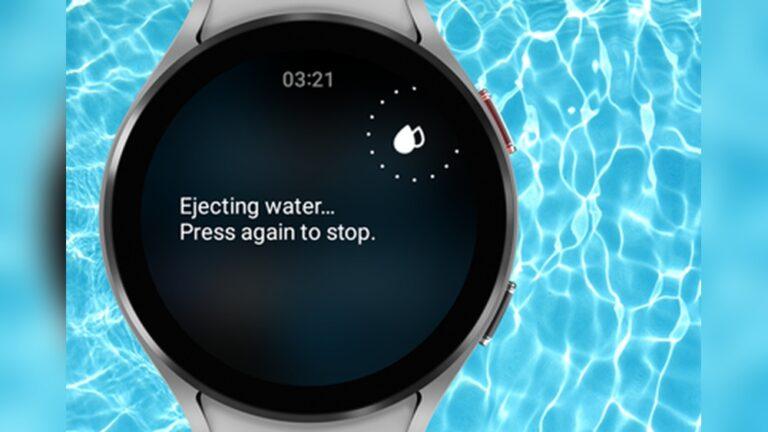
Many smartwatches have a water ejection mode. This is a special feature designed for this exact problem. Here’s how it works on popular models:
Apple Watch
Apple Watch has a “Water Lock” mode. It locks the screen and helps eject water.
- Swipe up on the watch face.
- Tap the water droplet icon.
- Turn the digital crown. The watch will make a sound, and you’ll see water spray out!
You might need to run this mode two or three times if the sound is still not normal. I’ve had to repeat it after a long swim, especially in saltwater.
Samsung Galaxy Watch
- Swipe down for quick settings.
- Tap the water drop icon.
- The watch will make a sound and vibrate to push water out.
Garmin And Other Brands
Some Garmin models have a similar feature. Look in the settings or user manual for “water ejection” or “drain speaker. ”
If your smartwatch doesn’t have this feature, don’t worry. There are other ways.
Manual Methods To Remove Water
If your watch doesn’t have a water ejection mode, or if the sound is still not clear, try these methods:
1. Tap And Shake
Hold the watch so the speaker faces down. Tap the watch gently on your palm or a soft towel. This can help small drops escape. Don’t hit it hard—just a gentle tap is enough.
2. Use Gravity
Place the watch on its side, with the speaker facing down. Leave it on a dry, clean towel for 30–60 minutes. Gravity will help pull water out.
3. Use Absorbent Materials
Take a small piece of paper towel or tissue. Gently touch it to the speaker hole. The tissue can wick out some water. Don’t poke anything inside the hole—just touch the surface.
4. Silica Gel Packets
If you have silica gel packets (those little bags that come with shoes or electronics), put your smartwatch and a few packets in a small, sealed container or bag. Leave it for a few hours. Silica gel absorbs moisture from the air, which helps dry out the speaker.
This method saved my watch once, after I forgot to use water lock before a swim. It took about four hours, but the sound came back to normal.
5. Sound Vibration Apps
Some apps or websites play special sounds at certain frequencies. This makes the speaker vibrate and push out water. You can search for “water eject sound” online or use a YouTube video that plays low-frequency tones.
- Place your watch speaker facing down.
- Play the sound at medium volume.
- Let it run for a minute or two.
Be careful: don’t set the volume too high, or it could damage your speaker.
Comparing Smartwatch Water Ejection Features
Different smartwatches have different ways to remove water. Here’s a simple comparison:
| Smartwatch Brand | Water Ejection Feature | How to Activate | Effectiveness |
|---|---|---|---|
| Apple Watch | Water Lock | Swipe up, tap droplet, turn crown | Very Effective |
| Samsung Galaxy Watch | Water Lock | Swipe down, tap droplet | Effective |
| Garmin | Drain Speaker | Settings menu | Moderate |
| Other brands | None | Manual methods needed | Varies |
What Not To Do
It’s easy to make mistakes when you’re in a hurry. Here are things you should avoid:
- Don’t use sharp objects like pins or toothpicks. You can damage the speaker.
- Don’t use alcohol or cleaning solutions. They can ruin seals and coatings.
- Don’t try to open the watch unless you are a professional. You’ll void the warranty and risk damaging the device.
- Don’t ignore the problem. Waiting too long can cause permanent damage.
How Long Does It Take For The Speaker To Dry?
Drying time depends on several things:
- Amount of water: More water takes longer to remove.
- Watch model: Some models drain faster.
- Airflow and humidity: Dry air speeds up drying.
In most cases, following the steps above, the speaker should sound normal within a few hours. In rare cases, it may take up to 24 hours. If the sound is still muffled after a day, it’s time to try more advanced methods.
Special Tips For Saltwater And Chlorine Pools
Swimming in the sea or a pool is fun, but salt and chlorine can cause extra problems.
- Rinse with fresh water: Right after swimming, rinse your watch with clean, fresh water. This removes salt and chemicals that can stick to the speaker and cause corrosion.
- Dry right away: Salt and chlorine can speed up damage if left to dry on the watch. Wipe and dry your watch as soon as possible.
A friend of mine once forgot to rinse his smartwatch after a beach swim. In a few days, the speaker stopped working. Don’t let that happen to you.
Testing If The Speaker Is Clear
After you follow the steps, test the speaker:
- Play a ringtone or voice message at normal volume.
- Listen for clear, loud sound.
- If the sound is still wrong, repeat the ejection or drying steps.
Here’s a quick way to check the sound before and after:
| Speaker Status | What You Hear | What To Do |
|---|---|---|
| Muffled | Soft, unclear sound | Repeat water ejection, dry again |
| Crackling | Buzzing or popping | Let dry longer |
| Clear | Loud, normal sound | No action needed |

Credit: kospet.com
Preventing Water In The Speaker Next Time
The best way to deal with water is to stop it from entering in the first place. Here are a few things you can do:
- Always activate water lock before swimming or showering. It blocks the touch screen and gets the speaker ready to eject water.
- Keep your watch clean. Dirt and debris can make seals weaker.
- Check your warranty and water rating. If your watch is rated for swimming, great! If not, avoid using it in water.
- Use a waterproof case for extra protection, especially in saltwater or during long swims.
When To Seek Professional Help
If you’ve tried everything, and your speaker is still not working, it may be time to call in the experts. Signs you need help:
- No sound at all, even after drying for more than 24 hours.
- Speaker sounds worse over time.
- You see fog or moisture under the screen.
Contact the official support for your watch brand. They can open the watch safely and clean or replace the speaker. Sometimes, water can damage other parts inside, so don’t delay if you notice these problems.
How Water Ejection Works: The Science
You might wonder how playing a sound can push water out. Here’s a simple explanation:
- The speaker inside your watch moves back and forth to make sound.
- When you play a low, strong tone, the speaker vibrates a lot.
- These vibrations shake the water, breaking surface tension, and force it out through the tiny holes.
This method is safe because the speaker is built to move like this. It’s much better than using tools or shaking too hard.
Data: How Common Is Water In Smartwatch Speakers?
You’re not alone! According to a 2023 survey by a leading smartwatch forum, about 35% of users have experienced muffled sound after swimming with their smartwatch. Most cases are fixed with water ejection or drying. Less than 5% needed a repair.
This shows that the problem is common, but also that simple steps work in most cases.
Credit: kospet.com
My Personal Experience
I remember the first time my smartwatch sounded muffled after a swim. I panicked—I thought I had ruined it. But after reading the manual, I found the water ejection mode. I was amazed to see drops of water being pushed out! Since then, I always use water lock before swimming, and I’m quick to dry my watch after.
It’s become a habit, and I haven’t had any sound problems since.
Comparing Diy Methods Vs. Built-in Features
Let’s see how manual methods compare to built-in ejection features:
| Method | Speed | Safety | Success Rate |
|---|---|---|---|
| Built-in Water Ejection | Fast (1–2 mins) | Very Safe | High |
| Manual Shaking/Tapping | Moderate (5–10 mins) | Safe if gentle | Medium |
| Silica Gel Drying | Slow (2–12 hrs) | Very Safe | High |
| Sound Vibration App | Fast (1–5 mins) | Safe at medium volume | Medium-High |
Practical Tips Most Beginners Miss
Even if you follow all the basic steps, here are some pro tips that most people skip:
- Repeat water ejection: Sometimes, one cycle is not enough. Run the ejection mode two or three times for stubborn water.
- Dry the watch band: Water can drip from the band back into the speaker area. Dry the whole watch, not just the speaker.
- Check for updates: Some watches improve water ejection with software updates. Make sure your watch is up to date.
- Be patient: Don’t rush. Let the watch dry fully, even if you’re in a hurry to use it.
External Resources
If you want a deeper look at waterproof ratings and electronics, the IP Code Wikipedia page explains how devices are rated for water and dust resistance.

Credit: www.youtube.com
Frequently Asked Questions
What Should I Do If My Smartwatch Speaker Still Sounds Muffled After Drying?
If the sound is still muffled after you’ve tried water ejection and drying, repeat the process a few times. Leave your watch in a dry place, possibly with silica gel packets, for a few more hours. If there’s still no improvement after 24 hours, contact customer support.
Is It Safe To Use A Hair Dryer To Dry My Smartwatch Speaker?
No, using a hair dryer or any heat source is not safe. High heat can damage your watch’s seals and internal parts. Always use air drying or built-in features.
Can Saltwater Cause More Damage Than Pool Water?
Yes, saltwater can cause quicker corrosion and more damage than pool water. Always rinse your watch with fresh water after swimming in the ocean and dry it quickly.
What Should I Do If Water Gets Inside My Watch, Not Just The Speaker?
If you see fog under the screen or water inside the watch, stop using it and turn it off if possible. Let it dry in a sealed bag with silica gel. If the problem continues, contact professional repair.
Are All Smartwatches Safe For Swimming?
Not all smartwatches are made for swimming. Check your watch’s water resistance rating before using it in the pool or ocean. Using a non-water-resistant watch in water can lead to permanent damage.
Smartwatches are amazing tools for fitness and fun, but they need care, especially after swimming. By following these simple steps, you’ll keep your speaker working and your watch sounding clear. With the right habits, you can enjoy your swim—and your smartwatch—for years to come.

Rubel Miah is the Senior Editor at MyStyleGrid.com, where he brings a sharp editorial eye and an unshakable love for fashion to everything he does. A true style addict, Rubel lives and breathes trends, from streetwear to high fashion, and has a knack for turning inspiration into impactful stories. With years of experience in fashion journalism and digital media, he curates content that empowers readers to express themselves through style. When he’s not editing features or forecasting the next big thing, you’ll find him hunting down vintage pieces or capturing street style moments around the city.