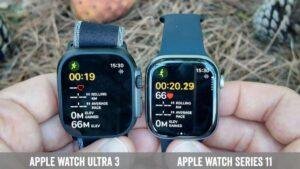
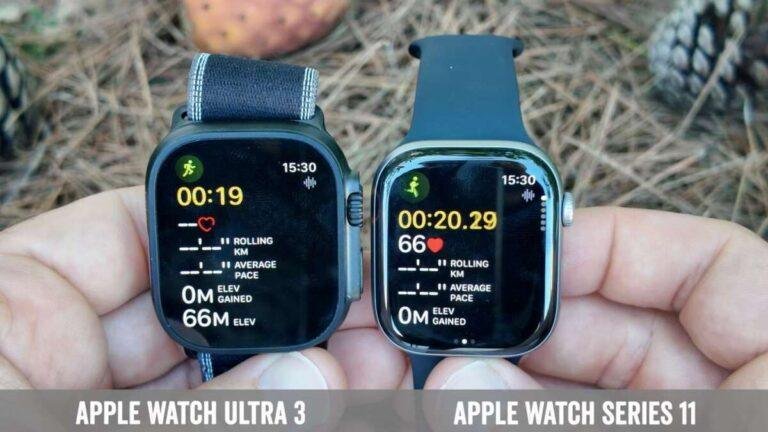
Apple Watch 11 is slimmer and more affordable, while Ultra 3 offers tougher design, longer battery life, and advanced outdoor tools.
The difference between Apple Watch 11 and Ultra 3 comes down to purpose. Apple Watch 11 is made for daily health tracking, calls, workouts, and smart features in a lighter body. Apple Watch Ultra 3 is built for demanding outdoor use, diving, long hikes, and users who want the strongest battery and most rugged case.
This comparison explains the key differences in design, display, battery, health tools, GPS, durability, price, and comfort. It also highlights which model makes more sense for real life, not just for reading a spec sheet.

Apple Watch 11 vs. Ultra 3 at a glance
Apple Watch 11 is the better fit for most people. It is smaller, lighter, and easier to wear all day and night. Ultra 3 is the specialist model. It adds a larger titanium case, stronger water protection, better outdoor navigation, and a longer battery life.
| Feature | Apple Watch 11 | Apple Watch Ultra 3 |
|---|---|---|
| Main purpose | Everyday health and smart features | Outdoor sports and extreme use |
| Case design | Slim aluminum or premium metal options | Rugged titanium case |
| Size | Smaller and more comfortable for many wrists | Larger 49mm-style Ultra design |
| Display | Bright, edge-to-edge display | Larger, brighter, more rugged display |
| Battery | About a day or more, depending on use | Around two days or more, depending on use |
| GPS | Strong GPS for normal workouts | More advanced GPS for trails and remote areas |
| Water use | Swimming and general water activities | Diving, high-speed water sports, and deeper water use |
| Controls | Digital Crown and side button | Digital Crown, side button, and Action button |
| Best for | Most iPhone users | Athletes, hikers, divers, and adventurers |
Exact battery life can change with GPS use, cellular service, screen brightness, temperature, and workout duration. Apple’s published figures are lab estimates, so real-world results will vary.
Design and build quality
The biggest physical difference between Apple Watch 11 and Ultra 3 is the case design. Apple Watch 11 has a clean, familiar shape that works well with office clothes, gym wear, and casual outfits. Its thinner body also makes it easier to sleep with.
Ultra 3 has a larger titanium case with a raised edge around the display. This design helps protect the screen during knocks. It also gives the watch a more serious tool-like look. Some people love that bold style, while others find it too large for daily wear.
Apple Watch 11 design benefits
Apple Watch 11 is usually the better choice if comfort matters most. Its lighter case can feel less noticeable during sleep, typing, and daily movement.
Key benefits include:
• Slimmer profile for easier all-day wear
• More size options for small and medium wrists
• A familiar design that fits most watch bands
• Lower weight during workouts and sleep tracking
• A more discreet look for work or formal settings
### Ultra 3 design benefits
Ultra 3 is designed like outdoor equipment rather than a simple smartwatch. Its titanium body should handle rough use better, and its large buttons are easier to operate while wearing gloves.
Important design features include:
• Rugged titanium construction
• Raised protection around the display
• A customizable Action button
• Larger controls for quick access
• A more secure fit for demanding workouts
The practical lesson is simple: do not buy Ultra 3 only because it looks tough. If you mostly walk, work, track sleep, and receive notifications, Apple Watch 11 may feel more comfortable.
Display differences
Both watches offer a sharp OLED display, but Ultra 3 has the more outdoor-focused screen. It is larger and designed to remain easy to read in bright sunlight. That matters when you are cycling, hiking, or checking a map without stopping.
Apple Watch 11 still provides a strong display for everyday use. Text, workout data, messages, and health graphs should be clear. Its smaller size can even be an advantage because it feels less bulky on the wrist.
Ultra 3 is the better option when display size matters. A larger screen gives you more room for:
• Trail maps
• Workout zones
• Compass information
• Navigation directions
• Multiple data fields during exercise
For indoor use, the difference is less important. Both models should be easy to read in a home, office, gym, or car.
Battery life and charging
Battery life is one of the clearest differences between Apple Watch 11 and Ultra 3. Apple Watch 11 is designed for daily charging. Depending on how you use it, you may charge it while showering, getting ready, or working at your desk.
Ultra 3 lasts much longer between charges. That makes it more useful for camping, long-distance hiking, travel, and multi-day events. Low Power Mode can extend battery life further, although some features may work differently.
Choose Apple Watch 11 if:
• You are comfortable charging once a day
• You mainly track short workouts
• You sleep near a charger
• You want a lighter watch
• You do not often travel off-grid
Choose Ultra 3 if:
• You want two or more days of normal use
• You track long GPS workouts
• You go camping or hiking
• You dislike daily charging
• You need a watch for long races or trips
In my comparison work, battery anxiety is often more important than people expect. A watch can have excellent health tools, but those tools are not useful if the battery dies halfway through a trip. This is where Ultra 3 earns its higher price.
Health and fitness tracking
Both models focus heavily on health. They can monitor heart rate, workouts, sleep, activity, and several safety features. The core health experience is broadly similar, so Apple Watch 11 is not a “basic” health watch.
Apple Watch 11 may include newer health features such as sleep scoring and notifications related to possible health concerns, depending on the software and region. These features can help you notice patterns, but they are not a replacement for medical advice.
Ultra 3 offers the same broad health platform but adds more tools for outdoor sports. Its larger screen makes workout data easier to view while moving. Its stronger GPS and extra controls also help during long activities.
Health features to consider
• Heart-rate tracking
• Sleep tracking
• Workout tracking
• Fall detection
• Crash detection
• Emergency calling
• Cycle tracking
• Blood oxygen availability may vary by region and model
• Possible health notifications, subject to local approval
Health features can differ by country because medical regulations are not the same everywhere. Always check the features available in your region before buying.
GPS and outdoor navigation
The difference between Apple Watch 11 and Ultra 3 becomes more obvious during outdoor navigation. Ultra 3 is built for hikers, runners, cyclists, and travelers who need reliable location data in difficult areas.
Ultra 3 typically offers dual-frequency GPS and stronger positioning in places with tall buildings, trees, or steep terrain. It also provides a compass, elevation information, waypoint tools, and a more visible outdoor interface.
Apple Watch 11 still works well for:
• City walks
• Road running
• Gym workouts
• Regular cycling
• Park walks
• Basic route tracking
For most users, Apple Watch 11’s GPS is enough. You do not need Ultra 3 just because you run three times a week. Ultra 3 becomes more valuable when you spend hours outdoors or depend on navigation far from roads.
Water resistance and diving features
Apple Watch 11 is suitable for swimming and normal water activities. It can track pool swims and some open-water workouts, but it is not designed as a professional dive computer.
Ultra 3 offers stronger water protection and deeper-use features. It may support recreational diving tools, depth information, and water-temperature readings through the built-in hardware and compatible apps.
This matters for:
• Scuba divers
• Snorkelers
• Open-water swimmers
• Surfers
• Boaters
• High-speed water sports users
Do not confuse water resistance with waterproofing. Seals can weaken over time, especially after drops, repairs, chemicals, or exposure to salt water. Rinse the watch with fresh water after ocean use and follow Apple’s care instructions.
Smart features and connectivity
Both watches connect closely with the iPhone. You can receive notifications, answer calls, send messages, use Apple Pay, control music, and access apps from your wrist.
The Ultra 3 experience feels more practical outdoors because of the Action button and longer battery. You can assign the button to start a workout, activate a shortcut, turn on the flashlight, or launch another supported feature.
Depending on the configuration and region, cellular connectivity can let you use the watch without your iPhone nearby. Ultra models may also offer satellite-based emergency communication features for supported situations and locations. These tools are designed for emergencies, not for normal messaging.
Before paying extra for cellular service, ask yourself:
• Do you often leave your iPhone at home?
• Do you run or hike alone?
• Do you travel often?
• Does your carrier support Apple Watch service?
• Will you use emergency features in remote areas?
Comfort and daily wear
Comfort is often the deciding factor in the difference between Apple Watch 11 and Ultra 3. A watch can be powerful, but it should not feel annoying during sleep, exercise, or work.
Apple Watch 11 is the safer choice for smaller wrists and people who prefer a light watch. It is also less likely to catch on clothing or feel heavy during sleep.
Ultra 3 can be comfortable if you like large watches. Its band and case feel secure during movement, but the size may bother some users. Try it on before buying if possible. Pay attention to how it feels when your wrist is bent, when you sleep, and when you wear a jacket.
A common mistake is judging comfort while standing still in a store. Wear it for several minutes, move your wrist, and imagine sleeping with it. That gives you a more realistic answer.
Price and value
Apple Watch 11 offers better value for most buyers because it delivers the main Apple Watch experience at a lower cost. You still receive health tracking, fitness tools, notifications, safety features, and strong iPhone integration.
Ultra 3 costs more because of its materials, battery, display, GPS hardware, water features, and outdoor controls. Its value depends on whether you will use those features.
Choose Apple Watch 11 when:
• You want the best everyday value
• You care about sleep and health tracking
• You prefer a lighter watch
• You mostly exercise near home
• You do not need advanced navigation
Choose Ultra 3 when:
• You hike, dive, cycle, or run long distances
• You need stronger battery life
• You spend time in remote areas
• You want a titanium case
• You prefer a large and rugged design
The most expensive model is not automatically the best model. The best choice is the one whose features match your routine.
Which Apple Watch should you buy?
For most people, Apple Watch 11 is the smarter purchase. It covers daily health, fitness, safety, communication, and smart features without the extra bulk.
Ultra 3 is the better choice for users with clear outdoor needs. It is worth considering if you hike, dive, camp, train for endurance events, or often spend long periods away from a charger.
A simple decision guide can help:
-
Choose Apple Watch 11 if comfort and value come first.
-
Choose Ultra 3 if battery life and outdoor durability come first.
-
Choose Apple Watch 11 if you have a small wrist or want easy sleep tracking.
-
Choose Ultra 3 if you need advanced GPS and water features.
-
Compare cellular costs before choosing a connected model.
-
Check regional health and emergency features before purchase.
One limitation is that software updates can change the experience over time. Apple may add features to both models, while some tools remain limited by hardware or local regulations.

Frequently asked questions about the difference between Apple Watch 11 and Ultra 3
What is the main difference between Apple Watch 11 and Ultra 3?
Apple Watch 11 is a slimmer everyday smartwatch, while Ultra 3 is a larger and tougher model for outdoor activities. Ultra 3 offers longer battery life, stronger navigation tools, and more rugged construction.
Is Apple Watch Ultra 3 worth it over Apple Watch 11?
Ultra 3 is worth the extra cost if you hike, dive, camp, run long races, or need multi-day battery life. For normal health tracking, messages, workouts, and daily use, Apple Watch 11 is usually the better value.
Which has better battery life, Apple Watch 11 or Ultra 3?
Ultra 3 has better battery life and is designed for longer use between charges. Apple Watch 11 generally needs more frequent charging, especially when you use GPS, cellular service, or sleep tracking.
Is Apple Watch 11 better for small wrists?
Yes, Apple Watch 11 is usually more comfortable for small wrists because it offers a slimmer and lighter design. Ultra 3 may feel large, especially during sleep or when wearing fitted clothing.
Can Apple Watch 11 and Ultra 3 track health features?
Yes, both models support major Apple Watch health and fitness functions. Specific tools can vary by region, software version, and hardware, so check the current regional specifications before buying.
Is Ultra 3 better for swimming and diving?
Ultra 3 is better for diving and demanding water activities because it has stronger water-focused hardware and related features. Apple Watch 11 is better suited to swimming and ordinary water use.
Does Apple Watch 11 have the same apps as Ultra 3?
Both models use the Apple Watch software platform and support many of the same apps. Ultra 3 may offer extra controls and hardware features that compatible apps can use.
Conclusion
The difference between Apple Watch 11 and Ultra 3 is less about basic smartwatch functions and more about design goals. Apple Watch 11 is lighter, simpler, and more affordable for daily health and fitness. Ultra 3 is larger, tougher, longer-lasting, and better suited to serious outdoor use.
Choose Apple Watch 11 if you want comfort and strong value. Choose Ultra 3 if you need extended battery life, rugged materials, advanced GPS, or deeper water features. Review your real routine, not just the feature list, and you will be much more likely to buy the right model. Share your planned use case or explore Apple’s latest technical specifications before making your decision.

Rubel Miah is the Senior Editor at MyStyleGrid.com, where he brings a sharp editorial eye and an unshakable love for fashion to everything he does. A true style addict, Rubel lives and breathes trends, from streetwear to high fashion, and has a knack for turning inspiration into impactful stories. With years of experience in fashion journalism and digital media, he curates content that empowers readers to express themselves through style. When he’s not editing features or forecasting the next big thing, you’ll find him hunting down vintage pieces or capturing street style moments around the city.