Yes, the Apple Watch SE 3 is worth it for affordable fitness tracking, safety tools, and everyday iPhone convenience.
The Apple Watch SE 3 targets people who want the core Apple Watch experience without paying for every premium health sensor. After comparing its likely strengths, limits, price, and daily use cases, this guide will help you decide whether the Apple Watch SE 3 is the right smartwatch for you.
What Is the Apple Watch SE 3?
The Apple Watch SE 3 is Apple’s more affordable smartwatch. It sits below the standard Apple Watch and the Apple Watch Ultra in price and features. Its goal is simple: deliver the essential Apple Watch experience at a lower cost.
The SE line usually focuses on practical tools such as:
• Activity and workout tracking
• Heart-rate alerts
• Sleep tracking
• Fall Detection
• Crash Detection
• Emergency SOS
• Notifications and calls
• Apple Pay
• Music and podcast control
• Family Setup support in some regions
The Apple Watch SE 3 is designed for iPhone users. It does not work as a full smartwatch with Android phones, so your phone choice matters before you buy.
Apple may offer the SE 3 in different case sizes, colors, and connectivity options. GPS models need an iPhone nearby for many connected features. Cellular models can make calls, send messages, and stream data away from your phone, but they also cost more and require a wireless plan.

Is the Apple Watch SE 3 Worth It for the Price?
For many buyers, the Apple Watch SE 3 offers the best balance between price and useful features. It gives you the main Apple Watch tools without pushing you toward the higher cost of a premium model.
The value is strongest when you want a watch for:
• Daily activity goals
• Walking, running, cycling, and gym workouts
• Basic heart-rate information
• Sleep habits
• Notifications
• Safety alerts
• Apple Pay
• Finding your iPhone
• Quick replies and calls
The SE 3 may also provide strong performance because newer Apple Watch models tend to use efficient, modern processors. That means apps should open quickly, menus should feel smooth, and the watch should remain useful for several years.
Still, the cheapest model is not always the best deal. A discounted older Apple Watch can sometimes offer features that the SE 3 lacks. Check the processor, battery health, software support, warranty, and condition before choosing an older model.
The Apple Watch SE 3 is worth it when its lower price matters more to you than advanced health hardware. It becomes less attractive if you want the most complete health data available from Apple.

Apple Watch SE 3 Features That Matter Most
Fitness and workout tracking
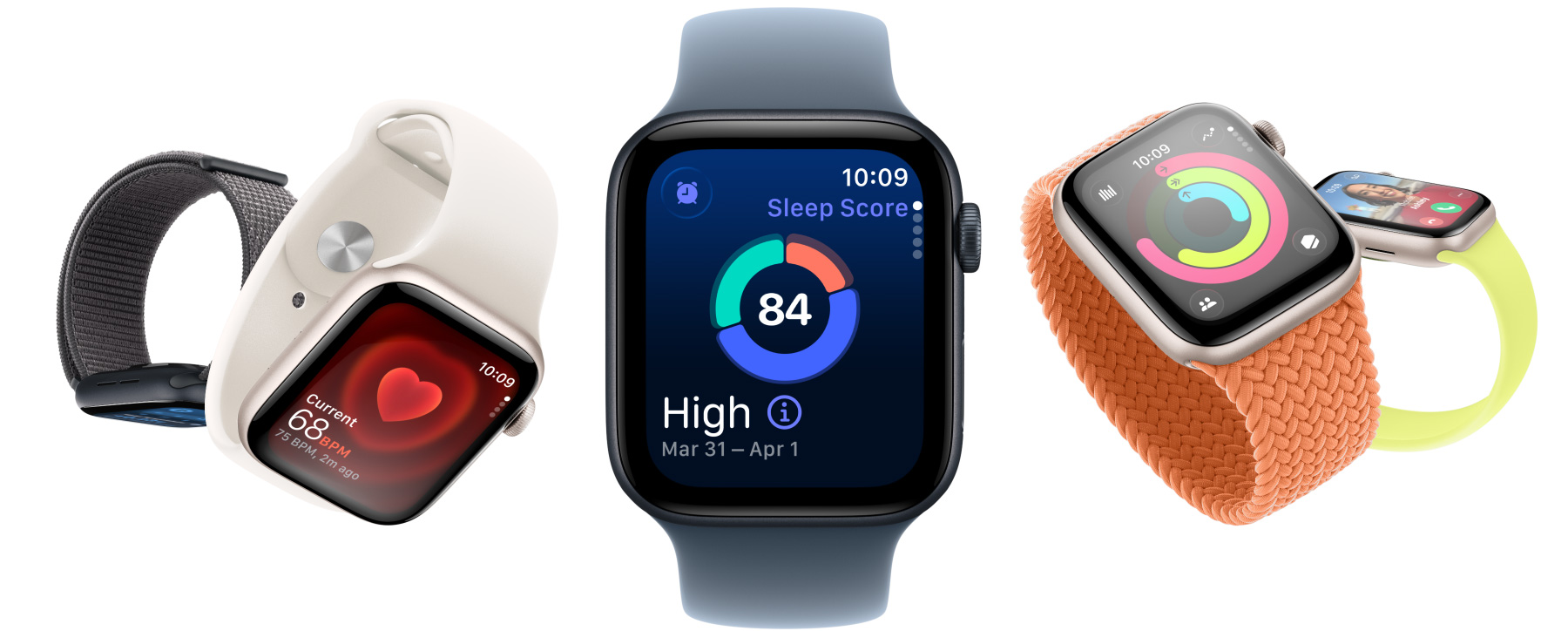
The Apple Watch SE 3 can serve as a helpful fitness coach on your wrist. It can track workouts, movement, calories, distance, pace, heart rate, and activity trends.
For most casual users, this is enough. You do not need a premium sports watch to record a morning walk or see whether you reached your daily movement goal.
Runners may also appreciate pace alerts, route tracking, and workout summaries. However, serious athletes may prefer a Garmin or Apple Watch Ultra because those devices focus more heavily on endurance, recovery, maps, battery life, and advanced training tools.
Safety features
Safety is one of the strongest reasons to consider the Apple Watch SE 3. Features such as Fall Detection, Crash Detection, Emergency SOS, and location sharing can provide peace of mind.
These tools are not a replacement for emergency services or medical care. They can also produce false alerts in unusual situations. Even so, they may be useful for older adults, people who exercise alone, and families who want an extra layer of protection.
Heart-rate monitoring
The Apple Watch SE 3 can help you notice unusual heart-rate patterns. It can alert you when your heart rate is unusually high or low while you appear to be inactive.
That does not make it a medical diagnostic device. A smartwatch can show a useful signal, but only a qualified health professional can interpret symptoms and provide medical advice.
Sleep tracking
Sleep tracking can show sleep duration and patterns. It may help you notice that late-night screen use, stress, or an inconsistent schedule affects your rest.
The main challenge is comfort. Some people do not enjoy wearing a watch in bed. Others forget to charge it before sleeping. In my practical view, sleep tracking only helps when you can build a simple charging routine around it.
Apple ecosystem features
The Apple Watch SE 3 works best with other Apple products. You can unlock a Mac, find an iPhone, control music, view notifications, use Apple Pay, and respond to messages without reaching for your phone.
These small actions add up. The watch feels less like a separate gadget and more like a remote control for your digital life.

What the Apple Watch SE 3 Does Not Offer
The Apple Watch SE 3 saves money by leaving out some premium features. The exact feature list can depend on the generation and software version, so check Apple’s current technical specifications before buying.
Common limitations of an SE model may include:
• No ECG app
• Fewer advanced health sensors
• No blood oxygen readings in some markets or models
• A less premium display
• Fewer case and material choices
• Shorter battery life than some specialist sports watches
• No compatibility with Android phones
These limits matter more to some users than others. If you want basic fitness data, they may not affect your daily experience. If you have a health-focused reason for buying an Apple Watch, review the available sensors with extra care.
The display is another important consideration. Premium Apple Watch models may offer an always-on display or a brighter screen. If you often glance at your watch during workouts or in bright sunlight, this difference could affect your satisfaction.
Battery life is also a key trade-off. Most Apple Watch owners need to charge their watch regularly. A Garmin watch may last for days or weeks, while an Apple Watch usually prioritizes apps, notifications, and a bright touch display over long battery life.

Apple Watch SE 3 vs. Apple Watch Series Models
The Apple Watch SE 3 is usually the better value choice. A standard Apple Watch is usually the better feature choice.
Choose the SE 3 if you want:
• A lower purchase price
• Essential activity tracking
• Notifications and Apple Pay
• Emergency and safety features
• A simple first Apple Watch
• A watch for a child or family member, where supported
Choose a standard Apple Watch if you want:
• A more advanced display
• More health sensors
• ECG support, where available
• More premium materials
• Faster charging or other model-specific upgrades
• A longer feature list
The price gap is important. If the standard model is only slightly more expensive during a sale, it may offer better long-term value. If the difference is large, the SE 3 can be the smarter purchase.
One mistake I often see in smartwatch buying advice is focusing only on the launch price. Look at the full ownership cost, including cellular service, a protective case, screen protection, and a replacement band. A low-priced watch can become much more expensive when accessories and service are added.

Apple Watch SE 3 for Different Types of Buyers
For first-time Apple Watch buyers
The Apple Watch SE 3 is a strong entry point. It teaches you how Apple Watch notifications, workouts, activity rings, and charging fit into your day.
It also reduces the risk of overspending on features you may never use. If you later want ECG readings, a premium display, or more advanced health tools, you can upgrade with a better understanding of your needs.
For parents and children
The Apple Watch SE 3 may be useful for family communication and safety. Cellular service can allow a child to call approved contacts without carrying an iPhone, depending on carrier and Family Setup support.
Parents should still review location settings, privacy controls, school rules, and screen habits. A smartwatch can improve communication, but it should not replace clear family boundaries.
For older adults
Fall Detection, emergency calling, and location features may make the Apple Watch SE 3 appealing for older users. The larger case option may be easier to read and control.
Before buying, confirm that the wearer can charge the watch, respond to alerts, and use the side button when needed. A feature has little value if the person finds it confusing.
For fitness beginners
The SE 3 is more than capable for walking, gym sessions, casual running, and basic cycling. The activity rings can make movement feel like a daily game, which helps some people stay consistent.
Do not treat calorie numbers as exact measurements. They are estimates. Use trends, workout time, pace, and how you feel as better guides.
For serious athletes
The Apple Watch SE 3 may feel limited for long races, multi-day hikes, or detailed training plans. A Garmin, Coros, or Apple Watch Ultra may be better for battery life, navigation, recovery data, and rugged use.
Apple Watch SE 3 Battery Life and Durability
Battery life is one of the most important parts of the Apple Watch SE 3 experience. Your results will depend on workouts, notifications, cellular use, screen brightness, music streaming, and sleep tracking.
A simple charging routine helps. Many people charge the watch while showering or working at a desk. If you track sleep, charge it before bed rather than waiting until the battery is nearly empty.
The case should handle normal daily use, but no smartwatch is indestructible. A screen protector or case may be sensible if you work with tools, play contact sports, or often hit your wrist against door frames.
Water resistance does not mean unlimited waterproofing. Avoid treating the watch as suitable for every water activity. Follow Apple’s care guidance, rinse it after swimming in salt water or a pool, and do not use it if the case or screen is damaged.
A key lesson from using wearable technology is that convenience beats complexity. A watch that survives your routine and stays charged will help more than a feature-rich watch that remains in a drawer.

Apple Watch SE 3 Buying Guide
Use this checklist before you buy:
- Confirm iPhone compatibility. The Apple Watch SE 3 requires an iPhone that supports its software.
- Choose GPS or GPS plus Cellular. GPS is cheaper, while Cellular adds independence away from your phone.
- Compare current sale prices. A discounted standard Apple Watch may be a better deal.
- Pick the right case size. Larger cases often make text easier to read, while smaller cases may feel lighter.
- Check the included band. Some bands fit different activities better than others.
- Budget for accessories. A charger, case, extra band, and cellular plan can raise the total cost.
- Review health features carefully. Do not assume the SE 3 includes every sensor found on premium models.
- Buy from an authorized seller. This makes returns, warranty support, and product authenticity easier to manage.
If you are buying used, check battery health, Activation Lock, physical damage, and whether the seller offers a return period. Avoid listings that do not clearly identify the model or provide a serial number check.

Who Should Not Buy the Apple Watch SE 3?
The Apple Watch SE 3 may not be right for you if you use an Android phone. Apple Watch compatibility is tied closely to the iPhone ecosystem.
You may also want another model if you need:
• ECG readings
• A premium always-on display
• Multi-day battery life
• Advanced hiking maps
• Rugged outdoor construction
• Detailed endurance training tools
• A larger selection of premium materials
People with medical concerns should not buy any smartwatch as a substitute for clinical care. Wearable readings can be helpful, but they can also be incomplete, delayed, or inaccurate in some situations.
The Apple Watch SE 3 is also a poor choice if you dislike frequent charging. A traditional watch or a long-battery fitness tracker may suit your habits better.

Is the Apple Watch SE 3 Worth It? Final Buying Verdict
So, is the Apple Watch SE 3 worth it? For most iPhone users who want affordable fitness tracking, notifications, safety features, and Apple ecosystem integration, yes.
The Apple Watch SE 3 is especially appealing when:
• You are buying your first Apple Watch
• You want a lower-cost option
• You mainly track basic workouts and activity
• You value Fall Detection and Emergency SOS
• You do not need ECG or premium health features
• You prefer a smaller, simpler device
The answer changes if the standard Apple Watch is close in price or if you need advanced health sensors, a premium display, or stronger battery life. In those cases, spending more may prevent buyer’s remorse.
The best way to decide is to list the three features you will use most. If they are notifications, activity tracking, Apple Pay, and safety tools, the Apple Watch SE 3 should meet your needs. If they include ECG, advanced training, and long outdoor trips, compare higher-end models before placing your order.
Frequently Asked Questions About Is the Apple Watch SE 3 Worth It
Is the Apple Watch SE 3 good for everyday use?
Yes, the Apple Watch SE 3 is suitable for notifications, calls, activity tracking, workouts, Apple Pay, and safety features. Its main trade-offs are limited premium health tools and the need for regular charging.
Can the Apple Watch SE 3 work with Android phones?
No. The Apple Watch SE 3 is designed to work with compatible iPhones and does not provide full Android support. Android users should consider a Wear OS watch, Garmin model, or another cross-platform option.