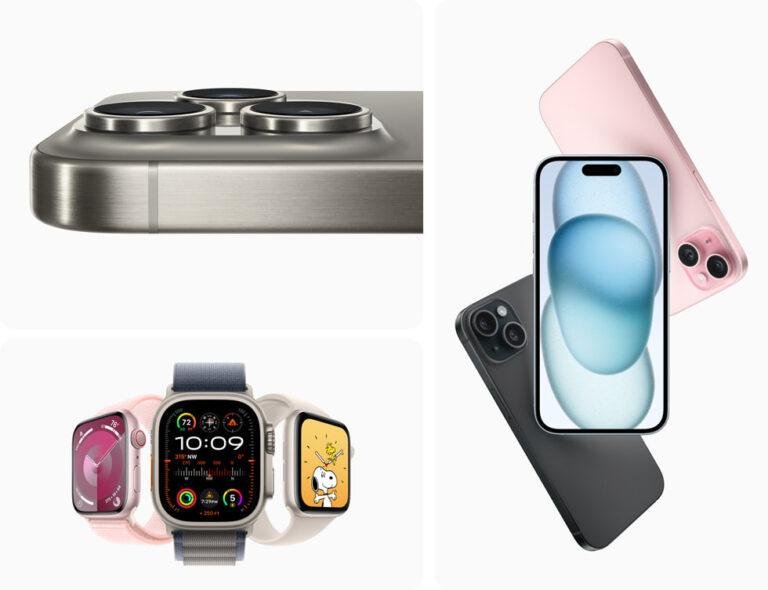
Apple Watch Series 4 and newer, SE models, and all Apple Watch Ultra models work with iPhone 15.
Knowing what Apple Watch is compatible with iPhone 15 can save you money and prevent setup problems. The answer depends on the watch model, its watchOS version, and the iOS version on your iPhone. This guide explains the supported models, key limits, buying tips, and the easiest way to pair your watch.

What Apple Watch Is Compatible With iPhone 15?
The iPhone 15 works with many Apple Watch models. For the best experience today, choose an Apple Watch that supports watchOS 11 or a newer version.
The current officially supported choices include:
• Apple Watch Series 6 and later
• Apple Watch SE (2nd generation)
• Apple Watch Ultra
• Apple Watch Ultra 2
Older models may also work when they run a compatible version of watchOS. Apple Watch Series 4, Series 5, and Apple Watch SE (1st generation) can work with an iPhone 15 in certain software setups, but they do not support the newest watchOS releases.
Here is a simple overview of what Apple Watch is compatible with iPhone 15:
| Apple Watch model | iPhone 15 compatibility | Important detail |
|---|---|---|
| Apple Watch Series 10 | Yes | Supports current watchOS versions |
| Apple Watch Series 9 | Yes | Strong all-around choice |
| Apple Watch Series 8 | Yes | Good health and fitness features |
| Apple Watch Series 7 | Yes | Works with supported watchOS versions |
| Apple Watch Series 6 | Yes | Supports watchOS 11 |
| Apple Watch SE (2nd generation) | Yes | Affordable current option |
| Apple Watch Ultra 2 | Yes | Best for outdoor and adventure use |
| Apple Watch Ultra | Yes | Supports newer watchOS versions |
| Series 4 and Series 5 | Limited | They can work, but software support is older |
| Apple Watch SE (1st generation) | Limited | It does not support the newest watchOS |
| Series 3 and older | Not recommended | Compatibility and setup support are limited or unavailable |
The safest answer to what Apple Watch is compatible with iPhone 15 is this: buy an Apple Watch Series 6 or newer, an Apple Watch SE 2, or any Apple Watch Ultra.

The Best Apple Watch Choices for iPhone 15
Your budget and daily needs should guide your choice. All compatible models can show notifications, track activity, and work with the Apple Watch app on iPhone 15.
Best value: Apple Watch SE 2
The Apple Watch SE 2 is a strong choice for most buyers. It tracks workouts, heart rate, sleep, steps, and basic safety features.
It does not include every advanced health sensor found on higher-end models. However, it offers the core Apple Watch experience at a lower price.
Choose it if you want:
• Fitness tracking
• Notifications on your wrist
• Apple Pay
• Fall Detection
• Emergency SOS
• Sleep tracking
• Family-friendly features


Best for most users: Apple Watch Series 9 or Series 10
The Series 9 and Series 10 offer a more complete feature set. They include a brighter display, advanced health tools, faster performance, and more storage than the SE 2.
The Series 10 is thinner and has a larger display than many earlier models. It is a good match for people who want modern features without the larger size of the Ultra.
Best for outdoor use: Apple Watch Ultra or Ultra 2
The Ultra models are built for hiking, running, diving, and long outdoor trips. They have a larger case, stronger materials, a bright display, and longer battery life than standard Apple Watch models.
The Ultra 2 is the better long-term option if you want the newest processor and continued software support. The first-generation Ultra can still be an excellent used or discounted choice.

Apple Watch Compatibility Depends on watchOS
The watchOS version matters just as much as the watch model. An older Apple Watch may physically work with an iPhone 15, but it may not support the newest features.
For example, watchOS 10 supports Apple Watch Series 4 and later, along with the first-generation Apple Watch SE and both Ultra models. Newer watchOS versions support fewer older watches.
The iPhone 15 originally launched with iOS 17. It can also run newer iOS versions, depending on Apple’s current support. Your Apple Watch must use a watchOS version that Apple allows with the iOS version installed on your iPhone.
This is why the answer to what Apple Watch is compatible with iPhone 15 can change over time. Apple updates its software requirements as new features need faster chips and newer sensors.
Before buying an older watch, check:
• The exact Apple Watch model
• The latest watchOS version it supports
• The iOS version on your iPhone 15
• Whether the watch still receives security updates
• Whether the seller removed Activation Lock

Do Older Apple Watch Models Work With iPhone 15?
Older Apple Watch models can be confusing. Apple Watch Series 4 and Series 5 may work with an iPhone 15 when they run a compatible watchOS version. However, they do not support watchOS 11.
The first-generation Apple Watch SE also has limited support. It may pair in an older software setup, but it lacks access to newer watchOS features.
Apple Watch Series 3 and earlier models are poor choices for an iPhone 15. They are old, have limited storage, and may fail during setup because their software is too far behind.


In practical setup checks, the most common mistake is buying a cheap older Apple Watch without checking its software limit. The watch may turn on and show the Apple logo, yet still fail to pair properly. A newer SE 2 is often a much better deal than an old Series 3 or Series 4.
A simple rule helps:
• Buy Series 6 or newer for longer support
• Buy SE 2 for the lowest current cost
• Buy Ultra or Ultra 2 for outdoor features
• Avoid Series 3 and older models

What Features Work With iPhone 15?
A compatible Apple Watch connects to iPhone 15 through Bluetooth and Wi-Fi. Cellular models can also connect to a mobile network when your carrier supports Apple Watch service.
Common features include:
• Call and message notifications
• Siri
• Apple Pay
• Workout tracking
• Heart rate monitoring
• Sleep tracking
• GPS location
• Music and podcast control
• Maps and turn alerts
• Fall Detection
• Emergency SOS
• Crash Detection on supported models
• App downloads through the App Store
Some features depend on the Apple Watch model. For example, temperature sensing, blood oxygen features, ECG, depth tracking, and advanced training tools are not available on every model or in every country.
The iPhone 15 itself has strong modern hardware, so it is not the weak link. The watch model and its software usually determine which features you can use.

GPS or Cellular: Which Apple Watch Should You Buy?
Both GPS and GPS + Cellular Apple Watch models work with iPhone 15. The main difference is how the watch connects when your iPhone is not nearby.
A GPS model uses your iPhone, Wi-Fi, or saved data for many tasks. It can still track outdoor workouts with built-in GPS, even if you leave your phone at home.
A cellular model can use a supported mobile plan for calls, messages, streaming, and emergency services. This is helpful when you run, travel, or exercise without carrying your iPhone.
Choose GPS if:
• You usually keep your iPhone nearby
• You want to spend less
• You do not need independent phone service
• You mainly want fitness and notification features


Choose GPS + Cellular if:
• You often leave your iPhone at home
• You want calls during outdoor workouts
• You need connected safety features away from your phone
• Your carrier supports Apple Watch cellular service
Cellular service usually costs extra each month. The watch also needs a compatible carrier plan, so check coverage before paying more for the cellular model.

How to Pair Apple Watch With iPhone 15
Pairing an Apple Watch with iPhone 15 is usually simple. Update both devices first to reduce errors.
-
Charge the Apple Watch and turn it on.
-
Place the watch near your unlocked iPhone 15.
-
Open the Apple Watch app on the iPhone.
-
Tap “Pair New Watch.”
-
Choose “Set Up for Myself” or the appropriate family option.
-
Scan the animation on the watch using the iPhone camera.
-
Restore from a backup or set up the watch as new.
-
Sign in with your Apple Account if asked.
-
Create a passcode and select your preferred settings.
-
Wait for the sync to finish.


The first sync can take several minutes. Keep both devices close together and connected to power if the watch has many apps or a large backup.
If pairing fails, restart both devices. Also check that Bluetooth is on, Wi-Fi is active, the watch is not locked to another Apple Account, and the watch has enough battery.

Used Apple Watch Buying Tips
A used Apple Watch can be a smart way to save money. It can also create serious problems if the seller does not prepare it correctly.
Before buying, confirm the following:
• The seller erased the watch
• Activation Lock is disabled
• The watch is not managed by a business or school
• The battery health is acceptable
• The model number matches the advertised model
• The watch includes the correct charger
• The screen has no deep cracks
• The Digital Crown and side button work
• The watch can reach the setup screen
Activation Lock is especially important. If the watch remains linked to someone else’s Apple Account, you cannot properly use it, even after an erase.
Ask the seller to erase the watch in front of you when possible. After erasing, the watch should show the pairing screen instead of asking for another person’s Apple Account password.
The best used option is often an Apple Watch Series 7, Series 8, or Series 9. These models offer modern features and should provide more useful life than much older watches.

Common Compatibility Problems
Even when you know what Apple Watch is compatible with iPhone 15, setup can fail for several reasons.
The watch software is too old
An older Apple Watch may need an update before pairing. Some models cannot update far enough to meet the iPhone’s software requirements.
The watch is linked to another account
Activation Lock blocks setup until the previous owner removes the watch from their Apple Account.
The iPhone lacks enough storage
A watch update may require temporary free space on the iPhone. Delete unused apps or large videos if the update will not start.
The watch battery is weak
An old battery can shut down during an update. Charge the watch to at least 50 percent before starting.
Cellular service is not supported
A cellular Apple Watch may work as a GPS watch even when your carrier does not support its cellular service. Confirm carrier compatibility before buying the cellular version.
How to Choose the Right Apple Watch for iPhone 15
Start with your main goal rather than the watch’s name. The most expensive model is not always the best fit.
Use this guide:
• For basic fitness and notifications, choose Apple Watch SE 2.
• For advanced health tools and a sleek design, choose Series 9 or Series 10.
• For hiking, diving, or long battery life, choose Ultra or Ultra 2.
• For a discounted used option, choose Series 7, Series 8, or Series 9.
• For long-term software support, choose the newest model you can afford.
Think about size, too. Standard models are lighter and better for small wrists. Ultra models have larger cases and may feel bulky during sleep or daily work.
If you are unsure what Apple Watch is compatible with iPhone 15, the Apple Watch SE 2 is the simplest recommendation for most people. It offers current compatibility without the higher price of the premium models.
Frequently Asked Questions About What Apple Watch Is Compatible With iPhone 15
Can I use Apple Watch Series 9 with iPhone 15?
Yes. Apple Watch Series 9 works with iPhone 15 and supports modern watchOS features. Update both devices before pairing for the smoothest setup.
Does Apple Watch SE work with iPhone 15?
The Apple Watch SE 2 works with iPhone 15 and supports current watchOS versions. The first-generation SE has more limited software support, so check its watchOS requirement before buying.
Can I pair Apple Watch Series 3 with iPhone 15?
Series 3 is not a good choice for iPhone 15. Its old hardware and software can cause setup problems, and it does not support newer watchOS versions.
Does Apple Watch Ultra work with iPhone 15?
Yes. Both Apple Watch Ultra and Ultra 2 work with iPhone 15. They are designed for users who want larger displays, stronger materials, outdoor tools, and longer battery life.
Do I need an Apple Watch cellular model for iPhone 15?
No. A GPS Apple Watch works well with iPhone 15 and can track workouts without cellular service. Choose cellular only if you want calls, messages, or data when your iPhone is away.
Can I use a refurbished Apple Watch with iPhone 15?
Yes, if the model and watchOS version are compatible. Confirm that the seller removed Activation Lock and check battery health before completing the purchase.
Does Apple Watch work with every iPhone 15 model?
Yes. Apple Watch compatibility is generally the same across iPhone 15, iPhone 15 Plus, iPhone 15 Pro, and iPhone 15 Pro Max. The key requirements are the iPhone’s iOS version and the watchOS version.
Conclusion
The best answer to what Apple Watch is compatible with iPhone 15 is Apple Watch Series 6 or newer, Apple Watch SE 2, and all Apple Watch Ultra models. Series 4, Series 5, and the first-generation SE may work in older software setups, but they have limited support.
For the best value, choose the Apple Watch SE 2. For advanced features, choose Series 9 or Series 10. For outdoor use and long battery life, choose Ultra or Ultra 2.
Check the watchOS version, battery condition, carrier support, and Activation Lock before buying. Compare current Apple Watch models and choose the one that fits your daily routine, budget, and future needs.

Rubel Miah is the Senior Editor at MyStyleGrid.com, where he brings a sharp editorial eye and an unshakable love for fashion to everything he does. A true style addict, Rubel lives and breathes trends, from streetwear to high fashion, and has a knack for turning inspiration into impactful stories. With years of experience in fashion journalism and digital media, he curates content that empowers readers to express themselves through style. When he’s not editing features or forecasting the next big thing, you’ll find him hunting down vintage pieces or capturing street style moments around the city.