Yes, many Apple Watch models can record a single-lead ECG in about 30 seconds.
If you are asking, “does Apple Watch have ECG,” the answer depends on your watch model, region, and software. This guide explains how the ECG app works, which models support it, how to take a reading, and what the results can and cannot tell you.

Does Apple Watch have ECG?
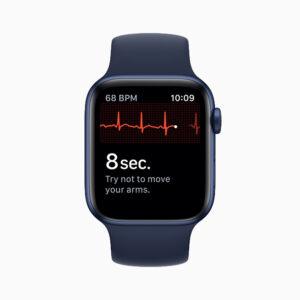
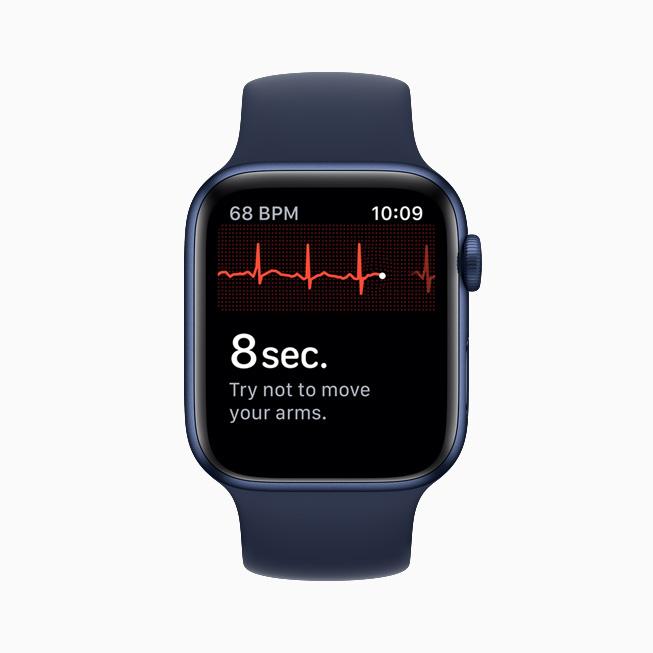
Yes, Apple Watch has an ECG feature on many newer models. The ECG app uses electrical sensors built into the back of the watch and the Digital Crown. When you touch the crown with a finger from your opposite hand, the watch creates a single-lead electrocardiogram.
An ECG, also called an electrocardiogram, records the electrical signals that control your heartbeat. Think of it as a short snapshot of your heart’s rhythm rather than a full medical exam.
The Apple Watch ECG app can look for signs of:
• Sinus rhythm, which usually means your heart rhythm looks regular
• Atrial fibrillation, often called AFib
• High or low heart rates that prevent a clear reading
• An inconclusive result
The ECG feature is useful, but it is not a replacement for a doctor, hospital ECG, or heart test. It can offer helpful information when symptoms occur, but it cannot detect every heart problem.
Which Apple Watch models have ECG?
The ECG app is available on selected Apple Watch models. In general, supported models include:
• Apple Watch Series 4
• Apple Watch Series 5
• Apple Watch Series 6
• Apple Watch Series 7
• Apple Watch Series 8
• Apple Watch Series 9
• Apple Watch Series 10
• Apple Watch Ultra
• Apple Watch Ultra 2
The Apple Watch SE models do not include the electrical sensors needed for the ECG app. The original Apple Watch, Series 1, Series 2, and Series 3 also do not support ECG recording.
A newer watch does not always mean better ECG results. The key factor is whether the model has the required electrical heart sensors and whether Apple has approved the ECG app in your country.
Does Apple Watch have ECG in every country?
No. ECG availability depends on local approval. Apple must receive permission from health regulators before enabling the feature in a region.
Your Apple Watch may have the correct hardware, but the ECG app might still be unavailable because of local rules. Availability can also change as Apple receives new approvals.
To check your watch:
-
Open the Health app on your iPhone.
-
Tap your profile picture.
-
Select Health Details or Apps, depending on your iOS version.
-
Look for the ECG app and heart health features.
You can also search for the ECG app directly on your Apple Watch. If you cannot find it, check your model, watchOS version, iPhone software, and country availability.
How does the Apple Watch ECG work?
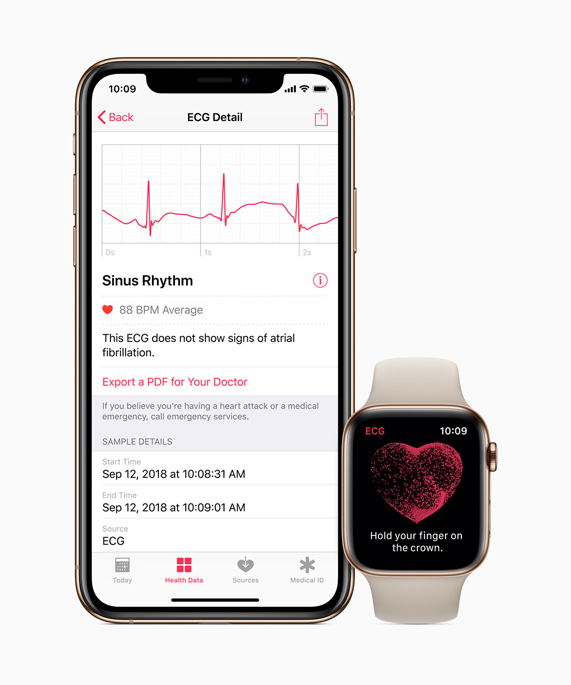
The Apple Watch ECG uses two electrical contact points. One sensor sits on the back of the watch against your wrist. The second sensor is built into the Digital Crown.
During a reading, the electrical signal travels from your wrist, through your body, to the finger touching the crown. The watch measures the timing and pattern of your heartbeat for about 30 seconds.
To take an ECG reading:
-
Wear the Apple Watch snugly on your wrist.
-
Open the ECG app.
-
Rest your arm on a table or in your lap.
-
Place a finger from your opposite hand on the Digital Crown.
-
Stay still and avoid talking.
-
Keep your finger on the crown until the countdown ends.
-
Review the result in the Health app.
The watch does not send electricity into your body. It only senses the small electrical signals produced by your heart. This makes the process painless and quick.
For the clearest result, clean and dry your skin. Sweat, water, loose contact, movement, and a poor fit can cause an inconclusive reading.
What can the Apple Watch ECG detect?
The main purpose of the Apple Watch ECG app is to identify signs of atrial fibrillation. AFib is an irregular heart rhythm that can increase the risk of stroke and other health problems.
A reading may show one of these results:
Sinus rhythm
This means the watch detected a regular rhythm during the recording. It is generally a reassuring result, but it does not prove that your heart is completely healthy.
Heart conditions can come and go. A normal ECG at 10:00 a.m. cannot rule out symptoms that appear later in the day.
Atrial fibrillation
This means the watch detected an irregular rhythm that may match AFib. You should contact a health professional, especially if this result is new or happens with symptoms.
A watch result alone does not confirm a medical diagnosis. A clinician may use a medical ECG, exam, blood tests, or other tools to confirm AFib.
High heart rate or low heart rate
The app may not classify the rhythm if your heart rate is too high or too low. Exercise, stress, illness, medication, and poor sensor contact can affect the result.
Inconclusive
An inconclusive result means the app could not classify the recording. This does not automatically mean something is wrong.
Try again while sitting still. If the result continues or you have symptoms, save the recording and discuss it with a health professional.
Poor recording
The watch may show a poor recording when your finger is not touching the crown correctly or when you move during the test. Dry skin, a loose band, and a dirty sensor can also cause problems.

How accurate is the Apple Watch ECG?
The Apple Watch ECG can be useful, but its accuracy has limits. Apple’s regulatory studies found that the ECG app can help identify AFib in suitable users under test conditions. Real-life results may differ.
The watch records a single-lead ECG. In a clinic, a standard 12-lead ECG looks at the heart from several angles. The hospital test gives doctors much more information.
The Apple Watch ECG may not detect:
• A heart attack
• A blood clot
• Heart failure
• High blood pressure
• All types of arrhythmia
• Structural heart problems
• Every episode of AFib
It also may not work well for people with certain implanted devices or conditions. Follow the instructions for your specific Apple Watch and ask your doctor if you have a pacemaker, defibrillator, or other cardiac device.
One practical lesson is easy to miss: a clear reading is not the same as a clean bill of health. Use the ECG as one piece of information. Your symptoms, medical history, and clinical tests matter more.
How to set up ECG on Apple Watch
Before using the feature, update your iPhone and Apple Watch. The ECG app requires a compatible watch, a supported iPhone, and a current enough version of watchOS and iOS.
The exact setup steps may vary, but the process usually looks like this:
-
Open the Health app on your iPhone.
-
Tap Browse, then Heart.
-
Select ECG.
-
Follow the setup instructions.
-
Enter your birth date when asked.
-
Read the safety information.
-
Open the ECG app on your watch and complete the first reading.
Apple limits the ECG app to adults in approved regions. Age requirements may vary based on local rules.
If the ECG app is missing, check these common causes:
• Your Apple Watch is an SE model
• Your model is too old
• The ECG feature is not approved in your country
• Your watch software is out of date
• Your iPhone software is out of date
• The watch was bought in a different region
• The Health app setup is incomplete
How to read and share an Apple Watch ECG
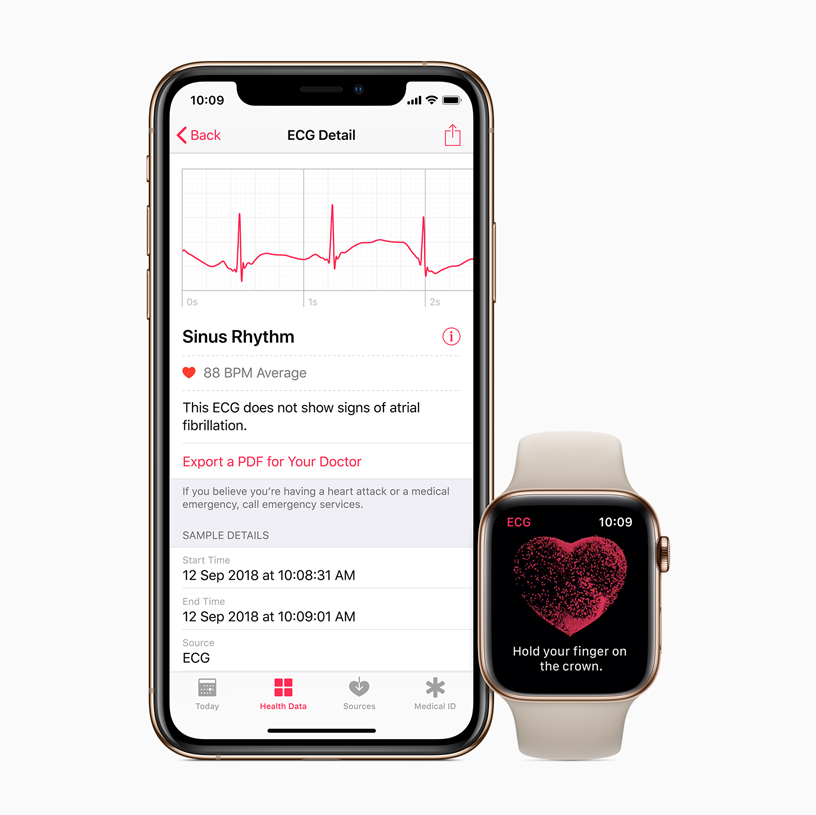
After the recording ends, the ECG app gives you a result. You can also view the waveform in the Health app on your iPhone.
To share a recording:
-
Open the Health app.
-
Tap Browse.
-
Select Heart.
-
Tap ECG.
-
Choose the recording you want to view.
-
Tap the share option.
-
Save or send the PDF file.
The PDF shows the waveform, date, time, and result. You can share it with your doctor through a secure method recommended by the clinic.
Avoid sending private health records through public posts or unprotected messages. Your ECG file contains personal medical information.
If you feel chest pain, trouble breathing, fainting, sudden weakness, or severe dizziness, do not wait for an Apple Watch reading. Call emergency services right away. A delayed watch test should never slow down urgent care.
Does Apple Watch have ECG and blood pressure monitoring?
The ECG feature and blood pressure monitoring are different. Apple Watch can record electrical heart activity, but most models do not directly measure blood pressure with an inflatable cuff.
Some Apple Watch models offer heart health features that may alert you to unusual trends. However, these features do not replace a validated blood pressure monitor.
If you need blood pressure readings, use a clinically validated upper-arm cuff. Wrist devices and smartwatch estimates can be less reliable when used incorrectly.
Apple Watch may also offer features such as:
• Heart rate tracking
• High and low heart rate alerts
• Irregular rhythm notifications
• Cardio fitness estimates
• Blood oxygen features where available
• Fall detection
Feature availability can vary by model, country, and software. Do not assume that every Apple Watch health feature works on every version.

ECG app versus irregular rhythm notifications
These two features are related but not identical.
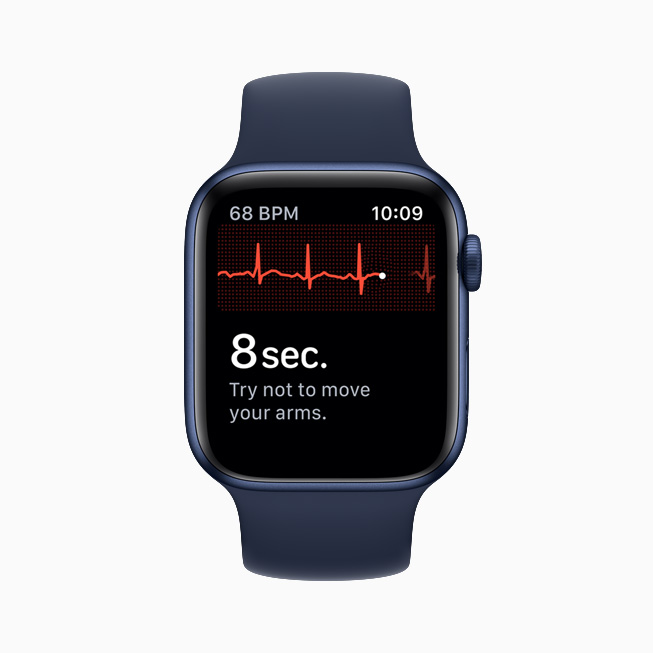
The ECG app requires you to start a recording. It captures about 30 seconds of heart rhythm when you choose to use it.
Irregular rhythm notifications work in the background. The watch checks for patterns that may suggest AFib and can alert you when it detects repeated irregular rhythms.
A notification is not a continuous heart monitor. The watch may miss short episodes, and it cannot detect every abnormal rhythm. It is best viewed as an early warning tool.
If the watch gives you an irregular rhythm alert, arrange medical advice. If you have severe symptoms, seek urgent care instead of waiting for more alerts.
Tips for getting a better Apple Watch ECG reading
Small changes can make the recording easier to read.
• Wear the watch above the wrist bone.
• Keep the band snug but comfortable.
• Rest your arm on a flat surface.
• Relax your shoulders and hand.
• Touch the Digital Crown lightly.
• Keep still for the full recording.
• Clean the back sensor and crown.
• Avoid taking a reading immediately after intense exercise.
• Make sure your skin is dry.
• Try the other wrist only if your watch settings support that position.
Do not take repeated readings every few minutes just to seek reassurance. That habit can increase worry without adding useful information. Record when you have a reason, such as symptoms or a medical plan.
It also helps to note what you felt during the reading. Write down symptoms, activity, caffeine use, stress, and medication timing. This context can help your clinician understand the result.
Benefits and limitations of Apple Watch ECG
The biggest benefit is access. A compatible Apple Watch can let you record heart rhythm at home, during travel, or while symptoms are happening.
Other benefits include:
• Quick recordings
• Easy storage in the Health app
• PDF sharing with a clinician
• Support for AFib screening
• No wires or clinic visit for each recording
• Useful information for people tracking known rhythm issues
Still, the limitations matter.
• It records only one ECG lead.
• It does not diagnose every heart condition.
• It cannot replace emergency care.
• Results can be affected by movement and contact.
• Availability varies by location.
• Some readings are inconclusive.
• A normal result does not guarantee a healthy heart.
The most useful approach is to treat the watch like a smoke alarm. It may warn you that something needs attention, but a professional must inspect the situation.
Does Apple Watch have ECG for exercise?
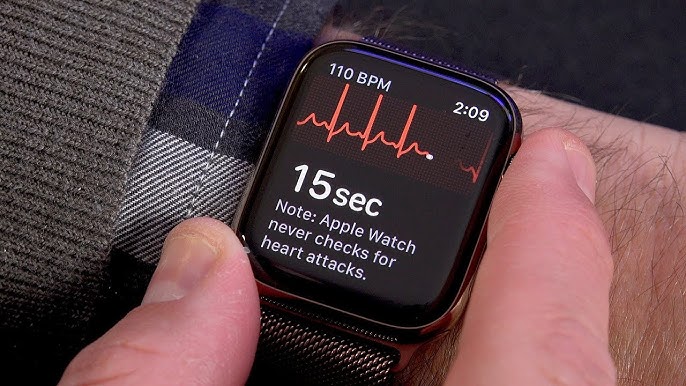
Yes, a supported Apple Watch can record an ECG outside of exercise, but the ECG app is not designed for use while you are moving. Exercise creates motion and electrical noise that can make the recording hard to classify.
If you feel unusual symptoms during exercise, stop and rest. Take a reading only when you are safe and still. Do not continue exercising simply because the watch does not show an alert.
Chest pressure, fainting, severe breathlessness, or pain spreading to the arm, back, jaw, or neck requires urgent medical attention. These symptoms need proper medical evaluation, even if your watch shows sinus rhythm.

Frequently asked questions about does Apple Watch have ECG
Does Apple Watch Series 3 have ECG?
No. Apple Watch Series 3 does not have the electrical sensors needed for the ECG app. ECG support began with Apple Watch Series 4.
Does Apple Watch SE have ECG?
No. Apple Watch SE models do not currently support the ECG app. They can still offer other health and safety features, depending on the model and region.
Does Apple Watch have ECG without an iPhone?
The watch can record an ECG after the feature is set up, but an iPhone is needed for setup and for viewing or sharing the full record in the Health app. The exact offline and sync behavior depends on your watch and software.
Can Apple Watch ECG detect a heart attack?
No. The Apple Watch ECG is not designed to detect heart attacks. If you have chest pain, breathing trouble, fainting, or other emergency symptoms, call emergency services immediately.
Is an Apple Watch ECG as good as a hospital ECG?
No. Apple Watch records a single-lead ECG, while a hospital usually uses a 12-lead ECG and other tests. The watch can provide useful rhythm information, but it gives a narrower view.
What does an inconclusive Apple Watch ECG mean?
It means the app could not classify the recording. Sit still, improve watch contact, and try again, but speak with a clinician if the result repeats or symptoms continue.
Can Apple Watch ECG detect AFib?
It can identify patterns that may suggest AFib in many compatible users. A doctor must confirm the diagnosis with medical evaluation and appropriate testing.
Conclusion
So, does Apple Watch have ECG? Yes, many Apple Watch Series 4 and later models, along with Apple Watch Ultra models, can record a single-lead ECG. The Apple Watch SE line does not currently include this feature, and availability depends on local approval.
The ECG app can help spot possible AFib and give you a record to share with a health professional. It cannot replace a hospital ECG, diagnose every heart problem, or provide emergency care.
Check your model, update your software, set up the ECG app, and learn how to use it calmly. If you have symptoms or receive an unusual result, contact a medical professional rather than relying on the watch alone. For more practical Apple Watch health guides, explore related resources and share your questions below.

Rubel Miah is the Senior Editor at MyStyleGrid.com, where he brings a sharp editorial eye and an unshakable love for fashion to everything he does. A true style addict, Rubel lives and breathes trends, from streetwear to high fashion, and has a knack for turning inspiration into impactful stories. With years of experience in fashion journalism and digital media, he curates content that empowers readers to express themselves through style. When he’s not editing features or forecasting the next big thing, you’ll find him hunting down vintage pieces or capturing street style moments around the city.