Tracking your swimming workouts can feel tricky, right? Many people swim for fitness, but often do not know how far they went or how well they did. Today, smartwatches make this much easier. These small devices use sensors to measure your swim.
But, not everyone knows how to use them correctly. With the right steps, you can get accurate data, improve your training, and reach your goals faster.
I remember my first time using a smartwatch in the pool. At first, I felt confused. The numbers did not match what I expected. After some practice and learning, my results improved. Now, I trust my smartwatch, but only because I learned how to use it well.
Let’s break down how you can do the same.
Understanding Smartwatch Sensors For Swimming
Smartwatches are full of sensors. For swimming, the most important ones are:
- Accelerometer: Measures movement and speed.
- Gyroscope: Tracks rotation and direction.
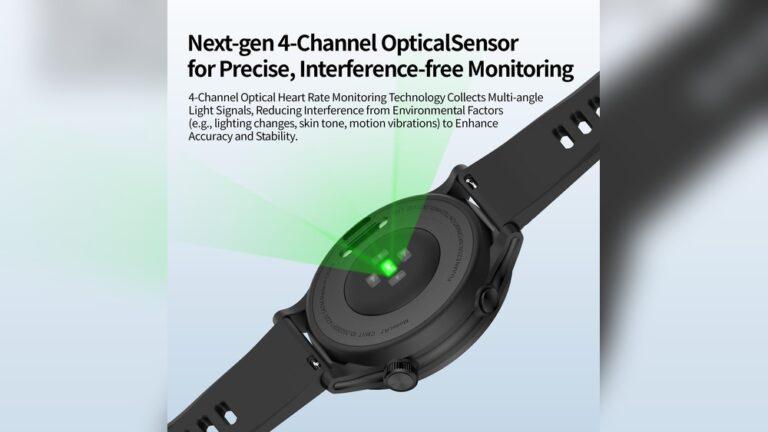
- Heart Rate Sensor: Checks your pulse.
- GPS: Finds your location (works best for open water).
- Water Resistance: Allows the watch to work in the pool.
These sensors work together to count laps, strokes, speed, and even rest time. But, if you want accurate results, you must use them properly.
Setting Up Your Smartwatch Before Swimming
Let’s talk about setup. Smartwatches need a bit of care before you jump in the water.
1. Choose The Swimming Mode
Almost every smartwatch has a special swimming mode. This tells the watch to start measuring your swim, not your steps or running.
2. Select Pool Length
If you swim in a pool, set the correct length. Most pools are 25 meters or 50 meters. If you choose the wrong number, your lap count will be wrong.
3. Check Water Lock
Some watches need you to turn on water lock. This stops water from pressing buttons or the screen by mistake.
4. Wear The Watch Correctly
Put your watch on your wrist, not too loose, not too tight. If it moves around, your data may be off.
5. Update Firmware
Before swimming, update your watch software. Many brands fix bugs and improve tracking often.
Credit: www.formswim.com
How Smartwatch Sensors Track Swimming Workouts
Now, let’s see how these sensors work in the water.
Lap Counting
When you swim, your arm moves in a pattern. The accelerometer and gyroscope sense this movement. When you turn at the wall or pause, the watch counts a lap. If you change your stroke or stop in the middle, the watch may miss a lap.
Stroke Recognition
Most smartwatches can detect different strokes: freestyle, backstroke, breaststroke, and butterfly. The sensors see how your arm moves and match it to a stroke. If you mix strokes or swim slowly, the watch may get confused.
Distance Measurement
In the pool, your watch uses lap count and pool length to find the total distance. In open water, it uses GPS. GPS is not perfect, but good enough for most swimmers.
Heart Rate Tracking
Some watches track your heart rate underwater. This helps you know how hard you worked. But, water can block the sensor, so results may be less accurate.
Pace And Speed
Your watch can show your pace (time per 100 meters) and speed (meters per second). This helps you see if you are getting faster.
Rest Time
If you stop at the wall, most watches track your rest time. This is useful for interval training.
Common Problems And Mistakes In Swim Tracking
Even the best smartwatches can make mistakes. Here are some common issues:
1. Wrong Pool Length
If you set the pool length wrong, every lap will be counted wrong.
2. Pausing Mid-lap
Stopping in the middle of a lap confuses the sensors. Try to stop only at the wall.
3. Mixing Strokes
Changing strokes in the middle of a lap can cause errors.
4. Loose Fit
If your watch moves around, sensors cannot track your arm correctly.
5. Not Using Swimming Mode
If you forget to use swimming mode, the watch will not track laps or strokes.
6. Water Drops On Sensors
Sometimes, water blocks the heart rate sensor.
Tips For Accurate Swimming Workout Tracking
After years of swimming with smartwatches, I learned a few tricks. Here are the best tips for accuracy:
1. Always Check Pool Length
Before you start, check the pool length setting. If you swim in a new pool, update your watch.
2. Finish Laps At The Wall
Touch the wall firmly at the end of each lap. This helps the sensors count correctly.
3. Keep A Steady Stroke
Try to keep your stroke steady and clear. Quick changes confuse the watch.
4. Wear On Your Dominant Arm
Most people swim better with their dominant arm. Wearing your watch here improves tracking.
5. Clean Watch After Swimming
Rinse the watch in fresh water after swimming. Salt and chlorine can block sensors.
6. Avoid Pauses Mid-lap
If you need to stop, wait until you reach the wall.
7. Check Results After Each Workout
Look at your data and see if it matches your plan. If you notice errors, adjust next time.
8. Use Manual Lap Counting (if Needed)
Some watches let you press a button to count laps. If you often see mistakes, try manual mode.
Comparing Popular Smartwatches For Swimming
Let’s compare some top smartwatches. This helps you choose one that fits your needs.
| Smartwatch | Lap Counting | Stroke Detection | Heart Rate | GPS | Price (USD) |
|---|---|---|---|---|---|
| Apple Watch Series 9 | Yes | Yes | Yes (good) | Yes | 399 |
| Garmin Swim 2 | Yes | Yes | Yes (very good) | Yes | 249 |
| Fitbit Sense 2 | Yes | No | Yes (average) | No | 299 |
| Samsung Galaxy Watch 6 | Yes | Yes | Yes (good) | Yes | 349 |
| Polar Vantage V2 | Yes | Yes | Yes (excellent) | Yes | 499 |
You can see that most new watches do well. If you want heart rate tracking in water, Garmin and Polar are best. For stroke detection, Apple, Garmin, Samsung, and Polar all do well.

Credit: cubittofficial.com
How To Use Smartwatch Data To Improve Your Swimming
Getting data is nice, but using it is better. Here’s how you can use your smartwatch results to swim faster and smarter.
Set Goals
Start with clear goals. Maybe you want to swim 1000 meters, or get faster at 50 meters. Use your watch to track progress.
Review Data After Every Swim
After your workout, look at:
- Total distance
- Lap times
- Stroke count
- Heart rate
This shows if you reached your goal or need to improve.
Spot Trends
Over time, your watch builds a record. You can spot if you are getting faster or slower. This helps you change your training.
Adjust Training
If you see your heart rate is too high, slow down next time. If lap times are slow, work on your stroke.
Share Data
Many watches let you share your results with coaches or friends. This helps you stay motivated.
Open Water Swimming: Special Tips
Swimming in lakes or oceans is different. GPS is the main sensor here. But, GPS is not always perfect.
- Start GPS tracking before you enter water.
- Wait for the watch to lock on satellites.
- Swim in straight lines, if possible.
- Check your path after the swim.
- If your watch loses GPS, it may miss some distance.
Here is a quick comparison of GPS accuracy in open water:
| Smartwatch | GPS Accuracy | Battery Life |
|---|---|---|
| Garmin Swim 2 | Very good | 13 hours |
| Apple Watch Series 9 | Good | 7 hours |
| Polar Vantage V2 | Excellent | 40 hours |
If you plan long swims, battery life matters. Polar is best for long sessions.
Improving Stroke Efficiency With Smartwatch Feedback
Smartwatches can help you swim better, not just longer.
- Stroke Count: Fewer strokes per lap means better efficiency.
- Stroke Type: See which stroke is fastest for you.
- Pace: Keep a steady pace for endurance.
- Heart Rate: Swimming at the right heart rate helps you train safely.
Use this data to adjust your technique. For example, I noticed my stroke count was high in freestyle. By focusing on longer strokes, I improved my efficiency.
Using Third-party Apps For Better Tracking
Many watches connect with apps for deeper analysis.
- Strava: Tracks swims and shares them with friends.
- Swim.com: Offers detailed swim breakdowns.
- Garmin Connect: Shows trends and graphs.
- Apple Health: Combines swim data with other workouts.
These apps help you see your progress in more detail. If you want to compare your times with others, apps are useful.
Regular Calibration And Maintenance
Smartwatches need care to stay accurate.
- Clean the watch after every swim.
- Update software regularly.
- Check settings before each swim.
- Charge battery fully.
If your watch gets wet inside, dry it fast. Water damage can cause errors.
What Smartwatch Data Really Means
Numbers can be confusing. Here is what the main metrics mean:
- Lap Count: Number of times you swim from wall to wall.
- Distance: Total meters swum.
- Stroke Count: How many strokes per lap.
- Pace: Time per 100 meters.
- Heart Rate: How hard your heart works.
- SWOLF: Combines stroke count and time (lower is better).
If you see strange numbers, check your settings and technique.

Credit: www.amazon.ae
Comparing Smartwatch Sensors With Old Methods
Before smartwatches, swimmers counted laps by memory or used pool clocks. Let’s see how smartwatches compare.
| Method | Accuracy | Ease | Data Depth |
|---|---|---|---|
| Manual Counting | Good (if focused) | Hard | Low |
| Pool Clock | Average | Medium | Low |
| Smartwatch Sensors | Very good | Easy | High |
Smartwatches win in ease and data depth. But, they can make mistakes if not used right.
Advanced Tips For Serious Swimmers
If you swim often or train for races, these tips help you get the most from your watch.
- Use interval training and record rest times.
- Track SWOLF score for stroke efficiency.
- Compare your data with past swims.
- Try different strokes and see which is best.
- Share your results with a coach for feedback.
I once trained for a local race. By using my smartwatch, I saw which intervals worked best for me. My coach helped me tweak my plan based on my data.
Choosing The Right Smartwatch For Your Needs
Not all smartwatches are equal. Think about these points:
- Water Resistance: At least 5 ATM (50 meters).
- Sensor Accuracy: Look for reviews and tests.
- Battery Life: Longer is better for open water.
- App Support: Good apps make tracking easier.
- Comfort: Pick a watch that feels good.
Common mistake: Choosing a watch for looks only. Make sure it is good for swimming.
If you want more details, check official sources like Swim England.
Frequently Asked Questions
How Do I Fix Wrong Lap Counts On My Smartwatch?
Check your pool length setting. Finish each lap at the wall. Avoid stopping mid-lap. If errors continue, try manual lap counting or update your watch software.
Can I Use My Smartwatch For Open Water Swims?
Yes, but GPS accuracy can vary. Start tracking before you enter water. Swim in straight lines for best results. Battery life matters for long swims.
Why Does My Heart Rate Not Show During Swimming?
Water can block the heart rate sensor. Make sure your watch fits tight. Some watches are better than others for underwater heart rate tracking.
Which Smartwatch Is Best For Swimming?
Garmin Swim 2 and Polar Vantage V2 are top choices for accuracy and battery life. Apple Watch Series 9 is good for casual swimmers. Pick based on your needs and budget.
What Does Swolf Mean And How Do I Use It?
SWOLF is a score that combines stroke count and time per lap. Lower SWOLF means better efficiency. Use it to track your technique improvements.
Tracking your swimming workouts with smartwatches is a smart move. With sensors and good setup, you get accurate results. You can spot your strengths and weaknesses, set goals, and swim smarter. My own journey showed me the value of using data to improve.
With a few simple steps and regular checks, you can enjoy better, safer, and more fun swims. Dive in, and let your smartwatch be your training partner.

Rubel Miah is the Senior Editor at MyStyleGrid.com, where he brings a sharp editorial eye and an unshakable love for fashion to everything he does. A true style addict, Rubel lives and breathes trends, from streetwear to high fashion, and has a knack for turning inspiration into impactful stories. With years of experience in fashion journalism and digital media, he curates content that empowers readers to express themselves through style. When he’s not editing features or forecasting the next big thing, you’ll find him hunting down vintage pieces or capturing street style moments around the city.