Usually, an Apple Watch does not need its own line, but cellular features require a compatible plan.
Whether an Apple Watch needs its own line depends on the model you own and how you plan to use it. A GPS Apple Watch works through your iPhone or Wi-Fi, while a GPS + Cellular model can make calls, send messages, stream music, and use data without your phone nearby. This guide explains the difference, the costs, the setup rules, and the common mistakes to avoid.
Does an Apple Watch need its own line?
No, an Apple Watch does not always need its own line. A GPS model can use your iPhone’s connection when the two devices are close. It can also connect to known Wi-Fi networks for some online tasks.
A GPS + Cellular Apple Watch can work away from your iPhone. To use its mobile data features, you need to add it to a compatible cellular plan. This plan is often called a smartwatch line, wearable line, or connected-device line.
The key point is simple:
• GPS Apple Watch: No separate cellular line is required.
• GPS + Cellular Apple Watch near your iPhone: It can use your iPhone’s connection.
• GPS + Cellular Apple Watch away from your iPhone: A cellular plan is needed for calls, texts, and mobile data.
So, when someone asks, “does an Apple Watch need its own line,” the correct answer is based on the watch model and your daily routine.
How Apple Watch connectivity works
An Apple Watch uses several connection types. It chooses the best available option based on distance, settings, and the model.
Bluetooth connection
When your watch is near your iPhone, it usually connects through Bluetooth. This saves battery and lets the watch use the iPhone’s cellular or Wi-Fi connection.
With this setup, you can receive notifications, answer calls, reply to messages, use apps, and access many watch features. Your iPhone does not need to be in your hand, but it should remain nearby.
Wi-Fi connection
If your watch is away from your iPhone but connected to a known Wi-Fi network, it may still perform many online tasks. You can receive notifications, use Siri, send messages through supported services, and check some updated information.
Wi-Fi does not turn a GPS Apple Watch into a full phone. Some functions still depend on the iPhone or a cellular connection.
Cellular connection
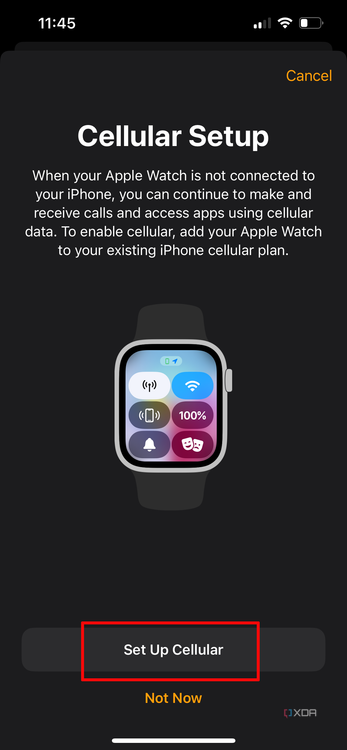
A GPS + Cellular model includes a cellular radio and an electronic SIM, often called an eSIM. When you activate a supported plan, the watch can connect to a mobile network by itself.
This allows you to:
• Make and receive calls.
• Send and receive messages.
• Stream music and podcasts.
• Use maps and navigation.
• Receive notifications.
• Contact emergency services.
• Use apps that need internet access.
The watch normally shares your iPhone’s phone number through carrier technology. It does not usually need a completely separate phone number for everyday calls and texts.

GPS Apple Watch versus GPS + Cellular Apple Watch
Choosing the right model is the easiest way to decide whether an Apple Watch needs its own line.
GPS Apple watch
a GPS model is best for people who usually carry their iPhone. It can track workouts, monitor activity, show notifications, control music, and use GPS during outdoor exercise.
It can also make emergency calls in some situations when a connection is available. However, it does not connect directly to a cellular network for normal calls, texts, or data.
A GPS model may be enough if you:
• Work near your phone.
• Exercise with your phone nearby.
• Spend most of your time around Wi-Fi.
• Want to avoid a monthly smartwatch fee.
• Mainly want fitness and notification features.
GPS + Cellular Apple Watch
A GPS + Cellular model is useful when you want to leave your iPhone behind. It includes all GPS model features, plus the option to connect to a cellular network.
You still need a compatible carrier plan to use cellular service. Buying the cellular version alone does not activate mobile data.
A cellular model may be worth considering if you:
• Run, cycle, or walk without your phone.
• Need to stay reachable during work or travel.
• Want emergency contact access away from your iPhone.
• Stream audio during workouts.
• Manage a watch for a family member who does not have an iPhone.
The cellular model usually costs more at purchase and may add a monthly charge. For many people, the extra cost is worthwhile. For others, it is like paying for a second key they rarely use.

Does a cellular Apple Watch use the same phone number?
In most cases, your Apple Watch uses a carrier feature that allows it to share your iPhone’s number. The watch may have a separate technical line behind the scenes, but callers normally see your regular iPhone number.
This setup helps calls and messages reach both devices. If you answer a call on your watch, the caller does not usually need to know that you are using a wearable.
The exact setup can differ by carrier. Some providers call the service Number Share, NumberSync, DIGITS, or another brand name. These services are designed to connect your watch to your existing mobile account.
This is an important distinction when asking, “does an Apple Watch need its own line.” It may need its own carrier connection, but it usually does not need a separate public phone number.
How much does an Apple Watch cellular line cost?
The price depends on your carrier, plan, discounts, taxes, and promotions. In the United States, smartwatch plans often cost around $5 to $15 per month before taxes and fees, although prices can change.
Some carriers include smartwatch service in premium plans. Others charge a separate monthly fee. Activation fees may also apply.
Before signing up, check:
• The monthly service price.
• Activation or setup fees.
• Taxes and regulatory charges.
• Whether your iPhone plan is eligible.
• Whether the carrier supports your Apple Watch model.
• International roaming rules.
• Cancellation terms.
• Data limits or speed restrictions.
A carrier may advertise a free smartwatch line for a limited period. Read the terms carefully. The discount may end after several months, or it may require an expensive qualifying phone plan.
From a practical cost view, ask yourself how often you will leave your iPhone behind. If the answer is almost never, a GPS model may offer better value. If you regularly exercise or work without your phone, cellular access can quickly become useful.

Can you use an Apple Watch without an iPhone?
For normal setup, an Apple Watch needs an iPhone that meets Apple’s current software and compatibility requirements. The watch is paired through the Apple Watch app on the iPhone.
After setup, a cellular Apple Watch can perform many tasks without the iPhone nearby. It is not fully independent in the same way as an Android phone or tablet. Some settings, updates, apps, and account features still depend on the paired iPhone.
A family member can also use an Apple Watch through Family Setup, now known in some regions as Apple Watch For Your Kids. This lets an eligible user operate a watch without having their own iPhone.
However, Family Setup has limits:
• Some features may not be available.
• The carrier must support the service.
• The watch still needs an organizer’s iPhone for management.
• Certain health and payment features may work differently.
• The watch user may need an Apple Account.
This means the answer to “does an Apple Watch need its own line” can change when the watch is set up for a child, older adult, or family member. In that case, a cellular plan is often more important.

What happens when a cellular Apple Watch has no plan?
A GPS + Cellular Apple Watch still works without an active cellular plan. The cellular hardware does not become useless. It simply cannot connect to a mobile network for regular service.
Without a plan, the watch can still use:
• Bluetooth through your iPhone.
• Wi-Fi networks.
• Workout tracking.
• Health sensors.
• Apple Pay where supported.
• Downloaded music and podcasts.
• Offline maps or stored content.
• Time, alarms, timers, and other basic tools.
If you leave your iPhone behind, cellular features will not work until you activate a supported plan. Emergency calling may still be available in certain areas and situations, but you should not treat it as a substitute for a normal cellular subscription.
This is why some buyers choose the cellular model even if they do not activate it right away. They keep the option open for future use. The downside is the higher purchase price.

Does an Apple Watch need its own line for texting and calls?
An Apple Watch does not need its own line when it is connected to your iPhone by Bluetooth. Your iPhone handles the mobile connection.
When you move out of Bluetooth range, the watch needs Wi-Fi or cellular service. A cellular plan is needed for reliable calling and texting from almost anywhere with network coverage.
Messages can behave differently depending on their type. iMessage may work over Wi-Fi or cellular data. Standard SMS and MMS messages often depend on the iPhone or a carrier connection.
Calls also need an active connection. If your watch is offline, you may still see past information, but you cannot expect new calls and messages to arrive.
The simple rule is:
• Near your iPhone: Your watch can use the iPhone’s line.
• On Wi-Fi: Some messages and online services may work.
• Away from your iPhone with cellular active: Calls and texts can work independently.
• Away from your iPhone without Wi-Fi or cellular: Communication is limited.

Do you need a separate line for a child’s Apple Watch?
A child’s Apple Watch often needs cellular service if the child will use it without an iPhone. Family Setup allows a parent or guardian to manage the watch from their iPhone.
The watch can support calls, messages, location sharing, emergency contacts, and some safety tools. The exact features depend on the watch model, software version, carrier, and region.
Parents should confirm these points before buying:
• The carrier supports Family Setup.
• The watch is compatible with the family organizer’s iPhone.
• The child has approved contacts.
• Location and privacy settings are configured.
• School and bedtime modes are enabled when needed.
• The watch has a reliable cellular signal in common locations.
For a child, the question “does an Apple Watch need its own line” usually has a clearer answer. If the child does not carry an iPhone, a cellular plan is generally needed for independent communication.

Common mistakes when activating Apple Watch cellular service
Many setup problems are not caused by the watch. They come from plan restrictions, account details, or carrier compatibility.
Avoid these mistakes:
-
Buying a cellular watch without checking carrier support. Not every carrier supports every Apple Watch model.
-
Assuming any SIM plan will work. Apple Watch cellular service often requires a specific wearable feature.
-
Activating the watch under the wrong Apple Account. This can create pairing and family management problems.
-
Ignoring regional model differences. Cellular bands vary by country and region.
-
Forgetting that the iPhone and watch may need compatible software. Update both devices before activation when possible.
-
Expecting cellular service to work everywhere. Buildings, rural areas, tunnels, and crowded events can reduce coverage.
-
Overlooking battery use. Cellular activity can use more battery than Bluetooth or Wi-Fi.
In troubleshooting, I have found that checking the carrier account first saves the most time. Restarting the watch may help, but it will not fix an unsupported plan or an incompatible model.
How to decide if you need cellular Apple Watch service
Use your routine as the test. Do not pay for cellular service simply because the feature sounds impressive.
Choose GPS only if:
• You normally carry your iPhone.
• You want lower upfront and monthly costs.
• Fitness tracking is your main goal.
• You spend most of your day near Wi-Fi.
Choose GPS + Cellular if:
• You often leave your phone at home.
• You want contact access during outdoor activities.
• You need a safety device for a family member.
• You travel around town without carrying a bag.
• You want music and maps away from your iPhone.
A useful test is to imagine your most common phone-free hour. If you would feel comfortable being unreachable, GPS is likely enough. If you would worry about missing an urgent call, cellular service may offer valuable peace of mind.
Remember that cellular service is not a replacement for careful planning. Keep the watch charged, check coverage, and save emergency contacts.
Frequently asked questions about whether an Apple Watch needs its own line
Does an Apple Watch need a separate phone number?
Usually, no. A cellular Apple Watch generally shares your iPhone’s number through a carrier feature, although the carrier may assign a separate technical line for billing and network use.
Can I use a GPS Apple Watch without a cellular plan?
Yes. A GPS Apple Watch can connect to your iPhone through Bluetooth and use Wi-Fi for some features. It does not need a monthly cellular plan.
Can a cellular Apple Watch work without an iPhone nearby?
Yes, but only after it has been activated with a supported cellular plan. Without cellular service, it needs your iPhone or a compatible Wi-Fi network for many online functions.
Can I add an Apple Watch to my existing phone plan?
Many major carriers allow this through a smartwatch or wearable add-on. Eligibility, pricing, coverage, and device support vary, so confirm the details with your carrier before purchase.
Does an Apple Watch use data from my iPhone?
When connected to your iPhone, the watch can use the iPhone’s internet connection. A cellular Apple Watch can also use its own mobile data when it is away from the iPhone.
Does a child need an iPhone to use an Apple Watch?
A child may use an Apple Watch through Family Setup without owning an iPhone. The organizer still needs a compatible iPhone, and the watch usually needs cellular service for independent calls and messages.
Can I use an Apple Watch with Wi-Fi only?
Yes. A GPS model or an inactive cellular model can use known Wi-Fi networks for some internet features. Wi-Fi coverage and feature support are more limited than a full cellular connection.
Conclusion
An Apple Watch does not always need its own line. A GPS model works well with an iPhone nearby, while a GPS + Cellular model needs a compatible wearable plan for calls, messages, and data when your iPhone is out of range.
Think about how you use your phone, how often you go out without it, and whether another family member will use the watch independently. Compare carrier prices and compatibility before you buy or activate service. With the right model and plan, you can avoid extra costs and still get the features that matter most. Check your carrier’s current Apple Watch options, then choose the setup that fits your real routine.

Rubel Miah is the Senior Editor at MyStyleGrid.com, where he brings a sharp editorial eye and an unshakable love for fashion to everything he does. A true style addict, Rubel lives and breathes trends, from streetwear to high fashion, and has a knack for turning inspiration into impactful stories. With years of experience in fashion journalism and digital media, he curates content that empowers readers to express themselves through style. When he’s not editing features or forecasting the next big thing, you’ll find him hunting down vintage pieces or capturing street style moments around the city.