Smartwatches are a big part of our daily lives now. They help us track steps, check messages, and even monitor our health. But one thing that can be very frustrating is when your smartwatch Bluetooth connection with your phone keeps dropping. It can make the watch almost useless. I know how annoying this feels. I once missed an important call because my smartwatch disconnected and did not alert me. Since then, I’ve learned many ways to make the connection strong and stable. In this guide, I’ll show you how to get rid of these problems for good. These tips are simple, clear, and based on real experience. You do not need to be a tech expert to follow them.
Why Bluetooth Connection Matters For Smartwatches
Bluetooth is how your smartwatch talks to your phone. It lets you get notifications, sync data, and even answer calls. If the connection is weak, you lose all these features. A stable link means your apps, health data, and calls stay up-to-date. This is why fixing Bluetooth issues should be the first thing to do if your smartwatch does not work well.
Most smartwatches use Bluetooth Low Energy (BLE). It helps save battery, but it can sometimes be less stable. The distance, interference, and old software can all make things worse. Understanding these basics will help you fix problems faster.
Common Bluetooth Problems Between Smartwatch And Phone
You might see some of these issues:
- Smartwatch disconnects often
- Notifications do not arrive
- Calls get missed
- Data does not sync
- Watch shows “Disconnected”
Knowing these helps you spot when things are not working. Let’s move on to solutions.

Credit: www.ebay.com
Basic Steps To Fix Bluetooth Connection
Before you try any advanced tricks, do these simple steps. They solve most problems.
1. Restart Both Devices
Switch off your smartwatch and phone, then turn them back on. This clears glitches and refreshes the Bluetooth system.
2. Turn Bluetooth Off And On
Go to Bluetooth settings on both devices. Turn it off for 10 seconds, then on again.
3. Check Device Distance
Keep your phone and smartwatch within 5-10 meters (15-30 feet). Walls and metal objects can block signals.
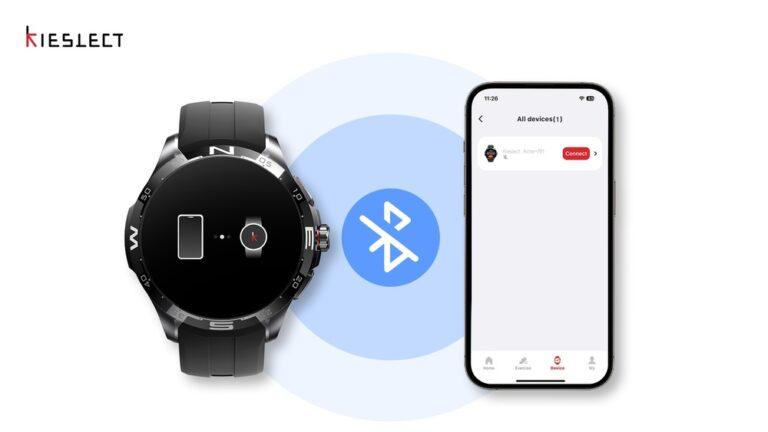
4. Forget And Re-pair Devices
In Bluetooth settings, select your smartwatch and tap “Forget. ” Then pair again as new.
5. Update Software
Go to settings and check for updates. Both your phone and watch need the latest firmware for best results.
6. Charge Your Devices
Low battery can make Bluetooth weak. Plug in both devices and try again.
These steps fix over 70% of Bluetooth connection issues in my experience.
Advanced Fixes For Persistent Bluetooth Problems
If the basic steps do not work, try these more advanced tips. They require a bit more time but can solve stubborn problems.
1. Clear Bluetooth Cache
On Android phones, the Bluetooth cache can get full or corrupt. This causes pairing issues.
- Go to Settings > Apps > Show system apps > Bluetooth > Storage
- Tap “Clear Cache” and “Clear Data”
On iPhone, restart your phone. The cache clears itself.
2. Reset Network Settings
This resets all Bluetooth, Wi-Fi, and mobile settings. You will need to reconnect to Wi-Fi after this, so make sure you know your passwords.
- On Android: Settings > System > Reset > Reset network settings
- On iPhone: Settings > General > Reset > Reset Network Settings
3. Remove Interference
Bluetooth uses radio waves. Other devices can block or weaken the signal. These include:
- Wi-Fi routers
- Microwaves
- Wireless headphones
- Other Bluetooth devices
Keep your phone and watch away from these when pairing.
4. Check App Permissions
Smartwatches use apps to manage connections. If the app does not have permission, it cannot work well.
- On Android: Settings > Apps > [Watch App] > Permissions
- On iPhone: Settings > [Watch App] > Bluetooth
Allow all needed permissions.
5. Try A Different Phone
Sometimes, the phone is the problem. Try pairing your watch with a friend’s phone. If it works, your own phone may have a problem.
6. Factory Reset Smartwatch
If nothing else helps, reset your smartwatch. This removes all data, so backup if you can.
- On most watches: Settings > System > Reset
After reset, pair as new.

Credit: www.ebay.com
How To Prevent Bluetooth Problems Before They Start
Many Bluetooth problems can be avoided. Here are some tips that keep things running smooth.
Keep Software Updated
Manufacturers fix bugs and add new features often. Check for updates every month. This includes your phone, smartwatch, and the companion app.
Use Original Accessories
Cheap or third-party chargers can create noise and signal problems. Always use the charger that came with your watch.
Avoid Crowded Wireless Spaces
If you live in an apartment with many Wi-Fi networks, Bluetooth can struggle. Try pairing away from other devices. At my home, I noticed better connection in the kitchen, away from the Wi-Fi router and TV.
Do Not Overload Bluetooth
Most phones can connect to several Bluetooth devices, but too many can make things slow. Disconnect other devices if you only need the watch.
Turn Off Battery Saver Modes
Some phones and watches disable Bluetooth when saving battery. Make sure battery saver is off when pairing.
Smartwatch And Phone Compatibility
Not all watches work with every phone. Make sure your watch and phone are compatible.
Operating System Match
- Apple Watch works best with iPhone.
- Samsung Galaxy Watch works best with Samsung or Android phones.
- Some watches have limited features with other brands.
Check the manufacturer’s website for a compatibility list.
Bluetooth Version
Newer Bluetooth versions (5. 0 and above) are faster and more stable. If your phone is old and your watch is new (or the other way around), you may have issues.
| Bluetooth Version | Max Range | Speed | Stability |
|---|---|---|---|
| 4.0 | 50 meters | Low | Medium |
| 4.2 | 60 meters | Medium | Medium |
| 5.0 | 100 meters | High | High |
If you can, upgrade your phone for the best experience.
App Settings That Impact Bluetooth
The app that comes with your smartwatch has settings that affect Bluetooth.
- Allow the app to run in the background
- Do not close the app from recent apps
- Give the app access to Bluetooth, location, and notifications
Some phones limit background activity to save battery. Change this in your phone’s app settings.
Background Data
Allow the smartwatch app to use data in the background. If you block this, the connection drops often.
Notification Access
Let the smartwatch app read notifications. This is needed for messages and calls to reach your watch.
Real-world Experience: What Worked For Me
Once, my smartwatch would disconnect every few minutes. It drove me crazy. I tried all the usual tricks—restart, updates, and re-pairing. Nothing worked. Finally, I checked the Bluetooth settings and found too many devices connected: headphones, speakers, and even my car. Once I removed old devices, my watch stayed connected all day. Sometimes, the small things make a big difference.
How Different Smartwatch Brands Handle Bluetooth
Every brand has its own way of managing Bluetooth. Here’s a quick look at the popular ones.
| Brand | Best with | App Needed | Common Issues |
|---|---|---|---|
| Apple Watch | iPhone | Watch app | Battery saver on iPhone kills connection |
| Samsung Galaxy Watch | Samsung/Android | Galaxy Wearable | Needs location on for full features |
| Fitbit | iOS/Android | Fitbit app | App sometimes crashes in the background |
| Garmin | iOS/Android | Garmin Connect | Older models have weak Bluetooth |
Bluetooth Range And Real-world Obstacles
Bluetooth range is not the same everywhere. Manufacturers say you get up to 100 meters with Bluetooth 5. 0, but in real life, walls, floors, and even your own body can block signals.
- One wall can reduce range by 50%
- Metal objects can block signal fully
- Water (like sweat or rain) can weaken the signal
Try to keep your phone and watch in the same room for best results.
How To Check Bluetooth Connection Quality
You can check if your Bluetooth signal is strong. Some apps show you the signal strength. Or, you can watch for these signs:
- Fast notification delivery means good signal
- Data syncs quickly
- Calls do not drop
If things are slow, the signal is weak.
Bluetooth Settings You Should Not Ignore
Both your phone and watch have hidden settings that help Bluetooth.
- On Android: Developer options > Bluetooth settings
- On iPhone: Reset Network Settings (if nothing else works)
Be careful with these. Only change settings if you know what you are doing.
Smartwatch Firmware: Why Updates Matter
Firmware is the watch’s software. Updates fix bugs and improve Bluetooth.
- Check for updates in the watch settings every month
- Update using the official app or website
Some updates need your watch to be fully charged.
Environmental Factors That Affect Bluetooth
Sometimes, it is not your devices but the environment.
- Crowded places (like malls) have many Bluetooth signals
- Electronic devices can create interference
- Even weather can sometimes make a small difference
If your watch works better at home than outside, this could be the cause.
When To Get Help From Support
If you have tried everything and still have problems, contact the support team for your watch or phone.
- Give them details: Phone model, watch model, software version
- Tell them what steps you already tried
They may offer a replacement if your device is faulty.
Tips To Maximize Battery Life Without Losing Bluetooth
You want good battery life but also a strong Bluetooth connection. Here’s how:
- Turn off features you do not use (like always-on display)
- Lower screen brightness
- Keep both devices charged
- Only connect to one device at a time
This keeps both your phone and watch working longer.
How To Pair Smartwatch And Phone Correctly
Many people rush pairing and miss steps. Here’s the right way:
- Charge both devices at least 50%
- Turn on Bluetooth on both
- Open the smartwatch app on your phone
- Follow the app’s steps exactly
- Wait for pairing to finish before using the watch
If you get an error, restart both devices and try again.
Common Myths About Bluetooth And Smartwatches
Let’s clear up some common myths:
- “Bluetooth drains battery fast.”
With BLE, battery use is very low.
- “You can pair any watch with any phone.”
Some watches only work fully with certain brands.
- “Bluetooth is always unstable.”
With the right settings, Bluetooth is very reliable.

Credit: www.ebay.com
How Bluetooth Security Affects Connection
Bluetooth uses security to keep your data safe. Sometimes, these settings can block pairing.
- Make sure both devices are set to “visible” or “discoverable” when pairing
- Use a PIN or code if asked
This keeps your data safe and connection stable.
Using Wi-fi To Help Bluetooth
Some smartwatches use Wi-Fi to help Bluetooth. If your watch loses Bluetooth, it can use Wi-Fi to stay connected (Apple Watch and some Samsung models do this).
- Connect your watch to the same Wi-Fi as your phone
- This gives you better range and fewer drops
The Importance Of Good Cables And Chargers
Low-quality chargers can create noise that interferes with Bluetooth. Always use the cables and chargers from the official brand.
What To Do If Your Smartwatch Still Disconnects
If you have tried everything in this guide and your watch still disconnects:
- Test the watch with another phone
- Try another location (like a friend’s house)
- Check for hardware damage (cracks, water inside)
If nothing works, it may be time to replace the device.
Extra Tips Most People Miss
Here are two extra tips I learned after years of using smartwatches:
- Check for nearby Bluetooth speakers or TVs. These can sometimes “grab” your watch’s connection.
- Turn off Bluetooth scanning for new devices in your phone’s settings. This can make the connection more stable.
Frequently Asked Questions
What Is The Ideal Distance For Bluetooth Connection Between Smartwatch And Phone?
The best distance is 5 to 10 meters (15 to 30 feet) with no walls in between. Walls, metal, and water can make the range much shorter.
How Do I Know If My Smartwatch And Phone Are Compatible?
Check the watch’s website for a list of supported phones. Usually, Apple Watches work best with iPhones, and Android watches work best with Android phones.
Why Does My Smartwatch Disconnect When My Phone Is In My Pocket?
Your body contains water, which can block Bluetooth signals. Try keeping your phone and watch on the same side of your body or in a bag.
Does Battery Saver Mode Affect Bluetooth Connection?
Yes. Many battery saver modes turn off Bluetooth or limit background apps. Turn off battery saver for stable connection.
Where Can I Find More Details About Bluetooth Technology?
For deeper information, visit the official Bluetooth SIG page. They explain how Bluetooth works and new features.