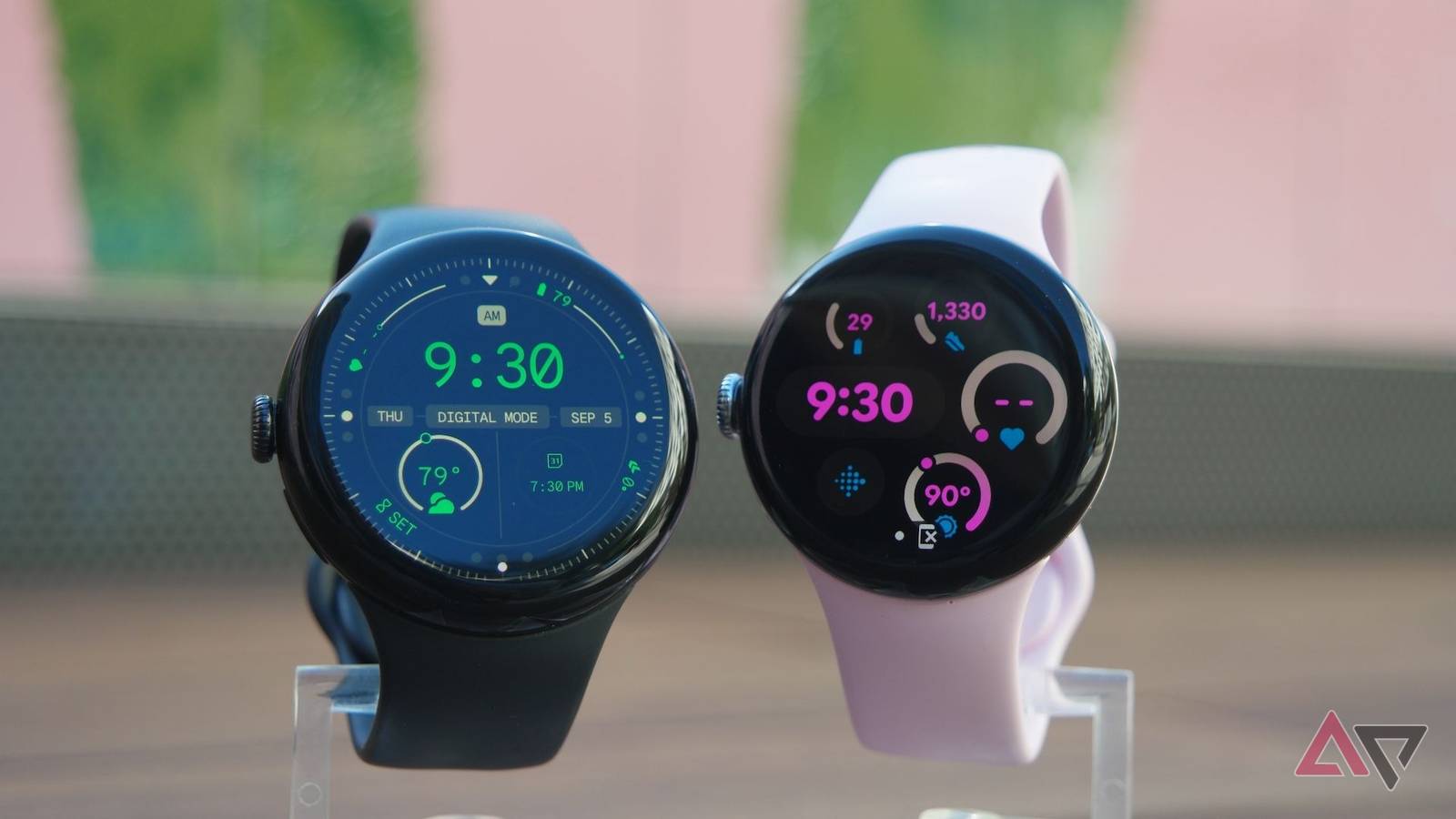
The Pixel Watch 3 is water-resistant, not fully waterproof, and has a 5 ATM rating plus IP68 dust and water protection.
If you are asking “is the Pixel 3 watch waterproof,” the accurate answer depends on how you plan to use it. Google’s Pixel Watch 3 can handle rain, sweat, hand washing, and shallow swimming, but water resistance is not permanent. This guide explains its ratings, safe uses, limits, care tips, and the mistakes that can lead to water damage.
Is the Pixel 3 Watch Waterproof?
No smartwatch is truly waterproof. The better term is water-resistant. The Pixel Watch 3 has a 5 ATM water-resistance rating and an IP68 rating under standard testing conditions.
The 5 ATM rating means the watch can resist pressure equal to a depth of about 50 meters in controlled laboratory tests. It does not mean you can safely wear the watch 50 meters underwater. Movement, water pressure, heat, soap, and salt can all change the result.
The IP68 rating adds protection from dust and water. It is useful for daily accidents, such as rain or a brief drop in fresh water. However, IP68 does not make the Pixel Watch 3 safe for every water activity.
What the Pixel Watch 3 Water-Resistance Ratings Mean
Understanding the ratings makes the answer to “is the Pixel 3 watch waterproof” much clearer.
What 5 ATM means
5 ATM is a pressure rating used for watches. It suggests that the Pixel Watch 3 can handle normal water contact and shallow swimming when the watch is in good condition.
It does not cover every real-world situation. A moving arm can create more pressure than still water. A jump into a pool can also place sudden force on the seals.
The 5 ATM rating generally supports activities such as:
• Wearing the watch in rain
• Sweating during exercise
• Washing your hands
• Swimming in shallow water
• Wearing the watch during light water splashes


What IP68 means
IP68 is an Ingress Protection rating. The first number, 6, means the watch has a high level of dust protection. The second number, 8, means it can resist water under specific test conditions.
IP ratings are not identical across all products. The test depth and test time can vary by device. For this reason, the Pixel Watch 3’s official product guidance matters more than the rating alone.
Why “waterproof” can be misleading
Water resistance can weaken over time. Small impacts, scratches, worn seals, repairs, and exposure to chemicals may reduce protection.
Think of the seals as a rain jacket. A new jacket may keep you dry in a storm, but repeated wear and damage can create weak spots. The same idea applies to the Pixel Watch 3.

Can You Swim With the Pixel Watch 3?
Yes, the Pixel Watch 3 is designed to support swimming in shallow water. It can track swim workouts and may record data such as duration, laps, and calories, depending on the workout mode and software version.
Before swimming, check that the watch and band are secure. A loose band can cause the watch to fall into the water. It is also wise to rinse the watch with clean, fresh water after swimming in a pool or ocean.
Use extra care in these situations:
• Deep-water swimming
• Diving or jumping from a high platform
• Water skiing
• Jet skiing
• Whitewater sports
• Strong ocean waves
• Long periods underwater


The answer to “is the Pixel 3 watch waterproof” is not a promise that it will survive all swimming conditions. Shallow pool swimming is very different from high-speed water sports.

Can You Wear the Pixel Watch 3 in the Shower?
It is best to avoid wearing the Pixel Watch 3 in the shower. Warm water, steam, soap, shampoo, and strong water flow can place stress on the watch seals.
Steam is especially important. Hot, humid air can enter small gaps more easily than cool water under light pressure. Soap can also leave a film around buttons, speakers, and seals.
If you accidentally wear the watch in the shower, dry it with a soft, clean cloth. Do not use a hair dryer or place it on a radiator. High heat may damage the battery, screen, adhesive, or seals.

Is the Pixel Watch 3 Safe in Salt Water or Chlorine?
The Pixel Watch 3 may tolerate brief contact with pool or ocean water, but chlorine and salt can harm the watch over time. These substances may affect metal parts, seals, sensors, and the charging contacts.
If you swim with the watch:
-
Rinse it with fresh water after leaving the pool or ocean.
-
Dry it with a soft cloth.
-
Pay attention to the speaker and charging area.
-
Let the watch dry fully before charging it.
Do not press buttons aggressively while the watch is wet. Also, avoid charging a wet watch. Moisture near electrical contacts can lead to corrosion or charging problems.

Water Activities to Avoid With the Pixel Watch 3
The Pixel Watch 3 is not made for every water activity. Even with a 5 ATM rating, sudden pressure and fast water movement can exceed the conditions used during testing.


Avoid using it for:
• Scuba diving
• Free diving
• High-board diving
• Water skiing
• Jet skiing
• Surfing in heavy waves
• Hot tubs and saunas
• Steam rooms
• High-pressure water sprays
• Long underwater sessions
Hot tubs and saunas deserve special attention. Heat can affect the watch’s seals and battery. Google’s safety guidance for wearable devices also warns users to avoid extreme temperatures and conditions that may damage the device.
How Long Does Pixel Watch 3 Water Resistance Last?
Google does not promise that water resistance will last forever. The protection may weaken because of normal wear, accidental drops, repairs, screen damage, or exposure to chemicals.
Several factors can reduce water resistance:


• A cracked screen or damaged case
• Repeated drops or hard impacts
• Opening the watch for repair
• Exposure to soap, sunscreen, oil, or cleaning products
• Extreme heat or cold
• Strong water pressure
• Normal aging of the seals
Water damage may not be covered by the standard limited warranty. Warranty terms can vary by country and situation, so check the current support information for your region.

What to Do If Your Pixel Watch 3 Gets Wet
If your Pixel Watch 3 gets wet, act calmly. Most minor splashes are not a problem, but correct drying can reduce the chance of damage.
Follow these steps:
-
Remove the watch from the water.
-
Wipe it with a soft, dry, lint-free cloth.
-
Shake it gently to help clear water from the speaker area.
-
Leave it in a dry place with good airflow.
-
Do not charge it until the watch and contacts are fully dry.
-
Do not use rice, a hair dryer, an oven, or direct sunlight.
If the speaker sounds muffled, the watch may still have water inside the speaker opening. Some Pixel Watch models offer a feature that helps clear water from the speaker. Use that feature only as instructed in the watch software.
If the screen flickers, the watch becomes hot, stops charging, or repeatedly restarts, contact Google support or an authorized repair provider.
How to Keep the Pixel Watch 3 Water-Resistant
Good care can help preserve the watch’s seals and charging contacts. It cannot restore water resistance after serious damage, but it can reduce avoidable wear.
Use these practical habits:
• Rinse off salt or chlorine after swimming.
• Dry the watch before placing it on the charger.
• Keep soap and shampoo away from the case.
• Avoid wearing it in a sauna or hot tub.
• Inspect the screen and case after a hard impact.
• Use a well-fitting band during exercise.
• Avoid high-pressure sprays.
• Remove the watch before applying sunscreen or oily skin products.
One mistake people often make is assuming that a high water-resistance number removes all risk. In real life, movement, heat, chemicals, and age matter just as much as the laboratory rating.

Pixel Watch 3 vs. “Waterproof” Expectations
Many buyers search “is the Pixel 3 watch waterproof” because they want a simple yes or no. The practical answer is more useful when divided by activity.
| Activity | Recommended? | Reason |
|---|---|---|
| Rain | Yes | Normal rain is within daily water resistance |
| Sweat | Yes | Designed for workout use |
| Hand washing | Yes | Brief splashes are normally fine |
| Shallow swimming | Generally yes | Supported by the 5 ATM rating |
| Ocean swimming | Use caution | Salt water can cause corrosion |
| Pool swimming | Use caution | Chlorine may affect materials |
| Showering | Best to avoid | Heat, steam, and soap add risk |
| Hot tub | No | Heat and chemicals can damage seals |
| Scuba diving | No | Pressure exceeds normal smartwatch use |
| Water skiing | No | Fast water creates strong impact and pressure |
This table explains why “waterproof” is too broad a label. The Pixel Watch 3 is suitable for many everyday water situations, but it is not a dive computer or a rugged underwater tool.
My Practical Advice for Using the Pixel Watch 3 Around Water
The safest approach is to treat the Pixel Watch 3 like a capable fitness watch with limits. I would wear it for rain, gym workouts, and a normal pool swim, but I would remove it before a shower, hot tub session, or high-impact water activity.
A common mistake is charging the watch immediately after swimming. Even a small amount of moisture on the charging pins can cause trouble. Dry both the watch and charger first, and wait until there is no visible moisture.
Another lesson is to check the case after a drop. A watch may look fine while its seal has suffered hidden damage. If the watch has hit a hard surface, be more cautious around water from that point forward.
Does Water Damage Affect the Pixel Watch 3 Battery?
It can. Water may reach internal parts and cause corrosion, short circuits, or charging problems. Battery issues may appear right away or develop days later.
A wet charging connection can also become hot or fail to charge correctly. Never force the charger onto a wet watch. Dry the contacts and inspect them for residue before charging.
If the battery drains much faster after water exposure, stop using the device and seek support. Continuing to charge or operate a damaged watch may make the problem worse.
Frequently Asked Questions About Is the Pixel 3 Watch Waterproof
Is the Pixel Watch 3 fully waterproof?
No. The Pixel Watch 3 is water-resistant, with a 5 ATM rating and IP68 protection under controlled testing conditions. It is not designed for every underwater activity.
Can I swim with the Pixel Watch 3?
Yes, shallow swimming is generally supported. Avoid diving, strong waves, water skiing, and other activities that create sudden pressure or impact.
Can I wear the Pixel Watch 3 in the shower?
It is best not to. Hot water, steam, soap, and shampoo may weaken the seals or affect the watch over time.
Is the Pixel Watch 3 safe in salt water?
It may handle brief exposure, but salt water can cause corrosion. Rinse the watch with fresh water and dry it carefully after ocean swimming.
Can I wear the Pixel Watch 3 in a hot tub?
No. Hot tubs combine heat, chemicals, and water pressure that may damage the watch seals and internal parts.
What should I do if my Pixel Watch 3 gets wet?
Dry it with a soft cloth and allow it to air-dry fully. Do not charge it while wet or use heat to speed up drying.
Does the Pixel Watch 3 water resistance wear out?
Yes. Water resistance can weaken because of age, impacts, repairs, scratches, chemicals, and extreme temperatures. Treat the rating as protection, not a lifetime guarantee.
Conclusion
So, is the Pixel 3 watch waterproof? No, but the Pixel Watch 3 is strongly water-resistant for rain, sweat, daily splashes, and shallow swimming. Its 5 ATM and IP68 ratings do not make it safe for diving, hot tubs, showers, or high-speed water sports.
Protect the watch by rinsing away salt and chlorine, avoiding heat and chemicals, and drying it before charging. If you use the Pixel Watch 3 within its limits, it can be a reliable fitness companion for years. Share your own water-use experience or explore more Pixel Watch care guides before your next swim.

Madison Clark is a footwear expert and the voice behind MyStyleGrid.com. She specializes in honest shoe reviews, style tips, and practical guides to help readers find the perfect pair for any occasion. With years of experience in blogging and content creation, Madison makes footwear knowledge simple, stylish, and easy to follow.