Most phones connect to smartwatches through Bluetooth, the watch app, and a short on-screen pairing process.
Learning how to connect phone to watch is simple once you know which app, account, and compatibility rules apply. This guide explains the process for Apple Watch, Galaxy Watch, Wear OS watches, Fitbit devices, and other popular models, while also covering common pairing errors and practical fixes.
Check compatibility before you connect your phone to your watch
Before you start, check whether your phone and watch can work together. A watch may use Bluetooth, Wi-Fi, or a cellular connection, but it still needs a compatible phone during setup.
The main compatibility rules are:
• Apple Watch works with an iPhone. It does not officially pair with Android phones.
• Google Pixel Watch works with Android phones that meet Google’s software and hardware requirements.
• Samsung Galaxy Watch models have different compatibility rules. Most newer models work best with Android phones, while some features may require a Samsung Galaxy phone.
• Wear OS watches usually need an Android phone. Some older models may work with iPhones, but support can be limited.
• Fitbit watches and trackers work with both Android phones and iPhones through the Fitbit app.
• Garmin watches generally work with both platforms through the Garmin Connect app.
You should also update your phone and watch before pairing when possible. Low battery, outdated software, or an old companion app can make the connection fail before it even begins.

What you need to connect a phone to a watch
A smooth setup usually requires only a few things. Think of them as the keys that open the connection.
• A compatible smartphone
• A charged smartwatch, ideally with at least 50% battery
• Bluetooth turned on
• The correct smartwatch app
• A stable Wi-Fi or mobile data connection
• Your Apple ID, Google account, Samsung account, Fitbit account, or Garmin account, depending on the watch
Keep the watch close to your phone during setup. Bluetooth has a limited range, and walls, cars, and other wireless devices can sometimes interrupt the pairing process.
If the watch was connected to another phone, you may need to reset it first. Many watches store one main phone connection at a time. A factory reset removes old pairing data, but it may also erase health records that have not synced.
How to connect an iPhone to an Apple Watch
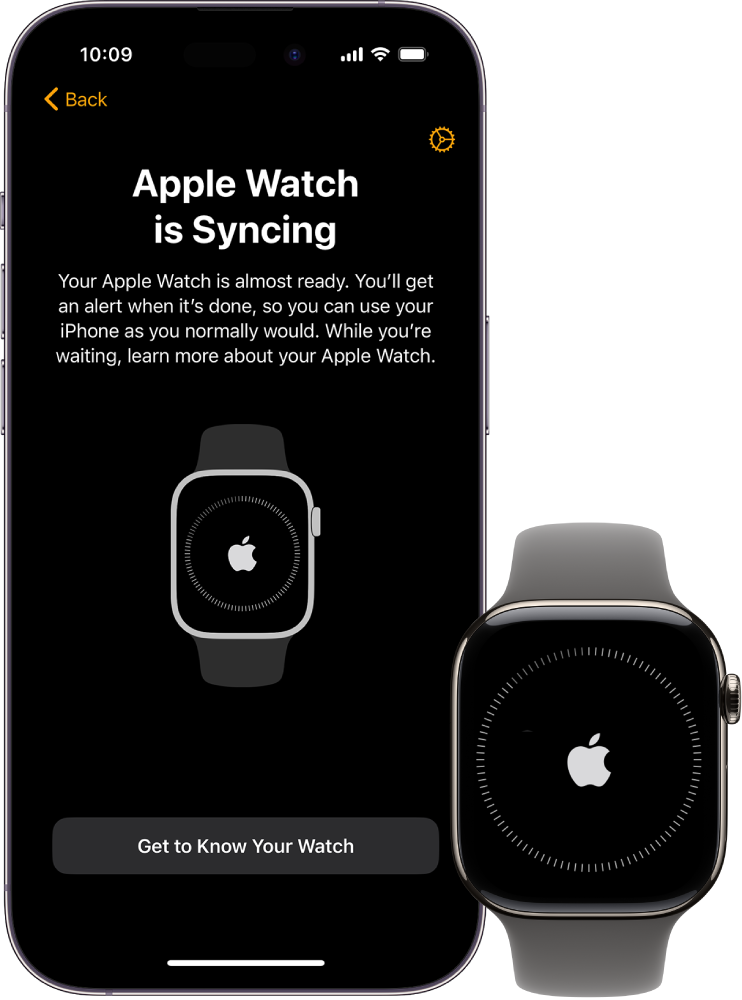
Apple provides a guided setup process, so connecting an iPhone to an Apple Watch is usually quick.
Step 1: Turn on the Apple Watch
Press and hold the side button until the Apple logo appears. Place the watch near your unlocked iPhone.
Your iPhone should display a message asking whether you want to set up the Apple Watch. If the message does not appear, open the Watch app manually.
Step 2: Open the Watch app
Tap All Watches, then tap Add Watch. Choose Set Up for Myself if the watch will be yours.
An animation will appear on the watch. Use your iPhone camera to scan it. If scanning does not work, tap Pair Apple Watch Manually and follow the prompts.
Step 3: Restore or set up the watch
you can set up the watch as new or restore it from a backup. Restoring a backup brings back many settings, apps, and preferences.
You may also be asked to sign in with your Apple Account. This step helps enable services such as Find My, iCloud syncing, and activation protection.
Step 4: Choose your settings
The iPhone will ask about wrist preference, passcode use, location services, Apple Pay, health features, and notifications.
Read each option carefully. For example, health tracking works best when you provide accurate information such as age, height, weight, and activity level.
Step 5: Wait for the sync to finish
Keep both devices close and connected to power if the process takes a while. The watch may restart during setup.
If your Apple Watch was previously paired, erase it from the watch or the old iPhone before starting again. This is one of the most common reasons people cannot connect a phone to a watch.

How to connect an Android phone to a Samsung Galaxy Watch
Samsung Galaxy Watches normally use the Galaxy Wearable app. The exact screens may differ by watch model and Android version, but the basic process stays similar.
-
Charge and turn on the Galaxy Watch.
-
Install or update the Galaxy Wearable app from the Google Play Store.
-
Turn on Bluetooth on your Android phone.
-
Open Galaxy Wearable and tap Start or Add new device.
-
Select your watch from the list.
-
Confirm that the pairing code on the phone matches the code on the watch.
-
Accept the requested permissions.
-
Sign in to your Samsung or Google account if asked.
-
Choose your notifications, health settings, and app preferences.
Some Galaxy Watch features depend on the phone brand. Blood pressure, electrocardiogram features, and certain health tools may have regional, device, or account limits. These features are not medical diagnoses, so use them as wellness tools and follow medical advice when symptoms concern you.
If the app cannot find the watch, restart Bluetooth and move the watch closer. Avoid pairing through the phone’s Bluetooth menu first. The companion app usually needs to complete the setup and install the correct services.

How to connect an Android phone to a Wear OS watch
Wear OS watches use the Wear OS app or a brand-specific app, depending on the watch. Some newer watches use Google’s Pixel Watch app or another manufacturer’s setup tool instead.
Basic Wear OS setup
• Turn on the watch and select your language.
• Install the required watch app on your Android phone.
• Turn on Bluetooth, Wi-Fi, and location services if requested.
• Open the app and choose Set up a new watch.
• Select the watch name shown on the screen.
• Compare the pairing code on both devices.
• Sign in to your Google account.
• Follow the instructions for apps, contacts, notifications, and health data.
• Keep the phone and watch nearby until the setup completes.
Location access may seem unrelated, but Android often uses it to scan for nearby Bluetooth devices. You can review app permissions later, but denying needed permissions during setup may stop the connection.
If the watch uses a separate manufacturer app, install that app instead of relying only on the general Wear OS app. The correct app may control updates, watch faces, payments, health features, and device settings.

How to connect a phone to a Fitbit or Garmin watch
Fitbit and Garmin watches support both major phone platforms. They use their own apps, which manage syncing, activity records, notifications, and software updates.
Fitbit setup
-
Install the Fitbit app on your iPhone or Android phone.
-
Create an account or sign in.
-
Charge and turn on the Fitbit device.
-
Tap the account icon and select Set up a device.
-
Choose your Fitbit model.
-
Follow the Bluetooth pairing instructions.
-
Enter the code shown on the Fitbit if asked.
-
Allow the app to sync your health and activity information.
Garmin setup
-
Install Garmin Connect.
-
Sign in or create a Garmin account.
-
Open the app and choose Add Device.
-
Select your Garmin watch.
-
Confirm the pairing code.