Yes, every modern Apple Watch has Wi-Fi, but connection features vary by model and network.
Knowing does apple watch have wifi helps you understand what your watch can do without your iPhone nearby. Wi-Fi supports messages, calls, apps, Siri, updates, and more, while cellular models add mobile data away from known networks. This guide explains how Apple Watch Wi-Fi works, what it cannot do, and how to fix common connection problems.

Does Apple Watch Have Wi-Fi?
Yes, Apple Watch has built-in Wi-Fi. This applies to current Apple Watch models, including the Apple Watch SE, Apple Watch Series models, and Apple Watch Ultra models.
Wi-Fi lets the watch connect to the internet when your iPhone is not close. However, the watch does not connect to every Wi-Fi network in the same way a phone or laptop does.
Apple Watch usually works best with:
• Wi-Fi networks your iPhone has connected to before
• Compatible private home and office networks
• Supported 2.4 GHz or 5 GHz networks, depending on the watch model
• Networks without a browser login page
The watch stores trusted Wi-Fi details through your iPhone. This makes daily use simple because you normally do not need to enter the network password each time.

How Apple Watch Wi-Fi Works
Apple Watch uses three main connection types:
-
Bluetooth connects the watch to your nearby iPhone.
-
Wi-Fi connects the watch to the internet when your iPhone is out of Bluetooth range.
-
Cellular connects some Apple Watch models to a mobile network without an iPhone or Wi-Fi.
The watch generally prefers Bluetooth because it uses less power. If Bluetooth is unavailable, it can switch to a known Wi-Fi network. If you own a cellular Apple Watch with an active plan, it may use cellular data when Wi-Fi is not available.
Think of these connections as three roads. Bluetooth is the short road to your iPhone. Wi-Fi is a nearby public road. Cellular is the long road that works across town, as long as your carrier supports it.
A key point is that Wi-Fi does not turn a GPS-only Apple Watch into a cellular watch. Wi-Fi provides internet access, but it does not provide mobile coverage everywhere.

What Can Apple Watch Do Over Wi-Fi?
When your Apple Watch is connected to a compatible Wi-Fi network, many online features can continue to work.
You may be able to:
• Send and receive iMessages
• Use Siri for online requests
• Receive app notifications
• Check the weather
• Stream or control music, depending on the app
• Download apps from the App Store
• Send email
• Make or receive calls with Wi-Fi Calling support
• Use Maps for directions and location-based information
• Install watchOS updates when other requirements are met
• Use third-party apps that support independent Wi-Fi access
Some features still depend on your iPhone, Apple account, carrier, or app design. For example, not every iPhone app has a fully independent Apple Watch version.
Messages are a good example. iMessage can work over Wi-Fi, but standard SMS text messages may require your iPhone or an active cellular setup. Your carrier and Wi-Fi Calling settings also affect whether calls work without the iPhone nearby.

Can Apple Watch Work Without an iPhone?
Apple Watch can perform many tasks without an iPhone nearby, but the answer depends on its connection and model.
A GPS-only Apple Watch can work independently for offline tasks such as:
• Tracking workouts
• Measuring heart rate
• Recording activity
• Playing downloaded music
• Using alarms, timers, and the stopwatch
• Making contactless payments with Apple Pay
• Following stored workout data
With Wi-Fi, the watch gains more online features. A cellular Apple Watch offers the widest level of independence because it can connect to a mobile network.
Initial setup still requires an iPhone. Apple also uses the iPhone for many settings, software tasks, and data transfers. So, “works without an iPhone nearby” does not mean “never needs an iPhone.”
In practical testing, this is where many buyers get confused. A watch may show the green Wi-Fi symbol and still lack access to a feature because that feature needs cellular service, an iPhone relay, or an app-specific connection.

Does Apple Watch Connect to Any Wi-Fi Network?
No. Apple Watch does not connect to every Wi-Fi network.
The watch can usually connect to networks that use common security standards, such as WPA and WPA2. Newer models may support additional Wi-Fi bands and security options, but compatibility still depends on the watch and its software.
Apple Watch may struggle with:
• Hotel Wi-Fi that requires a web login
• Airport Wi-Fi with a terms-and-conditions page
• School or business networks that need special certificates
• Networks that use unusual security settings
• Networks with device registration portals
• Networks that block wearable devices
Public Wi-Fi often looks free but asks you to open a web page and sign in. Apple Watch has a small screen and may not support that sign-in process. In these cases, connecting the iPhone to the network may not guarantee that the watch can use it independently.
A private home network is usually the easiest option. If your router has separate 2.4 GHz and 5 GHz names, try the network that your watch supports and that your iPhone already knows.

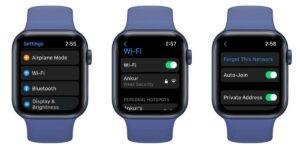
How to Connect Apple Watch to Wi-Fi
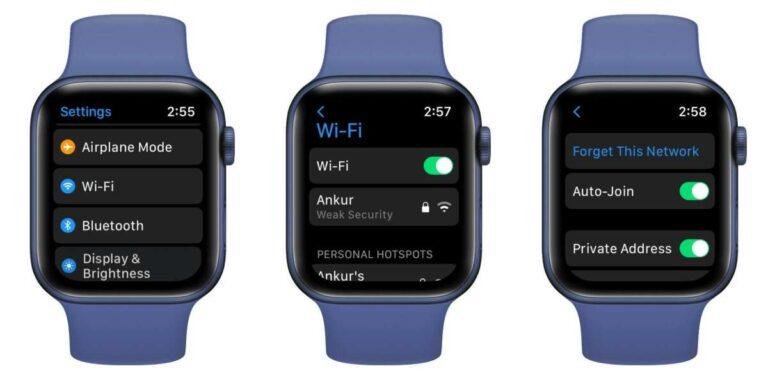
Your Apple Watch normally joins a known network automatically. You can also check its Wi-Fi settings manually.
Connect through Apple Watch
-
Open the Settings app on the watch.
-
Tap Wi-Fi.
-
Choose a network from the list.
-
Enter the password if requested.
-
Tap Join.
Entering text on a watch can feel slow. You can use Scribble, dictation, or the on-screen keyboard if your model and watchOS version support them.
Check the connection through your iPhone
Open the Watch app on your iPhone, then review connection and network settings. Keep both devices close during setup. A current version of iOS and watchOS can also reduce connection problems.
If the network does not appear, move closer to the router. Restarting both the watch and router can also help. A simple restart often fixes a temporary network error faster than changing several settings.

How to Check If Apple Watch Is Connected to Wi-Fi
You can check the current connection from Control Center.
-
Press the side button to open Control Center.
-
Look for the connection symbols.
-
Tap the Wi-Fi icon if you need more information.
A green iPhone icon usually means the watch is connected to the iPhone. A blue or Wi-Fi connection symbol can indicate that the watch is using Wi-Fi.
You can also open Settings, tap Wi-Fi, and review the network name. If Wi-Fi is turned off, tap the switch to enable it.
The symbols can vary by watchOS version. If the watch shows no iPhone connection and no Wi-Fi connection, it may be offline unless it has cellular service.

Does Apple Watch Use Wi-Fi When the iPhone Is Nearby?
Usually, Apple Watch prefers Bluetooth when the iPhone is nearby. Bluetooth uses less battery and provides a direct connection between the two devices.
The watch may use Wi-Fi when:
• The iPhone is too far away
• Bluetooth is turned off
• Bluetooth is blocked by interference
• The watch needs internet access and a known network is available
This design helps preserve battery life. You do not need to force Wi-Fi on for normal use. Leaving Wi-Fi enabled lets the watch choose the best available connection.
One common mistake is turning off Wi-Fi to save battery all day. The battery savings may be small, while the change can prevent useful features from working when the iPhone is out of range.
Wi-Fi Versus Cellular Apple Watch
The biggest difference between Wi-Fi and cellular Apple Watch models is how far they can stay connected from the iPhone.
Wi-Fi or GPS Apple Watch
A GPS Apple Watch can use Wi-Fi when it is away from the iPhone. It cannot use mobile networks on its own.
This model is a good choice if you usually carry your iPhone or spend most of your time at home, work, or other known Wi-Fi locations.
Cellular Apple Watch
A cellular Apple Watch includes mobile network hardware. With an eligible plan, it can make calls, send messages, receive notifications, stream content, and use online apps away from Wi-Fi and the iPhone.
Cellular service usually costs extra each month. Coverage, carrier support, international use, and emergency features vary by region and provider.
Which model should you choose?
Choose a GPS model if:
• You normally keep your iPhone nearby
• You want a lower purchase price
• You do not need calls during phone-free activities
• You are comfortable using Wi-Fi for online features
Choose a cellular model if:
• You run or exercise without your iPhone
• You need calls or messages while traveling light
• You want added safety during outdoor activities
• You regularly visit places without Wi-Fi
Does Apple Watch Need Wi-Fi for GPS?
No. Apple Watch does not need Wi-Fi to use GPS for outdoor workouts.
GPS models can record distance, pace, routes, and location data outdoors using built-in positioning hardware. The watch may need the iPhone or Wi-Fi later to sync data, download maps, or share results.
Location accuracy can change near tall buildings, dense trees, mountains, or indoors. This is normal for GPS devices and does not mean the Wi-Fi connection is broken.
For the best results, begin an outdoor workout in an open area and wait briefly for the watch to locate you. Downloaded music and workout tracking can also help you leave your iPhone at home.
Does Apple Watch Use Wi-Fi for Calls?
Apple Watch can support calls over Wi-Fi in some situations, but several requirements must be met.
Wi-Fi calling may depend on:
• Your Apple Watch model
• Your iPhone settings
• Your carrier
• Wi-Fi Calling support
• Whether the iPhone is turned on and connected to the carrier network
• Your watchOS and iOS versions
A cellular Apple Watch with an active plan has more calling options. A GPS model may use Wi-Fi Calling when the related iPhone and carrier setup allow it.
If calls do not work, check Wi-Fi Calling on the iPhone, confirm that the watch is connected to a known network, and contact your carrier if needed. Wi-Fi internet access alone does not guarantee regular phone calls.
Does Apple Watch Have Wi-Fi Without Cellular?
Yes. A GPS-only Apple Watch has Wi-Fi even though it does not have cellular hardware.
This means you can use Wi-Fi for supported internet features without paying for a mobile plan. You can also use many offline features, such as fitness tracking, alarms, Apple Pay, and downloaded media.
The limitation is range. The watch must be near a known Wi-Fi network, or it must reconnect to the iPhone, to use many online services. Wi-Fi cannot replace cellular service when you are far from both your phone and a compatible network.
For many people, this is enough. If you mainly want fitness tracking and notifications at home or work, a GPS model may offer the best value.
Common Apple Watch Wi-Fi Problems
Wi-Fi problems are often caused by the network rather than the watch.
Try these steps:
-
Confirm that Wi-Fi is turned on.
-
Move closer to the router.
-
Check whether the iPhone can use the same network.
-
Restart the Apple Watch and iPhone.
-
Restart the router.
-
Update the iPhone and Apple Watch.
-
Forget and reconnect to the network if the option is available.
-
Test a different private Wi-Fi network.
-
Remove networks that use browser-based sign-in.
-
Contact Apple Support if the watch cannot see any networks.
If the watch connects at home but not at a hotel, airport, or school, the network may require a login page. That is a compatibility limit, not necessarily a hardware fault.
Another lesson from hands-on troubleshooting is to avoid changing several settings at once. Test one change, then check the connection. This makes it easier to find the real cause.
Does Apple Watch Wi-Fi Drain the Battery?
Wi-Fi can use some battery power, especially when the watch searches for networks or transfers data. However, leaving Wi-Fi enabled does not always cause a major battery drain.
Battery life can decrease faster when you:
• Use cellular service often
• Stream music for long periods
• Use GPS for extended workouts
• Make many calls
• Use a bright display
• Run demanding apps
• Install software updates
The watch manages connections automatically. It normally uses Bluetooth first, then Wi-Fi, and then cellular when available and needed.
To extend battery life, keep the software updated, reduce unnecessary background activity, and use Low Power Mode during long workouts. Turning off Wi-Fi may help in a rare case, but it is not the best first solution for normal battery concerns.
Privacy and Security Tips for Apple Watch Wi-Fi
Use trusted networks whenever possible. Public networks can expose connected devices to privacy risks, even when the network appears safe.
Follow these tips:
• Use a password-protected home network.
• Avoid unknown public networks.
• Do not enter sensitive information on suspicious login pages.
• Keep watchOS and iOS updated.
• Use a strong router password.
• Turn off automatic connection to networks you do not trust.
Apple Watch is not a substitute for good network security. A secure router, current software, and careful network choices provide better protection than any single device setting.
Frequently Asked Questions About Does Apple Watch Have Wi-Fi
Does every Apple Watch have Wi-Fi?
Most Apple Watch models, including GPS-only versions, have built-in Wi-Fi. Older models may support fewer Wi-Fi bands than newer models, so network compatibility can vary.
Can Apple Watch connect to Wi-Fi without an iPhone?
Apple Watch can connect to a known Wi-Fi network when the iPhone is not nearby. Initial setup and many settings still require an iPhone.
Does Apple Watch need Wi-Fi to receive notifications?
No, not always. Notifications can arrive through Bluetooth from the iPhone, through Wi-Fi when the watch is independent, or through cellular service on supported models.
Can Apple Watch use Wi-Fi at a hotel?
It may connect if the hotel network does not require a browser sign-in. Networks with captive portals, room-number forms, or terms pages often do not work well with Apple Watch.
Does Wi-Fi Apple Watch work without a cellular plan?
Yes. A GPS Apple Watch can use Wi-Fi and many offline features without a cellular plan. It cannot use mobile data when it is away from both the iPhone and Wi-Fi.
Can Apple Watch make calls over Wi-Fi?
It may make calls over Wi-Fi when Wi-Fi Calling, the iPhone, the carrier, and the watch model support the feature. A cellular model with an active plan usually provides more independence.
How do I turn on Wi-Fi on Apple Watch?
Open Settings on the watch, tap Wi-Fi, and select an available network. Enter the password if the watch requests one.
Conclusion
Apple Watch does have Wi-Fi, and the feature is available on GPS-only models as well as cellular versions. Wi-Fi can support messages, apps, Siri, updates, and some calls when your iPhone is not nearby, but it cannot replace cellular service everywhere.
For the best experience, connect your watch to a trusted network, keep your devices updated, and understand the difference between GPS, Wi-Fi, and cellular models. Check your carrier and Apple Watch specifications before buying, then choose the model that matches your daily routine.

Rubel Miah is the Senior Editor at MyStyleGrid.com, where he brings a sharp editorial eye and an unshakable love for fashion to everything he does. A true style addict, Rubel lives and breathes trends, from streetwear to high fashion, and has a knack for turning inspiration into impactful stories. With years of experience in fashion journalism and digital media, he curates content that empowers readers to express themselves through style. When he’s not editing features or forecasting the next big thing, you’ll find him hunting down vintage pieces or capturing street style moments around the city.