Yes, the Pixel Watch 4 has an ECG feature that can check your heart rhythm in supported regions.
The answer to “does Pixel Watch 4 have ECG” is more useful when you understand how the feature works, what it can detect, and where its limits begin. Google’s ECG system is designed for spot checks, not constant medical monitoring, and availability may depend on your country, watch model, software, and Fitbit account settings.
Does Pixel Watch 4 have ECG?
Yes, the Pixel Watch 4 includes an electrocardiogram, or ECG, feature. It uses electrical sensors built into the watch and the user’s finger contact to record the heart’s rhythm for about 30 seconds.
The ECG app is intended to identify signs that may match atrial fibrillation, often called AFib. AFib is an irregular heart rhythm that can increase the risk of stroke and other heart problems.
When asking “does Pixel Watch 4 have ECG,” it is important to separate the hardware from the app. The watch needs compatible sensors, approved software, and regional support for the ECG feature to work.
The ECG feature is not the same as the Pixel Watch’s optical heart-rate sensor. The optical sensor shines light into the skin to estimate pulse. ECG sensors measure the heart’s electrical signals, much like a single-lead medical ECG.

How the Pixel Watch 4 ECG works
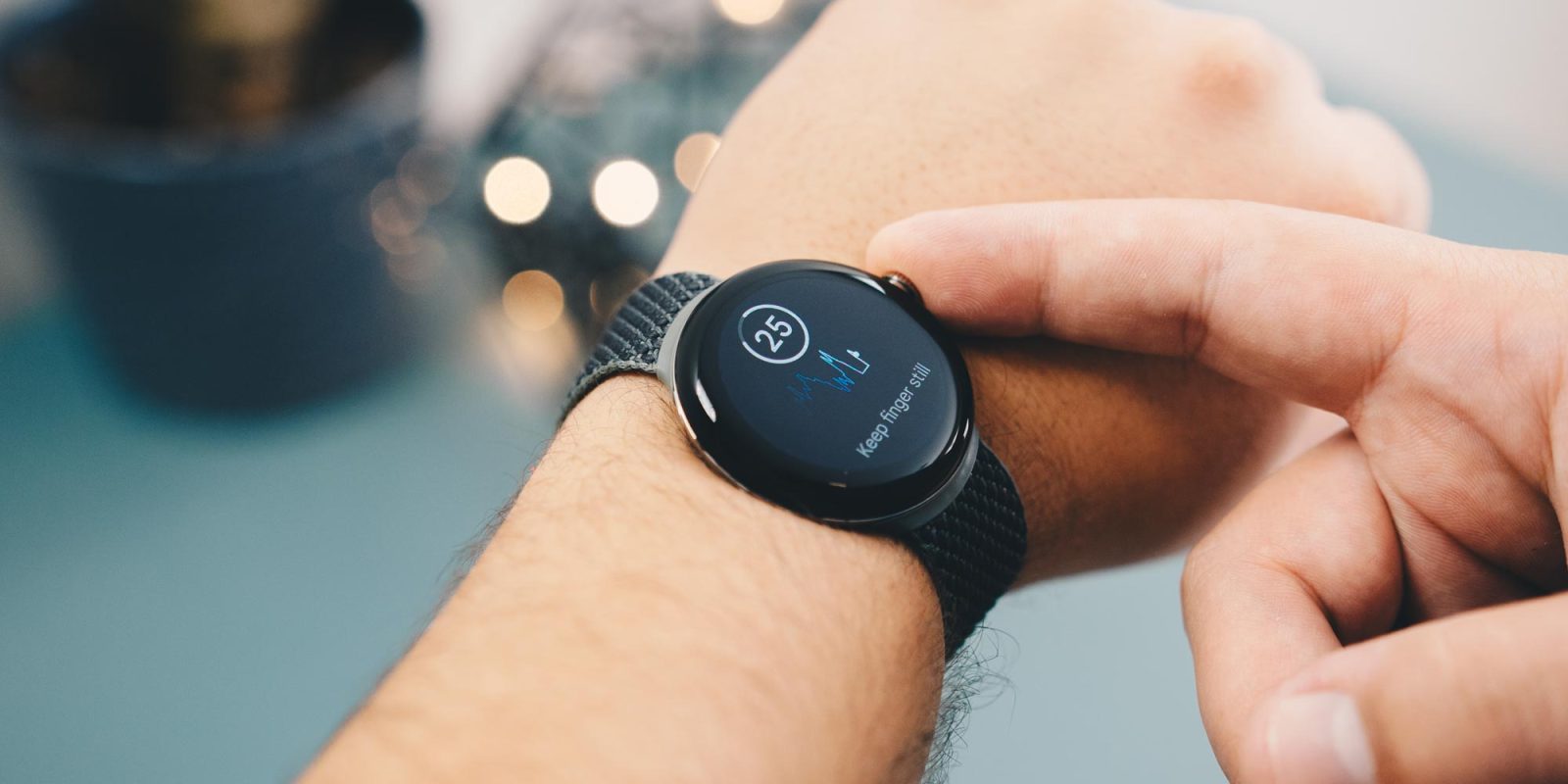
The Pixel Watch 4 records an electrical signal between the watch and your finger. To take a reading, you normally open the ECG app, sit still, and place a finger from your opposite hand on the watch crown or another contact point.
A typical reading takes around 30 seconds. During that time, the watch looks for rhythm patterns. It may classify the result as one of the following:
• Sinus rhythm: The rhythm appears regular during the recording.
• Possible AFib: The recording shows an irregular pattern that may match atrial fibrillation.
• Inconclusive: The signal is not clear enough for a useful result.
• Poor recording: Movement, loose contact, sweat, or skin conditions affected the reading.
The Pixel Watch 4 ECG is a spot-check tool. It does not continuously watch for every heart problem. Some Fitbit features may use passive heart-rate data to look for unusual patterns, but that is different from taking an ECG recording.
Think of the ECG as a snapshot, not a video. It can capture useful information at one moment, but it cannot show what your heart is doing all day.

What can the Pixel Watch 4 ECG detect?
The main purpose of the Pixel Watch 4 ECG is to look for signs of AFib. AFib can feel like a flutter, racing heart, skipped beat, or uneven pulse. Some people have no symptoms at all.
The ECG may help you collect information to discuss with a doctor. This can be useful if you notice symptoms that come and go and are hard to reproduce during a clinic visit.
Still, the Pixel Watch 4 ECG does not detect every heart condition. It is not designed to diagnose:
• Heart attacks
• Blocked arteries
• High blood pressure
• Heart failure
• All types of irregular heartbeat
• Structural heart disease
• Every cause of chest pain
A normal ECG result does not prove that your heart is healthy. It only means that the recorded signal did not show the patterns the app is built to identify.
If you have chest pain, severe shortness of breath, fainting, sudden weakness, or other emergency symptoms, seek urgent medical care. Do not wait for a Pixel Watch 4 ECG reading.
How to take an ECG on Pixel Watch 4
Taking an ECG is simple, but small details can affect the result. Use these steps for the clearest recording:
-
Wear the Pixel Watch 4 snugly on your wrist.
-
Sit down and rest your arm on a table or your leg.
-
Open the ECG app on the watch.
-
Place a finger from your opposite hand on the crown or required sensor area.
-
Stay still and avoid talking for the full recording.
-
Review the result when the recording ends.
-
Save or share the reading if your health care professional requests it.
Clean, dry skin usually gives better contact. A loose band can cause gaps between the sensor and your skin. Movement can also create noise that makes the ECG hard to read.
A common mistake is touching the watch with a wet finger or taking a reading while walking. I have seen this issue come up often in wearable testing discussions: users blame the sensor when the real problem is poor contact or motion.
For the best results, take the reading in a quiet place. If several recordings remain inconclusive, remove the watch, clean the back, put it on again, and try once more.

Does Pixel Watch 4 ECG work everywhere?
No. ECG availability can vary by country and region. Medical features often require local approval, and Google may enable or disable them based on where the watch is sold and used.
Your Pixel Watch 4 may also need:
• The latest watch software
• The latest Fitbit app
• A compatible Android phone
• A supported Fitbit account
• A supported age range
• A watch model with the required health sensors
Travel can make this confusing. A watch purchased in one country may not offer every health feature in another country. Software updates, account location, and local regulations may also affect access.
If the ECG app is missing, check the Fitbit app and install available updates. You should also confirm that your country supports the feature. Do not assume that a missing app means the watch is defective.
This regional limit is one reason a simple “does Pixel Watch 4 have ECG” answer needs a little context. The hardware may support ECG, while the feature remains unavailable in a specific market.
Pixel Watch 4 ECG compared with other heart features
The Pixel Watch 4 may offer several heart-related tools, but they do different jobs. Knowing the difference can prevent false reassurance.
ECG
The ECG records the heart’s electrical rhythm for a short period. It is mainly useful for checking for possible AFib during a spot reading.
Optical heart-rate tracking
The optical sensor estimates your pulse using light. It can track heart rate during exercise, sleep, and daily activity, but it is not an ECG.
Irregular rhythm notifications
Irregular rhythm notifications use heart-rate data to look for possible signs of an irregular rhythm over time. They are not the same as starting an ECG manually.
Blood oxygen tracking
Blood oxygen, when available, estimates oxygen saturation. It does not measure heart rhythm and cannot replace an ECG.
Cardio fitness estimates
Cardio fitness features estimate exercise capacity, often using heart rate and activity data. They provide a fitness trend, not a diagnosis.
These tools work like different instruments in a toolbox. The ECG checks electrical rhythm, while the optical sensor tracks pulse and the oxygen sensor estimates blood oxygen. One tool cannot replace the others.

Benefits of using the Pixel Watch 4 ECG
The biggest benefit is convenience. You can record a heart rhythm at home instead of waiting for a clinic appointment to capture a symptom.
The ECG can also help you share a time-stamped reading with a health care professional. This may give your doctor more context, especially when symptoms are brief.
Other benefits include:
• Fast readings that usually take about 30 seconds
• Easy access from the watch
• Digital records in the Fitbit app
• Useful information during occasional palpitations
• A simple way to learn more about your heart rhythm
The feature may be especially helpful for people who have been told to watch for AFib. However, a wearable reading should support medical care, not replace it.
One practical lesson is to keep notes with your readings. Write down the time, symptoms, caffeine intake, exercise, and stress level. A single ECG is a small piece of information. A clear pattern over several readings can be more helpful during a medical visit.

Limitations and safety warnings
The Pixel Watch 4 ECG has important limits. It is not a full 12-lead ECG, which is the type commonly used in hospitals and clinics. A single-lead wearable reading cannot provide the same level of information.
The app may also produce an inaccurate or unclear result because of:
• Movement