You can text on a smart watch using voice dictation, quick replies, or a tiny keyboard.
I’ve spent years testing wearables and teaching others how to text on a smart watch. This guide explains step by step how to text on a smart watch across major platforms, which methods work best, and how to avoid common mistakes. Read on to get fast, practical tips that make texting on your watch simple and reliable.

Why text on a smart watch?
Texting from your wrist saves time. You stay focused while replying quickly. It also keeps your phone in your pocket during workouts or meetings.
I’ve found that knowing how to text on a smart watch reduces distraction. You avoid pulling out your phone for small replies. This section explains the real benefits and when to prefer watch texting over a phone.

Which smart watches support texting?
Most modern smart watches allow texting, but features vary by platform.
- Apple Watch: Full support for iMessage and SMS when paired with an iPhone.
- Wear OS watches: Support texting via Android messages and third-party apps.
- Samsung Galaxy Watch: Works well with Samsung Messages and Android devices.
- Other watches: Some fitness-focused watches allow quick replies only.
Check compatibility before you buy. A paired phone often enables full texting features. If you want to text without a phone, choose a watch with LTE support.

Preparing your watch and phone
Set up your devices to make texting easy and fast.
- Pair devices: Follow the watch’s setup app to pair it to your phone.
- Enable notifications: Allow message notifications on the watch companion app.
- Grant permissions: Allow microphone and messaging access for voice replies.
- Update software: Install the latest watch and phone updates to avoid bugs.
I once missed replies because permission settings blocked dictation. Fixing permissions took two minutes and saved lots of frustration.
Methods to text on a smart watch
There are several ways to send messages from a watch. Choose the method that fits your situation.
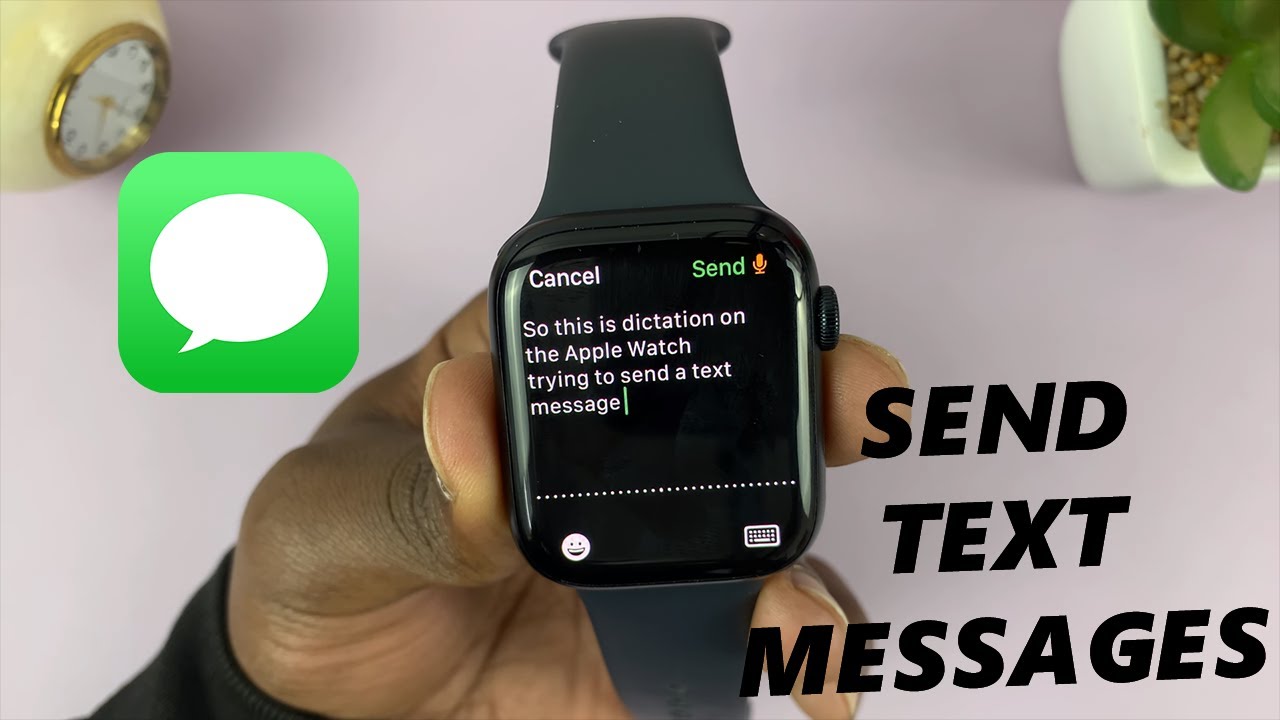
- Voice dictation: Speak your message and let the watch convert it to text. Best for fast, hands-free replies.
- Pre-written quick replies: Tap a short reply like “On my way.” Great for one-tap responses.
- Tiny keyboard: Use a small on-screen keyboard or swipe keyboard on some watches. Useful for short, precise messages.
- Reply templates and emojis: Use saved phrases and emojis for personality and speed.
- Handwriting or scribble: Draw letters on some watches to form a message.
Each approach has trade-offs. I prefer voice dictation for long replies and quick replies for short confirmations.

Step-by-step: how to text on a smart watch
Here are clear steps for the most common methods.
- Send a reply using voice dictation
- Wake your watch and open the message notification.
- Tap Reply and choose the microphone icon.
- Speak clearly and pause between sentences.
- Review the transcription and tap Send.
- Use a quick reply
- Open the text notification.
- Tap a suggested reply or “Reply.”
- Select a saved response and send.
- Type on the tiny keyboard
1. Open the message on the watch.- Tap Reply, then the keyboard option.
- Type or swipe to enter text.
- Tap Send.
Practice once or twice to get the rhythm. I practiced typing short texts for a week and gained real speed.

Best practices and tips
Small habits make a big difference when you learn how to text on a smart watch.
- Keep messages short: Short texts are faster and clearer.
- Use punctuation commands: Say “period” or “comma” when dictating.
- Proofread aloud: Read the transcription quickly before sending.
- Customize quick replies: Add phrases you use often.
- Use LTE sparingly: Turn it off to save battery, unless you need independence from your phone.
I once sent a garbled message because I forgot to say “period.” Now I pause and verify. It saves awkward follow-ups.

Troubleshooting common issues
If texting fails, try these fixes.
- No microphone response: Check microphone permissions and app access.
- Messages not delivered: Verify cellular or Bluetooth connection.
- Poor transcription: Speak slowly, avoid background noise, or try a manual reply.
- Missing quick replies: Update the watch app and sync templates.
If problems persist, restart both devices. A quick reboot fixes many issues I’ve seen during testing.

Privacy and safety when texting on a watch
Smart watch messages can be exposed to people nearby. Use these safeguards.
- Hide message previews: Turn off full content in notifications.
- Use biometric locks: Require a passcode or device unlock.
- Avoid sensitive info: Don’t dictate passwords or private details in public.
- Review messages before sending: Quick checks prevent mistakes.
I learned to disable previews after nearly reading a private message aloud in a quiet cafe. Simple privacy settings avoid that.

Frequently Asked Questions of how to text on a smart watch
How do I enable voice dictation on my watch?
Open the watch settings or companion app, enable microphone and speech-to-text permissions, and select dictation for message replies. Make sure both devices are updated for best accuracy.
Can I send SMS from a watch without my phone?
Yes, if your watch has LTE or cellular support and an active plan. Otherwise, your paired phone usually must be nearby to send SMS.
Is dictation accurate on a noisy street?
Dictation works best in quiet environments. In noisy places, speak slowly, or use quick replies or the keyboard to avoid errors.
How do I add custom quick replies?
Go to the watch’s companion app on your phone. Find Messages or Quick Replies and add or edit phrases that fit your routine.
Will texting on my watch drain battery fast?
Frequent voice dictation and LTE use consume more battery. Use short replies and limit LTE to save power.
Conclusion
Mastering how to text on a smart watch makes daily communication faster and less distracting. Use voice dictation for long replies, quick replies for short confirmations, and the tiny keyboard when you need precision. Start with basic settings and practice the method that fits your routine. Try one tip today—customize quick replies or enable dictation—and see how much time you save. Leave a comment about your favorite watch texting trick or subscribe for more wearable tech tips.

Rubel Miah is the Senior Editor at MyStyleGrid.com, where he brings a sharp editorial eye and an unshakable love for fashion to everything he does. A true style addict, Rubel lives and breathes trends, from streetwear to high fashion, and has a knack for turning inspiration into impactful stories. With years of experience in fashion journalism and digital media, he curates content that empowers readers to express themselves through style. When he’s not editing features or forecasting the next big thing, you’ll find him hunting down vintage pieces or capturing street style moments around the city.