You can find your Apple Watch phone number in the Watch app, iPhone settings, or your carrier account.
Finding your Apple Watch phone number can feel confusing because a cellular Apple Watch often shares your iPhone number, while a family-managed watch may have its own number. This guide explains how to find your Apple Watch phone number, check whether it is linked to your iPhone, and confirm the details with your carrier.
Why Your Apple Watch May Have a Different Number
An Apple Watch with cellular service connects to a mobile network through an eSIM. Your carrier may assign it a separate technical number, even when calls and texts appear to use your regular iPhone number.
For most personal Apple Watch plans, the watch shares your iPhone number through a feature often called NumberSync, One Number, or Number Share. The exact name depends on your carrier.
A watch set up for a family member may work differently. If it was configured through Family Setup, it can have its own phone number and mobile plan.
Knowing this difference helps you avoid a common mistake: confusing the watch’s cellular number with your iPhone number, IMEI, or serial number.

How to Find Your Apple Watch Phone Number on Your iPhone
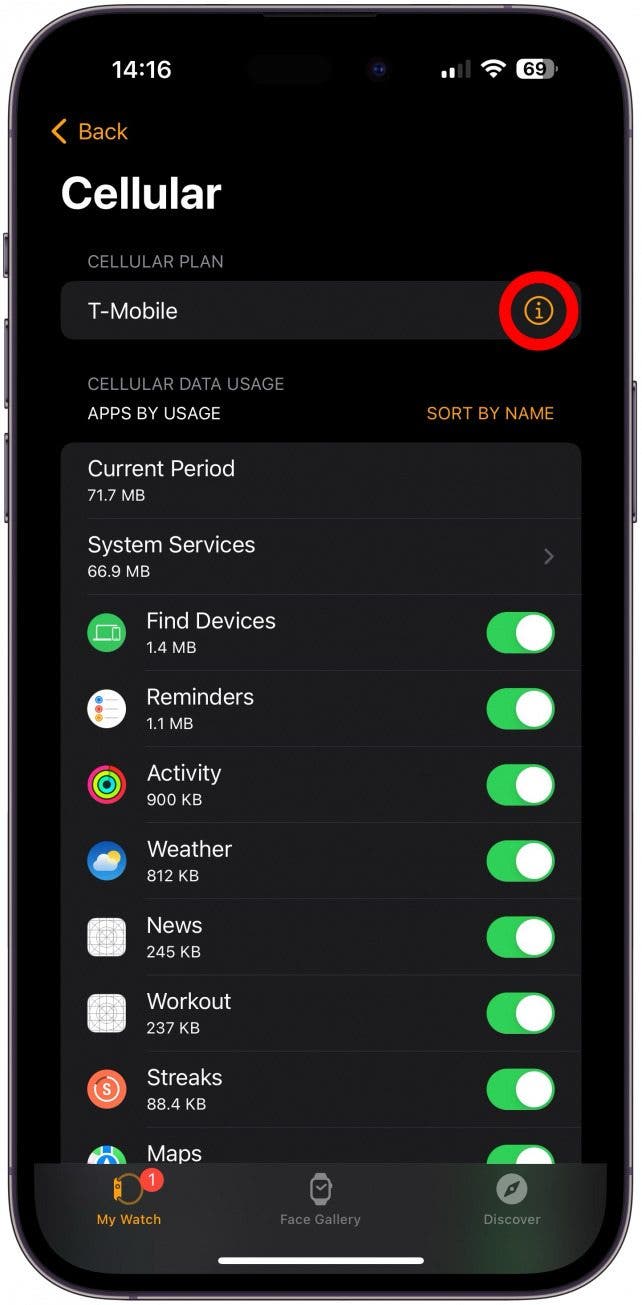
The Watch app is usually the best place to start. It shows your cellular plan and may display the number linked to your Apple Watch.
Follow these steps:
- Open the Watch app on your paired iPhone.
- Tap the My Watch tab.
- Select Cellular.
- Look for your carrier, plan name, or account details.
- Tap the information button next to the plan if one appears.
- Check for a listed phone number, account number, or line number.
Carrier settings differ, so you may not always see a normal 10-digit phone number. Some carriers show only the plan name or a line identifier.
If you use more than one Apple Watch, confirm that the correct watch is selected before reviewing the cellular details. This is especially important if you have upgraded watches or removed an older device from your account.
How to Find Your Apple Watch Phone Number on the Watch
You can also check the watch itself. The exact menu may change slightly based on your watchOS version and carrier.
Try these steps:
- Press the Digital Crown.
- Open Settings.
- Tap Phone.
- Look for the number or phone settings shown there.
On some Apple Watch models, the phone settings may show the iPhone number rather than the watch’s carrier-assigned line. That does not always mean the watch lacks cellular service.
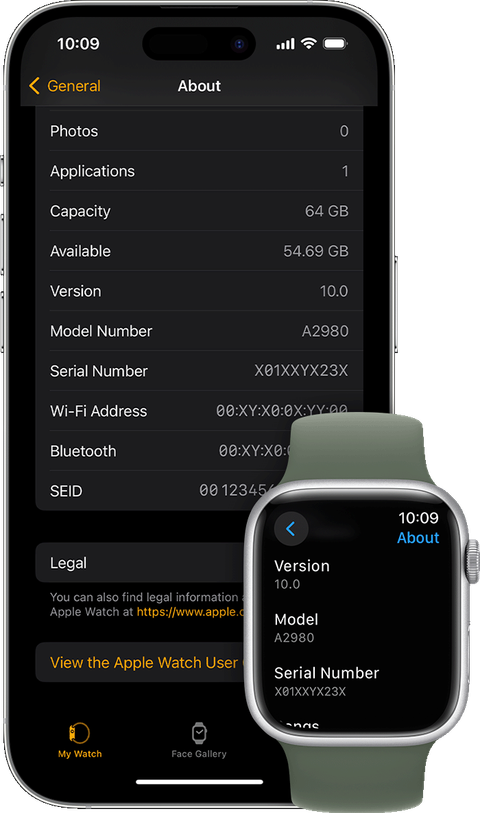
You can also open Settings and check General, About, or Cellular. These screens may show network information, the carrier name, the IMEI, and other device details.
Remember that an IMEI is not a phone number. It is a unique identity code for the cellular hardware. A serial number identifies the device for service and support, but it cannot receive calls or texts.
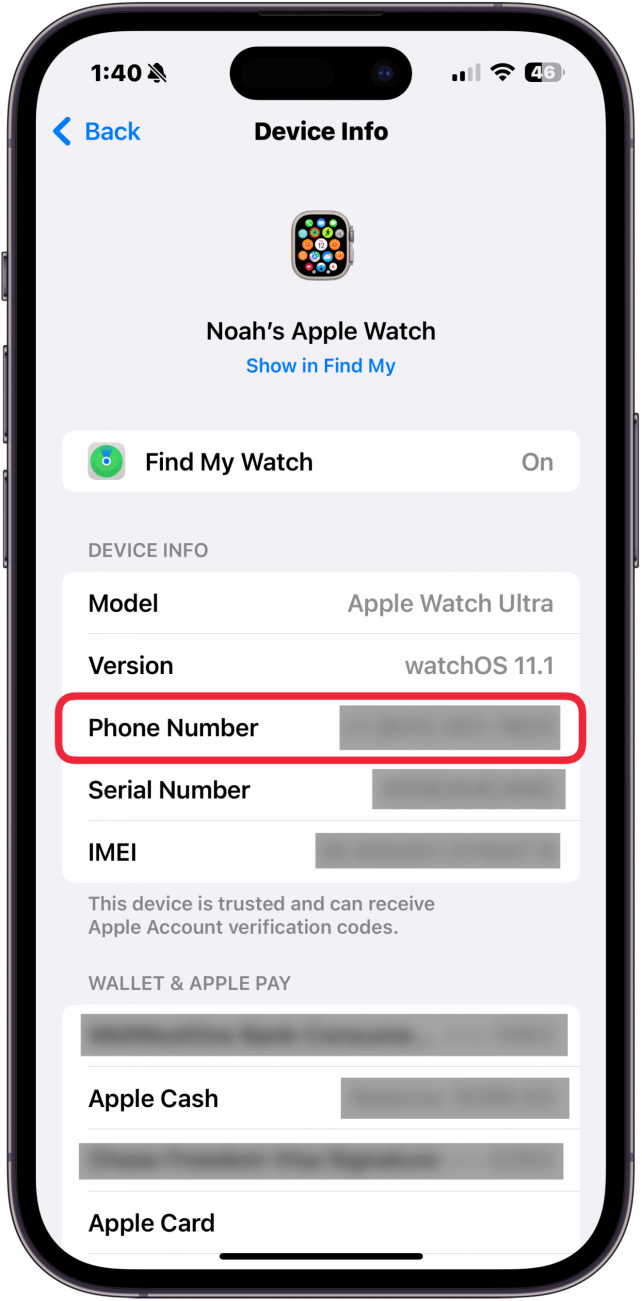
How to Find Your Apple Watch Phone Number Through iPhone Settings
If your Apple Watch uses the same line as your iPhone, your iPhone settings may show the number used for calls and messages.
On your iPhone:
- Open Settings.
- Tap Phone.
- Look beside My Number.
You can also open Settings, tap your name, and review the devices connected to your Apple Account. This may confirm that your Apple Watch is linked to your iPhone, but it may not show a separate watch number.
The Contacts app offers another quick check. Open Contacts and view your own contact card. The number listed there is usually your iPhone number, not a separate cellular number assigned to the watch.
This method is useful when you want to confirm the main number shared with the Apple Watch. It is less useful when you need the carrier’s technical number for billing or account management.

How to Find Your Apple Watch Phone Number in Your Carrier Account
Your mobile carrier has the most reliable record of every number and line attached to your account. Use the carrier’s app or website and sign in to your account.
Look for sections such as:
• My devices
• Manage lines
• Wireless plans
• Connected devices
• Wearables
• Apple Watch
• Billing details
Select the line connected to your Apple Watch. The carrier may show a phone number, device label, plan type, or wearable line ID.
You can also contact customer support. Ask them to confirm the number or line assigned to your Apple Watch’s cellular plan. Tell the representative whether the watch is paired with your iPhone or set up through Family Setup.
In my experience helping people troubleshoot wearable connections, carrier support often gives the clearest answer. The Watch app may hide the technical number, while the carrier can see the full account record.
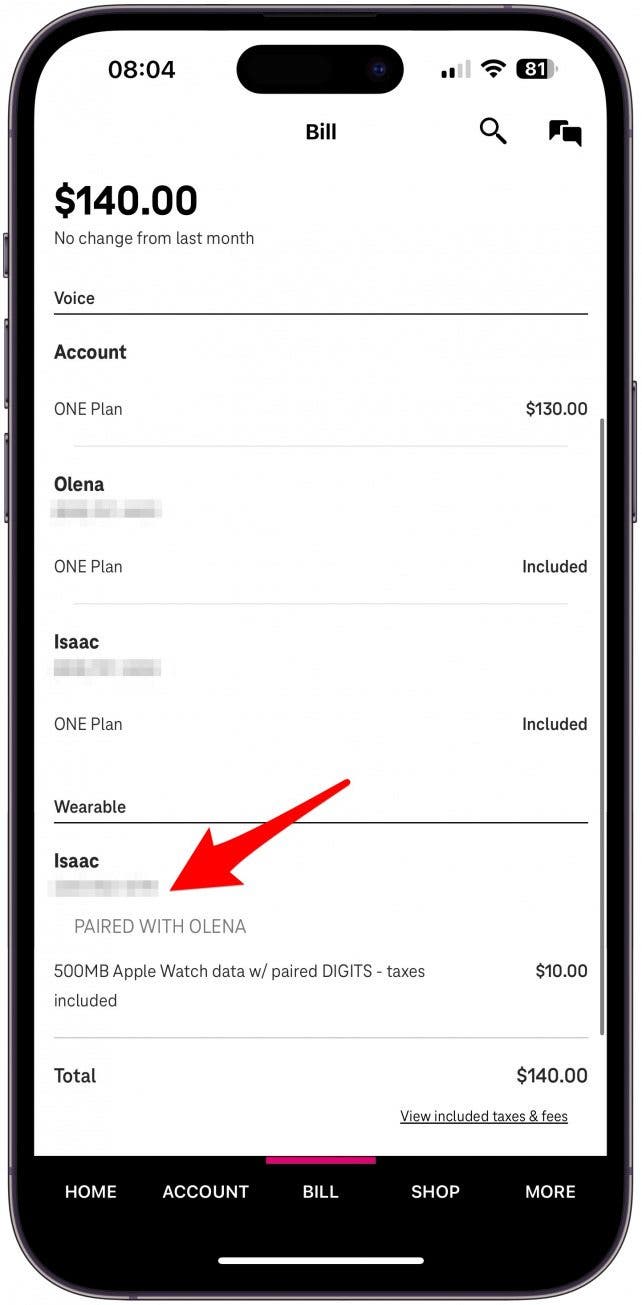
How to Check Whether Your Apple Watch Has Cellular Service
Before searching for a phone number, confirm that your watch actually has cellular service. A GPS-only Apple Watch does not have a mobile line or independent cellular phone number.
Check the watch for these signs:
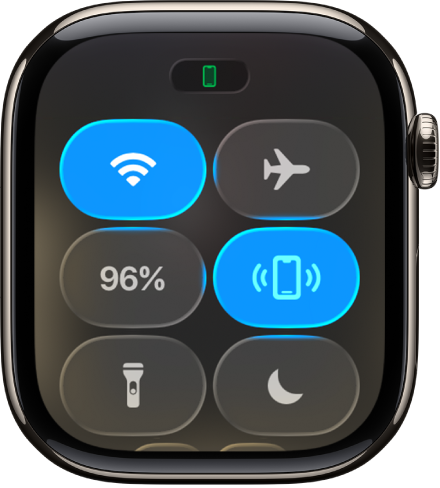
• A green cellular icon in Control Center
• A cellular plan listed in the Watch app
• A carrier name under Cellular settings
• The ability to make calls away from your iPhone and Wi-Fi
• A cellular setup option in the Watch app
To open Control Center, press the side button. A green cellular icon usually means the watch is connected to a cellular network. A white icon may mean that a cellular plan exists but the watch is using another connection at that moment.
If there is no Cellular option in the Watch app, your model may be GPS-only. It may also mean that cellular service was never activated.

How to Find Your Apple Watch Phone Number With Family Setup
Family Setup allows an Apple Watch to be managed from another person’s iPhone. This option is useful for children, older adults, or anyone who does not have an iPhone.
A watch using Family Setup can have its own carrier plan and phone number. The number may not appear in the same place as the organizer’s iPhone number.
To find it:
- Open the Watch app on the iPhone used to manage the watch.
- Tap All Watches.
- Select the family member’s Apple Watch.
- Tap Cellular.
- Review the plan and account details.
The family member’s carrier account may provide the clearest number. If the Watch app does not show it, contact the carrier and provide the watch’s account details or IMEI.
This is one area where people often search for the Apple Watch phone number in the wrong iPhone. The number is normally tied to the organizer’s carrier account, not necessarily the wearer’s device.
How to Find Your Apple Watch Phone Number From the Phone App
An Apple Watch can place and receive calls, but the number shown during a call may be your iPhone number. This is normal for many personal cellular plans.
To test the connection:
- Turn off Bluetooth on your iPhone temporarily.
- Move away from known Wi-Fi networks.
- Make a call from the Apple Watch.
- Ask someone which number appears on their caller ID.
Turn Bluetooth back on after the test. You can also check your carrier’s caller ID settings, because caller ID may be blocked or changed.
This test tells you which number other people see. It may not reveal the technical number stored by the carrier. For an official account number, the carrier remains the most accurate source.
What to Do If You Cannot Find the Number
If you still cannot find your Apple Watch phone number, work through these checks:
• Confirm that the watch is a cellular model.
• Update the iPhone and Apple Watch to the latest supported software.
• Restart both devices.
• Open the Watch app and check Cellular again.
• Confirm that the watch is paired with the correct iPhone.
• Check the carrier app for a wearable line.
• Contact the carrier and ask about the Apple Watch line.
Do not erase your Apple Watch as a first step. Erasing the watch can remove settings without fixing a carrier activation problem.
Also avoid guessing from the IMEI. The IMEI can help the carrier locate the device, but it is not the Apple Watch phone number.
A practical lesson is to keep a note of your carrier account details after activation. When you upgrade your watch or change carriers, this small record can save time.
Apple Watch Phone Number Versus iPhone Number
The Apple Watch phone number and iPhone number can refer to different things.
For a personal watch plan:
• Your iPhone and Apple Watch usually share one public number.
• The carrier may still assign a hidden or technical line to the watch.
• Calls and texts normally appear to come from your iPhone number.
• The watch can use cellular service when your iPhone is not nearby.
For Family Setup:
• The Apple Watch may have its own public phone number.
• Calls and messages may use that separate number.
• The plan is managed through another person’s iPhone.
• Carrier account records are especially important.
This explains why two people can follow the same steps and see different results. The setup type, carrier, watch model, and software version all affect what number appears.
Common Problems When Checking an Apple Watch Number
The Cellular option is missing
The watch may be a GPS-only model, or cellular service may not be active. Check the model details and contact the carrier if the watch should support mobile service.
The Watch app shows no number
Some carriers do not display the technical watch number in the Watch app. Review the carrier account or ask customer support to confirm it.
The watch shows the iPhone number
This is common with personal Apple Watch plans. The watch may share your iPhone number even if the carrier has a separate internal line for it.
Calls do not work away from the iPhone
Check that the watch has an active plan, cellular is turned on, and the carrier supports Apple Watch service. Poor coverage can also prevent calls.
You recently changed carriers
A new carrier may require cellular service to be transferred or activated again. The Watch app may need to be used to remove the old plan and add the new one.
Tips for Keeping Your Apple Watch Line Easy to Manage
A few simple habits make it easier to find your Apple Watch phone number later.
• Label the watch clearly in your carrier account.
• Save the carrier support number in your contacts.
• Record whether the watch uses personal setup or Family Setup.
• Keep the IMEI separate from the phone number.
• Review your plan after upgrading or changing carriers.
• Avoid sharing your account details publicly.
When selling or giving away an Apple Watch, remove the cellular plan and erase the device. This protects your personal data and prevents billing confusion.
Apple recommends removing the cellular plan when disconnecting a cellular Apple Watch. If you use the watch with a new iPhone, follow the normal unpairing and pairing process so activation stays clean.
Frequently Asked Questions About How to Find Your Apple Watch Phone Number
Does an Apple Watch have its own phone number?
A cellular Apple Watch may have a carrier-assigned number, but a personal watch usually shares your iPhone’s public phone number. A Family Setup watch can have its own separate number.
How do I find my Apple Watch phone number in the Watch app?
Open the Watch app, tap My Watch, and select Cellular. Review the plan details or tap the information button if available, but remember that some carriers do not display the full number there.
Can I find my Apple Watch phone number without an iPhone?
You may find limited details in the watch’s Settings app, but the carrier account is usually required for the full number. A GPS-only Apple Watch will not have a cellular phone number.
Is the Apple Watch IMEI the same as its phone number?
No. The IMEI identifies the cellular device, while a phone number identifies a mobile line. Your carrier can use the IMEI to locate the correct Apple Watch account.
Why does my Apple Watch show my iPhone number?
Personal Apple Watch plans commonly use number sharing. The watch may have a separate technical line, but calls and messages usually use your iPhone number.
How do I find the number for an Apple Watch using Family Setup?
Open the Watch app on the organizer’s iPhone, select the family member’s watch, and check Cellular. If the number is not shown, sign in to the carrier account or contact the carrier.
Can I call my Apple Watch directly?
A personal Apple Watch is normally reached through the shared iPhone number. A Family Setup watch may be called directly using its separate mobile number.
Conclusion
The best way to find your Apple Watch phone number is to check the Watch app, review your iPhone settings, and confirm the details through your carrier. A personal cellular Apple Watch often shares your iPhone number, while a Family Setup watch may have its own line.
Start by checking Watch app > My Watch > Cellular. If the number is missing, use your carrier account or contact support with the watch’s IMEI and plan details. Once you confirm the setup, save the information somewhere secure and explore your carrier’s Apple Watch support resources for future changes.

Rubel Miah is the Senior Editor at MyStyleGrid.com, where he brings a sharp editorial eye and an unshakable love for fashion to everything he does. A true style addict, Rubel lives and breathes trends, from streetwear to high fashion, and has a knack for turning inspiration into impactful stories. With years of experience in fashion journalism and digital media, he curates content that empowers readers to express themselves through style. When he’s not editing features or forecasting the next big thing, you’ll find him hunting down vintage pieces or capturing street style moments around the city.