Find your Galaxy Watch model in the Galaxy Wearable app, on the watch, or on its case and receipt.
Wondering how to tell what Galaxy Watch you have? The fastest way is to open the Galaxy Wearable app and check the watch’s model name and model number. If you do not have your phone nearby, you can also find this information in the watch settings, on the back case, or on the original box.
Knowing your exact Galaxy Watch model helps you choose the right charger, band, screen protector, software guide, and repair parts. This guide explains each reliable method, shows how to read Samsung model numbers, and points out common mistakes that can lead to the wrong identification.
Check the Galaxy Wearable app
The Galaxy Wearable app is usually the easiest way to identify your watch. It shows the connected device name and often lists the full model number in the watch information section.
Follow these steps:
- Open the Galaxy Wearable app on your Samsung Galaxy phone or compatible Android phone.
- Tap the watch name at the top of the screen.
- Tap Watch settings.
- Select About watch.
- Look for the model name, model number, serial number, and software version.
The model name may say something clear, such as Galaxy Watch6 Classic or Galaxy Watch4. The model number may look more complex, such as SM-R940 or SM-R860. Both details are useful, but the model number gives the most precise answer.
If you use more than one Galaxy Watch, check the device shown at the top of the app first. It is easy to read the details for an old watch when several devices are saved in the app.
Find the model in the watch settings
If your watch is working but you cannot use the phone app, check the information directly on the watch. This method works on most modern Galaxy Watch models, though menu names can vary slightly by software version.
On many Galaxy Watch devices, use this path:
- Open Settings on the watch.
- Scroll down and tap About watch.
- Tap Device or Software information, if shown.
- Read the model name and model number.
Some older models use a slightly different path:
- Open Settings.
- Tap General.
- Tap About watch.
- Review the device information.
You may also see the serial number, Bluetooth address, software version, and One UI Watch version. Do not confuse the serial number with the model number. The serial number identifies your individual watch, while the model number identifies the product type.
This is one of the best answers to how to tell what Galaxy Watch I have because it does not depend on the original box or a working phone connection.

Look at the back of the watch
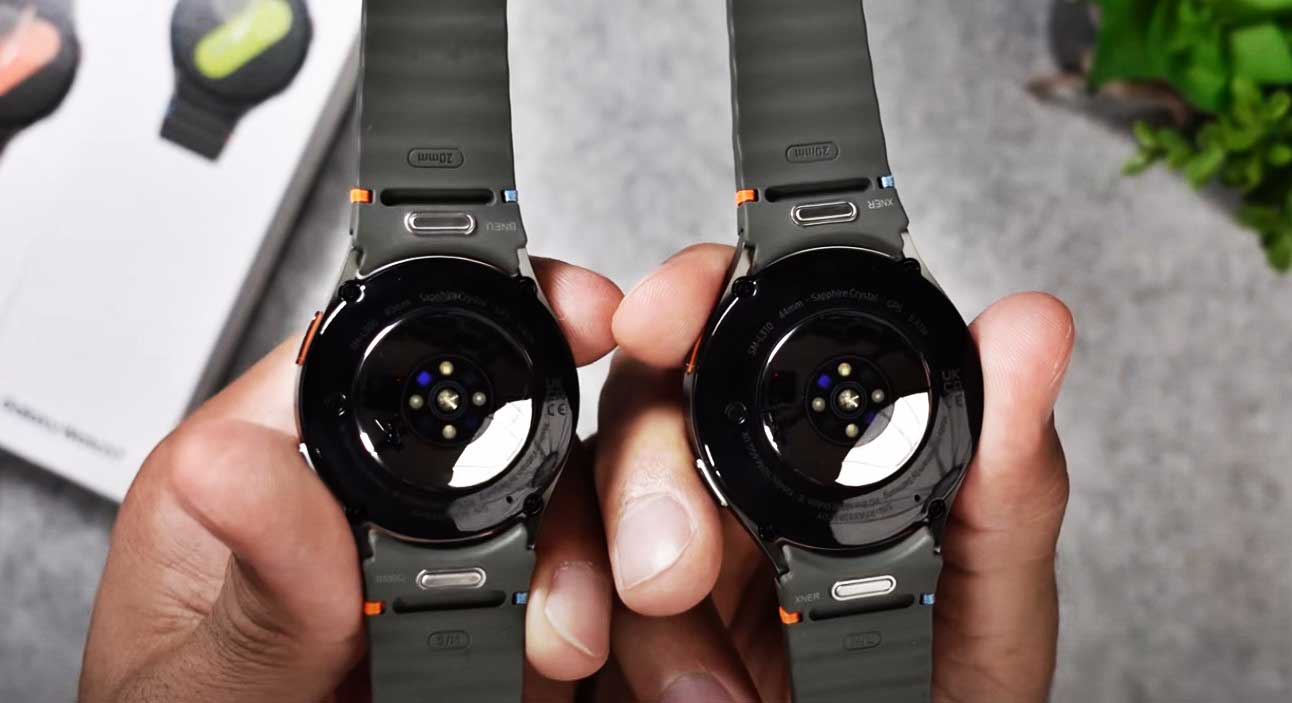
Turn the watch over and inspect the rear case. Samsung often prints or engraves important details around the health sensors, charging area, or outer ring.
Depending on the model, the back may show:
• The Galaxy Watch brand name
• The model number
• The case size
• LTE or Bluetooth details
• FCC or regulatory markings
• The serial number
The text can be very small. Use your phone camera and zoom in rather than guessing. A bright lamp can also help reveal faint lettering.
Do not rely on appearance alone. Several Galaxy Watch generations have a round screen, two side buttons, and similar black or silver cases. The back markings are more reliable than color, bezel shape, or band style.
If the back case is scratched, dirty, or hard to read, wipe it gently with a soft, dry cloth. Avoid sharp tools and strong cleaning chemicals, since they may damage seals or sensors.

Check the original box, receipt, or order history
The retail box is another dependable way to find your Galaxy Watch model. Look for a white label on the side or bottom of the box. It may list the product name, model number, color, case size, and connectivity type.
You can also check:
• Your purchase receipt
• Your email order confirmation
• Your Samsung account order history
• A retailer account, such as Best Buy, Amazon, or Walmart
• A carrier account if you bought an LTE watch
The box may identify a watch as “Galaxy Watch5 44mm Graphite” or “Galaxy Watch6 Classic 47mm Silver.” This gives you useful details, but confirm the model number if you need a replacement part or a warranty claim.
A common mistake I have seen is matching the box to the wrong watch after buying several devices. If possible, compare the serial number on the box with the serial number in the watch settings or Galaxy Wearable app.
Understand Samsung Galaxy Watch model numbers
Samsung model numbers can look confusing at first. They usually begin with “SM-R,” followed by several numbers and letters. The full code may change by region, size, color, or network support.
For example, model numbers may include:
• SM-R800 for an older Galaxy Watch
• SM-R830 for a Galaxy Watch Active2 size or variant
• SM-R860 for a Galaxy Watch4 variant
• SM-R900 for a Galaxy Watch5 variant
• SM-R930 for a Galaxy Watch6 variant
These examples are useful clues, but do not treat one number as a complete identification guide. Samsung releases regional and size variations, and similar model families may have different endings.
The safest process is to search the full model number in Samsung’s support pages or product documentation. The full code is more accurate than searching only “SM-R.” It can tell you the generation, size, cellular type, and market version.
When researching how to tell what Galaxy Watch I have, always record the entire model number. A missing digit or letter can point to a different watch.

Tell the difference between Galaxy Watch generations
The model name and design can help you narrow down the generation, but visual checks should support the model number rather than replace it.
Galaxy Watch
The original Galaxy Watch launched in 2018. It has a physical rotating bezel and a traditional watch design. Common case sizes include 42mm and 46mm.
Galaxy Watch Active and Active2
The Galaxy Watch Active has a slimmer, sport-focused body and no physical rotating bezel. The Active2 added a touch-sensitive digital bezel and came in multiple sizes.
Galaxy Watch3
The Galaxy Watch3 brought back a physical rotating bezel. It has a classic design and usually looks more like a traditional watch than the Active line.
Galaxy Watch4 and Watch5
The Galaxy Watch4 introduced Google Wear OS to the main Galaxy Watch line. The Watch5 looks similar but adds changes such as improved sensors and, on some versions, a temperature sensor.
Galaxy Watch6 and newer models
The Galaxy Watch6 series has thinner screen borders than earlier generations. The Classic version includes a physical rotating bezel, while the standard model uses a touch bezel.
Design clues are helpful when the model label is worn away. Still, cases and bands can be replaced, so do not identify a watch by accessories alone.

Identify the watch size and connection type
Finding the model is only part of the process. You may also need the case size and connection type before buying accessories or activating service.
Common case sizes include:
• 40mm
• 41mm
• 42mm
• 43mm
• 44mm
• 45mm
• 46mm
• 47mm
The size refers to the watch case width, not the screen size. A 44mm Galaxy Watch may need a different case protector than a 40mm version from the same generation.
You should also check whether the watch is Bluetooth or LTE. An LTE watch can connect to a mobile network, while a Bluetooth model normally relies on a phone or Wi-Fi. The Galaxy Wearable app, box, and model number can reveal this detail.
A watch with LTE may show a mobile network option in its settings. However, the lack of an active plan does not mean the watch is Bluetooth-only. Connectivity is built into the device, not determined by whether you currently pay for service.

Use the serial number when the model is unclear
The serial number is useful when the watch has damaged labels or when you need help from Samsung. It is unique to your specific device, unlike the model number, which may apply to thousands of watches.
You can find the serial number in:
• Settings on the watch
• The Galaxy Wearable app
• The original box
• Samsung account device details
Write down both the model number and serial number. Samsung support can use these details to check warranty status, repair options, and official device records.
Never post your full serial number publicly. Treat it like a personal device identifier. Share it only with Samsung, your carrier, or an authorized repair provider when needed.
In my experience, saving a photo of the watch information screen can prevent trouble later. It helps when the watch will not turn on, when you lose the box, or when you need to order a replacement charger.
What to do if your Galaxy Watch will not turn on
A dead or damaged watch makes identification harder, but you still have several options. Start with the box, purchase record, or Samsung account.
Try these steps:
- Check the back of the watch for tiny markings.
- Look for the model in your Galaxy Wearable app.
- Review your Samsung account device list.
- Search old email receipts.
- Contact Samsung support with the serial number.
- Ask an authorized repair center to inspect the device.
Do not guess based only on the charger. Many Galaxy Watch chargers look similar, and a charger may work with more than one generation.
You can also compare the case size, button layout, bezel type, and sensor arrangement with official Samsung product images. Use these features as a final check after finding a likely model.
If the watch has water damage or a swollen battery, do not open it to read the label. A damaged battery can be dangerous. Let a qualified technician handle the inspection.
Common mistakes when identifying a Galaxy Watch
Many identification errors happen because Galaxy Watch models share similar designs. A careful check takes only a few minutes and can save you from buying the wrong accessory.
Avoid these mistakes:
• Assuming every watch with a rotating bezel is a Galaxy Watch3
• Confusing the case size with the screen size
• Using the band size as the model name
• Treating the serial number as the model number
• Trusting a replacement case or band to identify the watch
• Searching an incomplete model number
• Assuming LTE service means the watch is an LTE model
• Relying on the watch color alone
The most reliable approach is to confirm at least two details. For example, match the model number in the watch settings with the model name in the Galaxy Wearable app.
Samsung’s official support manuals and product pages are the best references when details conflict. Retail listings can contain errors, especially for refurbished or imported watches.
Why knowing the exact model matters
Knowing how to tell what Galaxy Watch I have can help with more than simple curiosity. It affects daily use, repairs, updates, and accessory purchases.
The exact model can help you:
• Choose the correct screen protector
• Buy a compatible band
• Find the right charging puck
• Check available software updates
• Confirm health feature support
• Compare battery specifications
• Check LTE carrier compatibility
• Request warranty service
• Find accurate setup instructions
Software support also varies by generation and region. A newer model may receive features that an older watch cannot support because of different sensors, processors, or memory.
Health features deserve special care. ECG, blood pressure, sleep tracking, and body composition tools may vary by model and country. They may also require a compatible Samsung phone, app version, or local approval. Never assume that two watches support the same medical-related functions just because they look alike.
A simple identification checklist
If you want the shortest reliable method, use this checklist:
- Open the Galaxy Wearable app.
- Go to Watch settings and About watch.
- Record the model name and complete model number.
- Check the watch back for matching details.
- Confirm the case size and Bluetooth or LTE type.
- Compare the information with Samsung support documentation.
If the watch is not connected, use the settings menu on the watch. If it will not turn on, check the box, receipt, account history, or rear case.
This process answers how to tell what Galaxy Watch I have without relying on guesswork. It also creates a clear record you can use when shopping for accessories or speaking with support.
Frequently asked questions
How can I tell what Galaxy Watch I have without the app?
Open Settings on the watch and select About watch or General, followed by About watch. You can also check the model number on the back of the watch or the original box.
Where is the model number on a Galaxy Watch?
The model number may appear in the About watch menu, the Galaxy Wearable app, or on the rear case. It usually begins with “SM-R” and includes several numbers and letters.
How do I know if my Galaxy Watch is LTE?
Check the model information in the Galaxy Wearable app or on the box. An LTE watch may also show mobile network settings, but an inactive cellular plan does not change the watch type.
Can I identify my Galaxy Watch by its appearance?
You can narrow it down by checking the bezel, buttons, case size, and sensor layout. Appearance alone is not fully reliable because many models look alike and accessories can be replaced.
Is the Galaxy Watch serial number the same as the model number?
No. The model number identifies the product family and variant, while the serial number identifies your individual watch. Use the model number for accessories and the serial number for support or warranty help.
How do I find the size of my Galaxy Watch?
Check the About watch information, product box, or rear case. You can also measure the case width, but do not include the side buttons or crown in the measurement.
Why does my Galaxy Watch model number look different from one online?
Samsung uses different model numbers for case sizes, regions, colors, and Bluetooth or LTE versions. Search the complete code and compare it with official Samsung product information.
Conclusion
The most accurate way to learn how to tell what Galaxy Watch I have is to check the Galaxy Wearable app or the About watch menu. Confirm the result with the model number on the rear case, box, or purchase record, then note the case size and LTE or Bluetooth type.
Do not rely on color, band style, or general appearance alone. Save your model and serial numbers now, so future repairs, updates, and accessory purchases are much easier. Use the checklist above, compare your details with Samsung’s official support information, and share your model in the comments if you need help confirming it.

Rubel Miah is the Senior Editor at MyStyleGrid.com, where he brings a sharp editorial eye and an unshakable love for fashion to everything he does. A true style addict, Rubel lives and breathes trends, from streetwear to high fashion, and has a knack for turning inspiration into impactful stories. With years of experience in fashion journalism and digital media, he curates content that empowers readers to express themselves through style. When he’s not editing features or forecasting the next big thing, you’ll find him hunting down vintage pieces or capturing street style moments around the city.